Tutorials
JSON vs JSON Lines: Why Valid JSON Files Fail in Data Processing Tools
A file may contain perfectly valid JSON objects and still fail to load. The reason often lies in how those objects are arranged, rather than in their contents.
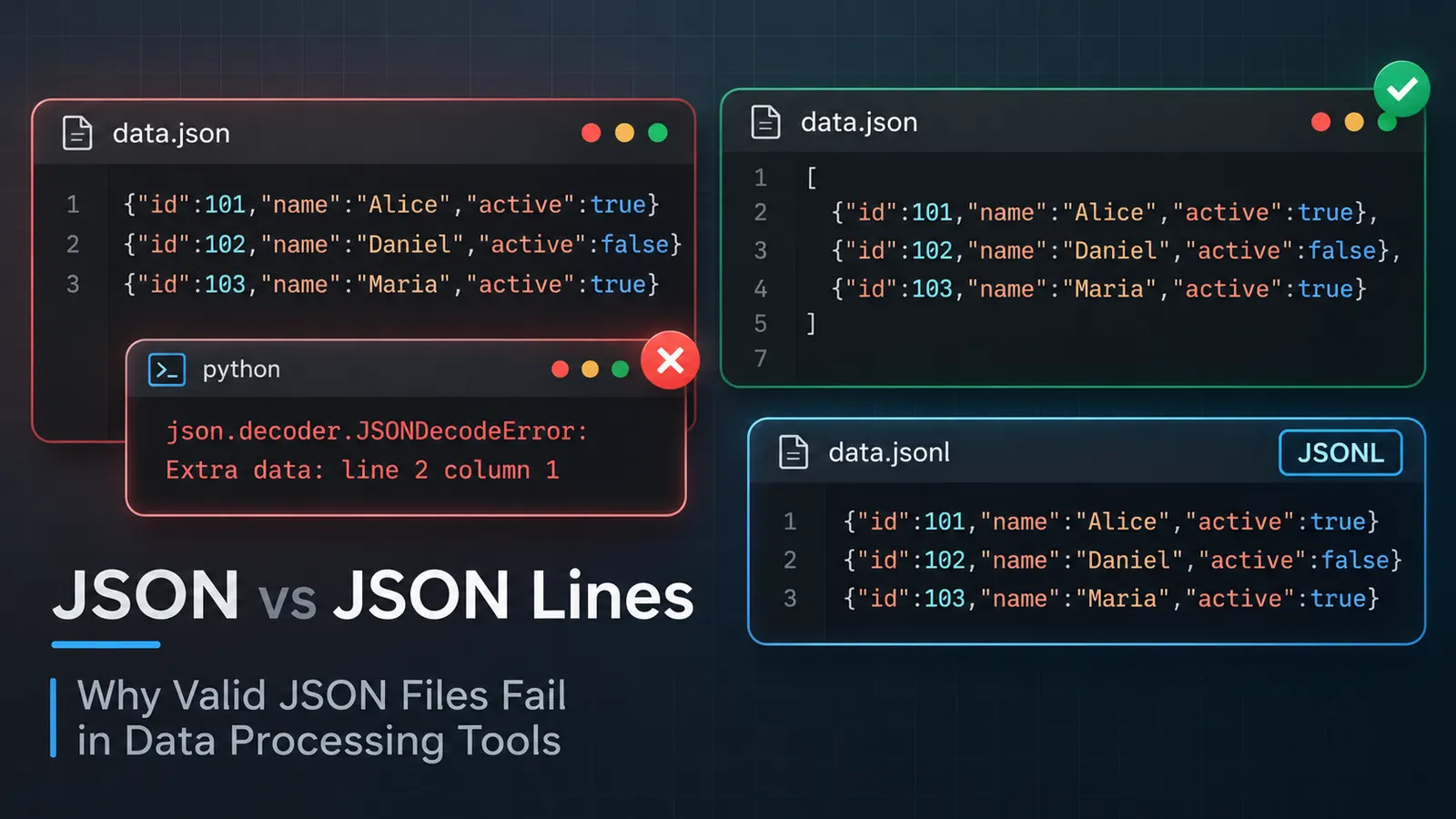
You open a JSON file, inspect its contents, and everything seems perfectly ordinary. The keys are enclosed in double quotes, the values look correct, and there are no obvious syntax mistakes.
Yet the moment you try to process it, the parser refuses.
Perhaps Python returns JSONDecodeError: Extra data. A JSON formatter might highlight the beginning of the second line, while another application simply reports that the file contains invalid JSON.
The first thought would probably be that something is missing. A comma, perhaps? But looking at the individual records, each one seems valid.
So what exactly is wrong?
Consider the following file:
{"id":101,"name":"Alice","active":true}
{"id":102,"name":"Daniel","active":false}
{"id":103,"name":"Maria","active":true}
There are three objects, and each follows the familiar JSON syntax. If we copied any one of them into a JSON validator, it would pass.
However, the file as a whole is not a valid JSON document.
The distinction lies in how the objects are arranged. What appears to be a malformed JSON file may actually be a perfectly valid JSON Lines file, also known as JSONL.
And although the two formats look similar, the difference becomes significant when a program attempts to read them.
One document or several independent records?
A JSON parser expects a complete JSON document containing a single top-level value.
That value can be an object, an array, a string, a number, a boolean, or null.
When multiple records need to be stored together, a common approach is to place them inside an array:
[
  {
    "id": 101,
    "name": "Alice",
    "active": true
  },
  {
    "id": 102,
    "name": "Daniel",
    "active": false
  },
  {
    "id": 103,
    "name": "Maria",
    "active": true
  }
]
Now the parser sees one top-level array containing three objects. The structure is complete, and the entire file can be interpreted as one JSON value.
JSON Lines approaches the same problem differently.
Rather than enclosing records in an array, it treats each line as an independent JSON value. No surrounding square brackets are necessary, nor are commas required between records.
{"id":101,"name":"Alice","active":true}
{"id":102,"name":"Daniel","active":false}
{"id":103,"name":"Maria","active":true}
The contents of the objects have not changed. Only their arrangement has.
In ordinary JSON, the three records belong to one array. In JSON Lines, they are three separate JSON values stored consecutively.
This explains why a conventional JSON parser rejects the second example. After successfully reading the first object, it encounters another one where it expects the document to have ended.
The remaining records are interpreted as unexpected additional data.
Why would anyone store JSON this way?
At first glance, wrapping the objects in an array seems simpler. It is familiar, easy to inspect, and supported by practically every JSON parser.
For a small configuration file or an API response, that may be all we need.
But suppose an application continuously records events. Every login, request, or background operation produces another entry.
A file containing such events might look like this:
{"time":"09:15:01","event":"login","userId":24}
{"time":"09:15:04","event":"page_view","userId":24}
{"time":"09:15:12","event":"logout","userId":24}
With JSON Lines, the application can append another record by writing its serialized JSON value followed by a newline.
There is no need to modify an enclosing array or insert a comma before its closing bracket.
This also makes sequential processing convenient. A program can read one line, parse its contents, process the resulting record, and continue to the next.
It does not necessarily need to load the entire file into memory.
Of course, using JSON Lines does not automatically make an application memory-efficient. A program could still read every record into an array before processing anything.
The advantage comes from the format allowing records to be handled independently.
There is another useful consequence. If processing fails on a particular record, a line-oriented reader can identify its position without having to treat the entire dataset as one enormous JSON structure.
That is particularly convenient when examining logs or exported datasets containing thousands of entries.
JSONL and NDJSON: are they different formats?
You may encounter files ending in .jsonl or .ndjson.
JSONL stands for JSON Lines, while NDJSON means Newline Delimited JSON.
Both use essentially the same arrangement: one JSON value per line.
Their conventions and specifications are not entirely identical, however.
The JSON Lines documentation requires UTF-8 encoding and specifies that each line must contain a valid JSON value. A value does not necessarily have to be an object.
For example, the following is valid JSON Lines:
{"id":1}
{"id":2}
null
42
"completed"
Some data-processing tools expect an object on every line, though. Such an application could reject this file even when its JSON Lines syntax is valid.
That would be a restriction imposed by the application, rather than a violation of the basic JSON Lines format.
The NDJSON specification also defines newline-delimited JSON values, but includes its own rules for serialization and parsing. For example, it permits parsers to ignore empty lines, provided that behavior is documented.
JSON Lines, by contrast, does not consider a blank line a valid record.
In everyday development, the two formats are often treated interchangeably. Nevertheless, when working with a particular importer or API, it is worth checking which format it expects and whether it imposes additional restrictions.
A filename alone cannot answer those questions.
Why Python reports “Extra data”
Let us return to the original example.
Suppose we save the three records in a file named users.json and attempt to read it using Python:
import json

with open("users.json", "r", encoding="utf-8") as file:
    users = json.load(file)
Python raises an error similar to:
json.decoder.JSONDecodeError:
Extra data: line 2 column 1
The message may seem confusing because the second record is valid JSON by itself.
But Python is not complaining about that record’s internal syntax.
The problem is that json.load() expects one complete JSON document. Once the first object has been parsed, the next object appears as additional content.
Changing the filename from users.json to users.jsonl will not solve the problem either.
The parser does not automatically change its behavior based on the file extension.
We need to read the file differently.
Reading JSON Lines correctly
Since every line contains its own JSON value, we can parse them individually:
import json

users = []

with open("users.jsonl", "r", encoding="utf-8") as file:
    for line_number, line in enumerate(file, start=1):
        try:
            user = json.loads(line)
            users.append(user)
        except json.JSONDecodeError as error:
            raise ValueError(
                f"Invalid JSON on line {line_number}: {error.msg}"
            ) from error

print(users)
In this example, json.loads() receives one line at a time instead of the entire file.
Each line is interpreted independently, and the resulting values are collected in a Python list.
For larger files, collecting everything may be unnecessary. We could process each record immediately and discard it afterward, avoiding the need to keep the full dataset in memory.
One detail deserves attention: the example intentionally does not skip blank lines.
An empty line is not valid JSON, and silently ignoring it could conceal a problem with the exported data.
If the application is designed to tolerate blank lines, that behavior should be an explicit decision.
How to recognize a JSON Lines file
The easiest place to begin is usually the file itself.
Open it in a text editor and examine how the records are separated.
A typical JSON Lines file contains complete JSON values arranged one after another:
{"product":"Keyboard","price":79}
{"product":"Mouse","price":35}
{"product":"Monitor","price":249}
Notice that each object begins and ends on the same line.
There is no outer array, and the records are not separated by commas.
A conventional JSON document containing the same information would instead look like this:
[
  {"product":"Keyboard","price":79},
  {"product":"Mouse","price":35},
  {"product":"Monitor","price":249}
]
However, line breaks alone are not enough to identify the format.
Consider this ordinary JSON object:
{
  "product": "Keyboard",
  "details": {
    "layout": "US",
    "wireless": true
  }
}
It spans several lines, yet remains a single JSON document.
The individual lines are not independent JSON values.
A JSON Lines reader would therefore fail if it attempted to parse each line separately.
This is an important distinction, particularly when a file has been formatted for readability.
If someone takes a valid JSON Lines file and pretty-prints every object across several physical lines, the result will generally no longer satisfy the JSON Lines format.
The indentation may make the contents easier to read, but it removes the line boundaries on which the format depends.
Converting JSON Lines into ordinary JSON
Sometimes the file is perfectly valid JSON Lines, but the application receiving it supports only conventional JSON.
In that case, converting the records into an array is usually more practical than modifying the receiving application.
For smaller files, the process can be performed manually by surrounding the records with square brackets and separating them with commas.
For larger datasets, a script is safer.
Here is a Python example that reads a JSON Lines file and produces one JSON array:
import json

records = []

with open("data.jsonl", "r", encoding="utf-8") as source:
    for line_number, line in enumerate(source, start=1):
        if not line.strip():
            raise ValueError(
                f"Blank line found at line {line_number}"
            )

        try:
            records.append(json.loads(line))
        except json.JSONDecodeError as error:
            raise ValueError(
                f"Invalid JSON on line {line_number}: {error.msg}"
            ) from error

with open("data.json", "w", encoding="utf-8") as target:
    json.dump(
        records,
        target,
        ensure_ascii=False,
        indent=2
    )
The resulting file contains one JSON array, suitable for tools that expect a conventional JSON document.
There is a limitation, though.
This script stores every record in memory before writing the result. For a sufficiently large dataset, memory consumption could become a problem.
If the input contains millions of records, a streaming conversion or a tool designed for large files may be preferable.
A shorter method with jq
If jq is installed, the conversion can be performed from the command line:
jq -s '.' data.jsonl > data.jsonThe -s option, also known as --slurp, collects the input JSON values into an array.
This is convenient when working with reasonably sized datasets.
Keep in mind that jq can read a stream of JSON values even when those values are not arranged as strict JSON Lines. Consequently, successful processing with this command does not necessarily prove that the original file follows every JSON Lines convention.
And just like the Python example above, slurping the complete input into one array requires memory proportional to the data being collected.
Converting a JSON array into JSON Lines
The opposite conversion is useful when preparing data for a system that expects records to arrive independently.
Suppose we have a conventional JSON file:
[
  {"id":1,"status":"pending"},
  {"id":2,"status":"completed"},
  {"id":3,"status":"failed"}
]
We can convert it into JSON Lines with Python:
import json

with open("data.json", "r", encoding="utf-8") as source:
    records = json.load(source)

if not isinstance(records, list):
    raise TypeError("Expected a top-level JSON array")

with open("data.jsonl", "w", encoding="utf-8") as target:
    for record in records:
        target.write(
            json.dumps(record, ensure_ascii=False) + "\n"
        )
Each array element becomes an independent JSON value on its own line.
The same operation can be performed using jq:
jq -c '.[]' data.json > data.jsonlHere, -c produces compact JSON output, keeping each value on one line.
The .[] expression extracts the individual elements from the array.
Unlike pretty-printing JSON, this representation preserves the record boundaries required by JSON Lines.
A few less obvious reasons JSONL imports fail
Even after selecting the correct parser, an import may still fail.
One possible cause is an actual newline inside a record.
In JSON, a newline within a string must be escaped:
{"message":"First line\nSecond line"}The sequence \n is represented by two characters in the file: a backslash and the letter n.
It represents a newline in the decoded string, but it does not split the JSON value across two physical lines.
If an actual line break is inserted inside the quoted string instead, the record becomes invalid.
Another source of trouble is encoding.
JSON Lines files are expected to use UTF-8 without a byte order mark (BOM). A file saved using an incompatible encoding may produce decoding errors before JSON parsing even begins.
Blank lines can also cause problems, particularly when records are joined from several sources.
A final newline after the last record is normal and recommended for JSON Lines. It should not be confused with an additional empty record. Two consecutive newline separators, on the other hand, create a blank line between records.
Finally, there is the question of structure.
A file may contain perfectly valid JSON values but still be unsuitable for the application receiving them.
For example:
{"id":1,"name":"Alice"}
{"id":2,"name":"Daniel"}
42
This follows the basic JSON Lines rules. Yet an importer expecting every record to contain an id and a name will probably reject the last value.
The parser and the application are checking different things.
One determines whether the data can be decoded. The other determines whether that decoded data has the expected structure.
Choosing the format that fits the data
Neither JSON nor JSON Lines is universally preferable.
For configuration files, smaller datasets, and API responses expected to contain one complete document, ordinary JSON is often the more convenient option.
It supports nested structures naturally and makes the relationship between objects explicit.
JSON Lines becomes attractive when records are produced continuously, appended to logs, or processed sequentially.
Its structure makes it possible to handle individual records without treating the entire dataset as one document.
But there is no guarantee that every tool supporting JSON will also support JSON Lines.
That brings us back to the original parsing error.
Three individually valid JSON objects were placed in a file, yet the application refused to read them. Nothing was necessarily wrong with the objects themselves. The application simply expected one JSON document and received several independent values.
Before attempting to repair such a file, examine its structure.
Does it contain one complete JSON value, perhaps an array? Or does each physical line represent a separate record?
The answer determines whether the file is actually malformed, whether the parser is inappropriate, or whether a conversion is all that is needed.