Software
Microsoft Copilot Autopilot Can Perform Tasks on Your PC — But Who Actually Gets Access?
Microsoft is giving Copilot agents more autonomy, including plans for local PC actions. But Autopilot's Frontier rollout, Windows Hybrid Intelligence, and enterprise access controls are separate pieces of the announcement.
Imagine asking Copilot to organize a folder, investigate a Windows problem, or prepare a project update while you work on something else.
The first two tasks involve your computer. The third might involve emails, meetings, documents, and conversations stored across Microsoft 365.
From the user’s perspective, they could all begin with the same instruction.
But does that mean one AI agent can now access everything on your PC and carry out those tasks without further involvement?
Microsoft’s announcements at Ignite 2026, held on November 17, make that possibility sound increasingly close. Autopilot is beginning to reach customers, while Windows Hybrid Intelligence is being developed to give Copilot access to local context, on-device models, and actions across the operating system.
There is, however, an important difference between what Microsoft has started rolling out and what it has announced for the coming months.
And the distinction matters particularly for anyone expecting these features to appear in the Copilot application already installed on their Windows computer.
What Microsoft actually announced on November 17
During Ignite 2026, Microsoft confirmed that Copilot Autopilot had begun rolling out to eligible customers in its Frontier program.
Autopilot is designed as a persistent agent.
Rather than waiting for each individual instruction, it can work toward a longer-running goal, monitor relevant activity, prepare follow-ups, and continue tasks over several days.
Microsoft gives examples such as watching Teams channels, following up on emails, coordinating projects, and maintaining recurring workflows.
Suppose someone is responsible for a supplier review.
The agent could help prepare the schedule, follow outstanding requests, organize meetings, and identify work that still needs attention.
This differs from asking a chatbot to summarize a document.
A summary has a reasonably clear endpoint. A supplier review can involve several people, changing deadlines, and decisions that have not yet been made.
Autopilot is intended to continue managing that process between conversations.
But there is a detail in Microsoft’s description that deserves attention: Autopilot is a cloud-based enterprise agent.
Its initial deployment is not equivalent to giving every Windows user an autonomous agent with access to their desktop.
That capability belongs to another part of Microsoft’s plans.
Copilot Chat, Cowork, and Autopilot are not interchangeable
The Copilot name now covers several different ways of working.
That can make the announcements difficult to interpret, particularly when the products share an interface.
Copilot Chat is intended for direct interaction. You ask a question, request an explanation, or prepare a draft.
Copilot Cowork handles more substantial tasks. A user describes an outcome, and the system can work through multiple steps using the available tools and permissions.
Autopilot extends that idea across time.
Instead of receiving one task and finishing it, the agent can maintain an ongoing goal.
For example, consider a project with several overdue tasks.
In Chat, you might ask:
Which tasks are overdue?
In Cowork, you might request a report that reviews the project, identifies outstanding work, and prepares follow-up messages.
With Autopilot, the intention is to delegate continuing responsibility for monitoring the project and bringing important developments to your attention.
This distinction helps explain why Microsoft introduced additional controls around Autopilot.
An agent that works for a few minutes while the user supervises it presents different operational risks from one that continues working over several days.
But none of these descriptions automatically establishes access to local Windows files.
The agent’s available resources depend on its environment, permissions, and supported capabilities.
What Hybrid Intelligence changes on Windows
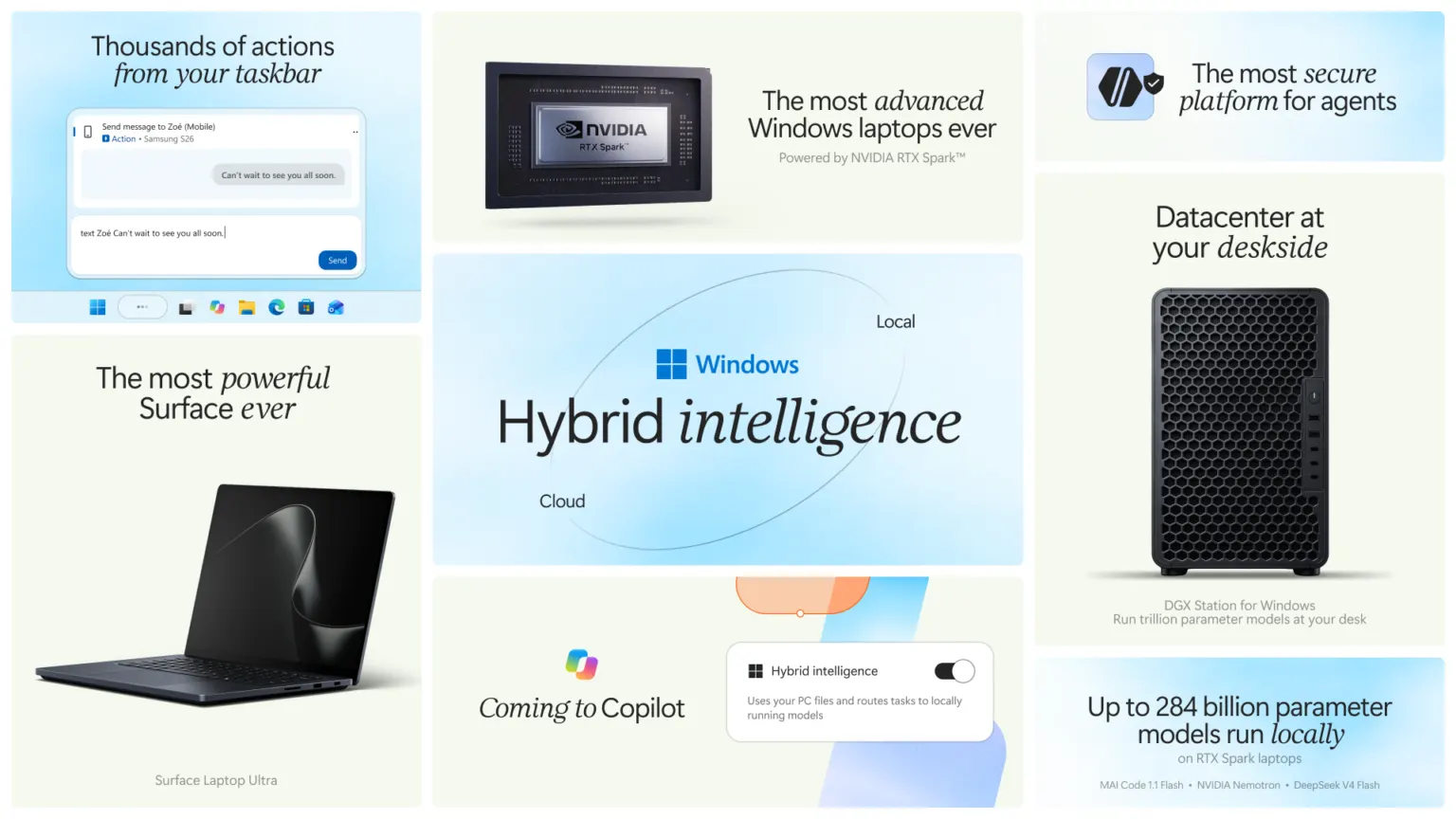
Microsoft is developing another set of capabilities under the name Hybrid Intelligence.
The idea is to combine models running locally on a device with cloud-based AI services, selecting an appropriate execution environment for different tasks.
The Windows announcement describes three areas of functionality.
Local context would allow Copilot, with permission, to use relevant information from the computer, including files, open applications, and device activity.
Local actions would allow it to perform certain operations across Windows.
Local models would allow suitable tasks to use AI models running on the computer itself instead of always relying on cloud inference.
Consider a Downloads folder containing several months of documents.
A local-action capability could allow a user to ask Copilot to find related files, organize them, or move them into appropriate folders.
Microsoft also describes PC diagnostics. For example, Copilot could perform a read-only system scan to investigate a connectivity or performance issue and explain what it finds.
These are considerably more direct interactions with Windows than summarizing an email.
They involve local resources and potentially persistent changes to the computer.
However, Microsoft’s November 17 Windows announcement describes the local context, actions, and model features for Copilot on Copilot+ PCs as coming soon.
It does not say that the complete set became available to everyone on the day of Ignite.
There is another limitation: the initial emphasis is on Copilot+ PCs.
Microsoft intends to expand hybrid intelligence over time, but that is not the same as confirming immediate support for every existing Windows 11 machine.
A user with an ordinary Windows installation should therefore not assume that updating the Copilot app will unlock all these features.
Does Hybrid Intelligence mean everything stays on the PC?
Not necessarily.
A model executing locally may process certain information without sending that particular inference to a remote model.
But Hybrid Intelligence is explicitly designed to combine local and cloud capabilities.
Different tasks may use different execution environments.
The fact that a system supports local models does not establish that every request, document, or intermediate result remains on the computer.
That would depend on the feature, its configuration, the models selected, and the relevant data-handling rules.
Microsoft has described local access as permission-based. The detailed boundaries of particular upcoming features should be evaluated when those features become available, rather than inferred from the general announcement.
Who actually gets Autopilot?
This is where the November announcement becomes more restrictive than its headline might suggest.
Autopilot is not being released simultaneously to everyone using Microsoft Copilot.
According to Microsoft’s Frontier documentation, the rollout began on November 17, 2026, and is progressive.
Microsoft’s adoption guidance says the rollout starts with eligible customers in the United States.
Eligibility involves more than having the Copilot application installed.
Microsoft identifies several requirements:
- An eligible Microsoft Copilot license.
- Participation in the Frontier rollout.
- Agent 365 and the required security controls.
- Usage-based billing configured for the organization.
- Administrative enablement when access becomes available.
These requirements make Autopilot an enterprise feature with organizational administration rather than an ordinary Windows setting.
Even if an employee has a suitable Copilot subscription, that does not guarantee their organization has received access.
And even when the organization becomes eligible, its administrators still control whether the feature is enabled.
Microsoft’s product documentation states that administrators can enable Autopilot through the Microsoft 365 admin center once access has been granted.
Users can then configure an agent, name it, and assign it a goal.
The agent’s initial orientation can draw on the previous 30 days of accessible emails, meetings, chats, and files. Microsoft says this orientation does not itself send messages or modify content.
That last detail matters.
Understanding the context of a project is different from being permitted to take consequential actions within it.
The ability to inspect relevant information does not necessarily include unrestricted permission to change or distribute it.
Is Autopilot included in the subscription?
Not as an unlimited, no-additional-cost capability.
Microsoft describes Autopilot as using Copilot Credits, with consumption-based billing.
Administrators can monitor usage and establish budgets.
Microsoft also states that final pricing and packaging will be announced before general availability.
Consequently, the availability of an eligible license does not mean that every action performed by Autopilot is included without additional consumption charges.
For an organization considering persistent agents, this is a practical concern.
A single request to summarize a document has a reasonably limited scope. An agent monitoring a project over several weeks can carry out recurring operations.
Its cost therefore depends on what work it performs and how the relevant billing system measures that work.
Who controls what an agent can access?
Granting an AI agent access to company information introduces questions that do not arise in the same way with an ordinary chat interface.
Suppose an agent is asked to coordinate a project involving internal documents, supplier correspondence, and several employees.
Which files can it read?
Can it contact people outside the organization?
What happens if the project includes information that the person assigning the task cannot access?
Microsoft’s answer relies heavily on enterprise identity and governance.
Autopilot agents have their own Microsoft Entra Agent ID and a named manager.
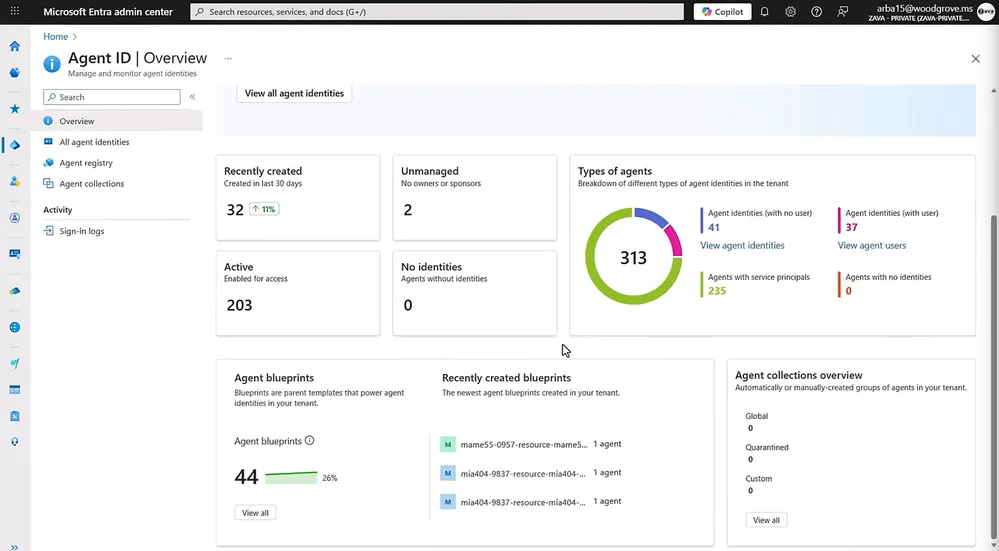
That identity allows the organization to distinguish activity performed by the agent from activity performed by a human user.
Microsoft says administrators can define access boundaries, block agents, and review their recorded sign-ins and actions.
Autopilot also uses organizational context through Work IQ within existing permissions.
This is relevant because an AI agent should not automatically inherit unlimited access merely because someone asks it to complete a task.
However, having an identity and an audit log does not eliminate every security concern.
An agent can still make an incorrect decision using information it is legitimately allowed to access.
A poorly scoped permission can also expose more resources than a particular task requires.
The meaningful security question is therefore not simply whether an agent has an identity.
It is how narrowly its permissions are configured, which actions require approval, and whether the organization can investigate what happened afterward.
Microsoft describes approval guardrails for consequential actions.
That does not mean every individual operation necessarily requires a manual confirmation. The exact approvals and boundaries depend on the configured agent and available capabilities.
Local PC access introduces another security boundary
The distinction becomes even more important when agents interact with Windows itself.
An agent that reads documents through Microsoft 365 services operates through one set of integrations and permissions.
An agent that works with local files, applications, and system resources may require a different set of protections.
Microsoft has introduced Microsoft Execution Containers (MXC) for isolating agent workloads.
MXC became generally available on Windows 11 in October 2026.
The technology allows access to files, networks, and other resources to be restricted through runtime-enforced policies.
At Ignite, Microsoft also described additional process-container improvements and experimental local micro-VM capabilities.
These mechanisms are relevant because desktop automation can involve more than making an API request.
An agent interacting with local tools might encounter files containing sensitive information, execute commands, or communicate with other systems.
Containment can limit the resources available to that agent.
But the availability of MXC should not be interpreted as confirmation that every future Copilot action runs in the same container configuration.
The precise security boundary depends on the feature and its implementation.
There is also a separate Microsoft product called Windows 365 for Agents.
It provides managed Cloud PCs on which agents can interact with Windows applications.
Those computers can be used for workflows involving desktop interfaces, including applications that do not expose suitable APIs.
But these are cloud-hosted agent environments, not necessarily the user’s personal laptop or desktop.
So even the phrase an agent using a PC can describe two fundamentally different situations: operating inside a managed Cloud PC or acting on the user’s local Windows installation.
They should not be confused when discussing access to personal files.
What is available now, and what remains a preview?
As of November 18, 2026, Microsoft’s announcements describe several different availability stages.
| Capability | Status |
|---|---|
| Copilot Home with Chat and Cowork | Generally available |
| Copilot Autopilot | Progressive Frontier rollout, beginning with eligible US customers |
| Local context and Windows actions in Copilot | Coming soon, initially focused on Copilot+ PCs |
| GitHub Copilot Hybrid Intelligence with local models | Preview on supported developer hardware |
| Microsoft Execution Containers on Windows 11 | Generally available |
| Windows 365 for Agents | Available as a managed Cloud PC capability, with additional integrations and features in preview |
The table also explains why two users may see very different Copilot experiences.
One may have access to Cowork but not Autopilot.
Another may be participating in a Frontier preview without having the upcoming local-action capabilities.
A developer with supported hardware may have access to GitHub Copilot’s local-model preview, while an ordinary Copilot user on another machine does not.
These differences do not necessarily indicate a broken installation.
They reflect separate products, licensing requirements, hardware limitations, and release schedules.
What this means for ordinary Windows users
The Ignite announcement is significant because Microsoft is moving toward a system where Copilot can work with both organizational information and local computing resources.
But the transition is not happening through one universal update.
For a personal Windows user, the main question is whether the upcoming local capabilities will be supported on their device and under their account configuration.
For an enterprise employee, the question is more complicated.
A suitable Microsoft 365 license may be necessary, but it is not sufficient for Autopilot access. The organization must also meet the Frontier requirements, configure billing and security controls, and enable the feature.
And for IT administrators, the most important question may be which tasks should be delegated to persistent agents in the first place.
An agent that prepares information for review is different from one authorized to make changes across several business systems.
The more autonomy it receives, the more carefully its identity, permissions, approval requirements, and operational costs need to be managed.
Microsoft is building the foundations for these capabilities, and parts of that foundation are already available.
But it would be misleading to interpret the November 17 announcement as meaning that every Copilot installation can now inspect and operate a user’s computer.
Autopilot’s rollout concerns a persistent enterprise agent.
Hybrid Intelligence concerns how Copilot and other AI experiences can use local context, local actions, and on-device processing.
Windows 365 for Agents provides another route, using managed cloud computers.
The technologies are related, and Microsoft intends to bring them closer together.
For now, however, their access requirements and availability remain different.
The important question is not only what Copilot may eventually be able to do.
It is which part of that system is actually available to a particular user, what information it is permitted to access, and who remains responsible when the agent takes action.
External Sources used for this article
- Microsoft — Copilot at Ignite 2026, November 17
- Microsoft — Frontier Program Features
- Microsoft — Autopilot Features and Requirements
- Microsoft — Ignite 2026: Building Windows for the Next Era of Work
- Microsoft — Building Windows for Hybrid Intelligence, October 7
- Microsoft — What's New in Agent 365 at Ignite 2026
- Microsoft — Windows 365 for Agents at Ignite 2026