Programming
React Hydration Failed, but the JSX Is Identical: Hidden Causes of Mismatches
React reports that server-rendered HTML does not match the client, but the JSX appears identical. The difference may come from dates, browser storage, HTML parsing, or code outside the component itself.
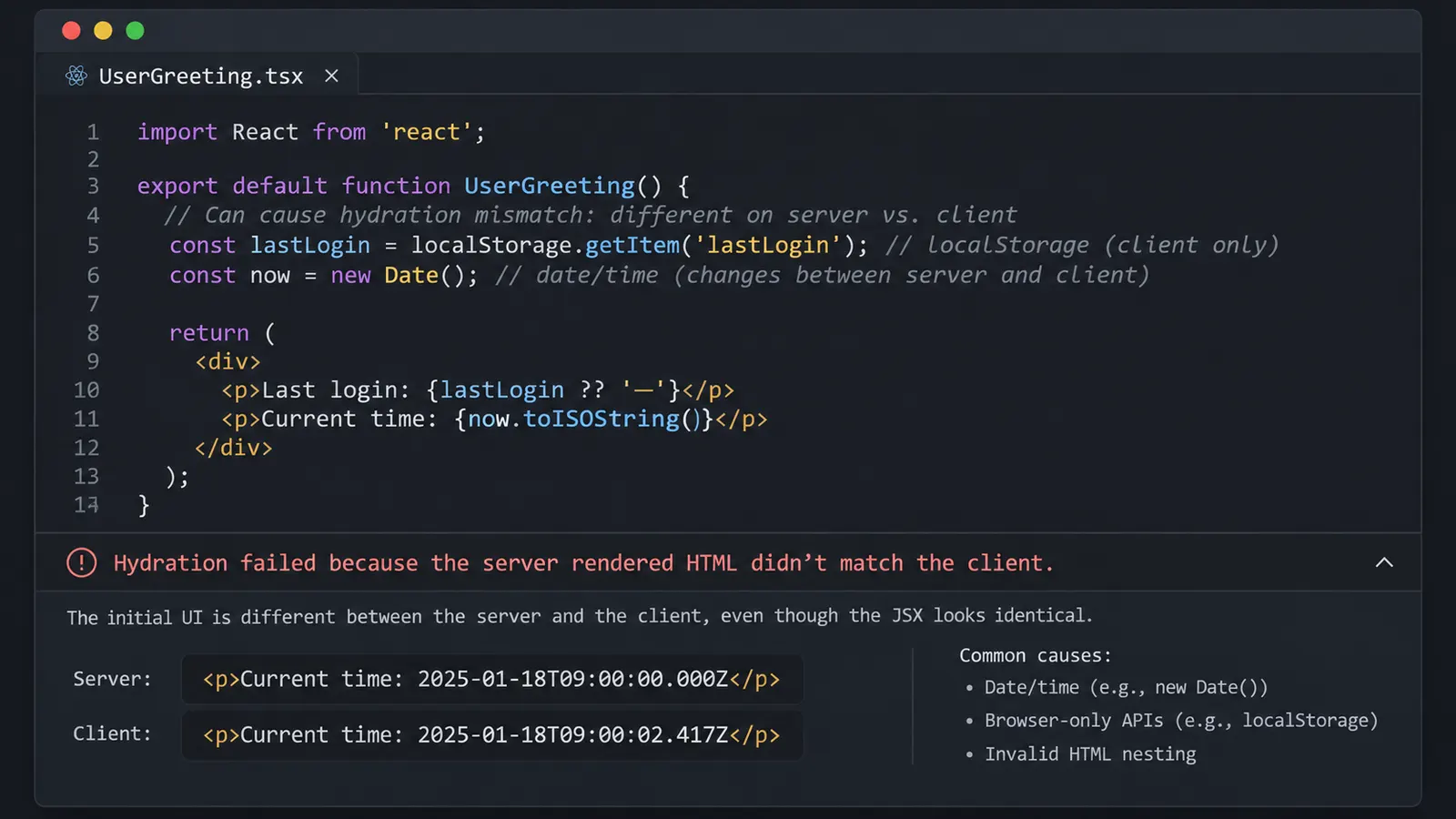
You open a React application, reload the page, and encounter an error that appears to contradict what you see in the source code.
Hydration failed because the server rendered HTML
didn't match the client.
React may also warn that the affected tree will be regenerated on the client.
The first place to look seems obvious: the JSX.
Perhaps one component contains an additional element, or a condition causes something to render on the server but disappear in the browser.
You compare the components, check their props, and find nothing suspicious.
Both environments appear to use exactly the same JSX.
So where is the difference coming from?
The answer becomes easier to understand once we distinguish the component’s source code from the HTML it actually produces.
Two environments can execute the same component and still generate different output. And even when React produces identical-looking markup, the browser may alter its structure before hydration begins.
In other words, the mismatch may exist somewhere that is not immediately visible in the JSX.
What React is trying to preserve during hydration
Consider a React application that uses server-side rendering.
When the browser requests a page, the server generates HTML and sends it to the client.
The browser can display that HTML before the application’s JavaScript has finished loading.
But the visible page is not yet necessarily fully interactive.
React must connect its component tree to the DOM elements that already exist. This process is called hydration.
In an application using React’s client APIs directly, the entry point might look like this:
import { hydrateRoot } from "react-dom/client";
import App from "./App.jsx";

hydrateRoot(
  document.getElementById("root"),
  <App />
);
React does not expect to construct the entire interface from scratch at this stage.
Instead, it attempts to reuse the HTML that was generated earlier and attach the component’s behavior to it.
This is where the important requirement appears.
The first client render must agree with the HTML produced on the server.
Suppose the server generates:
<div id="root">
  <h1>Welcome, Alice</h1>
</div>
But the browser’s initial React render expects:
<div id="root">
  <h1>Welcome, Daniel</h1>
</div>
The elements have the same structure, but their text differs.
React now has to reconcile two incompatible descriptions of the same interface.
Depending on the mismatch and React version, it may recover by rendering part of the tree on the client. Certain differences may not be automatically corrected.
That can introduce extra work, discard existing DOM elements, or produce unexpected behavior.
This is why React treats hydration mismatches as problems worth fixing rather than harmless warnings.
There is another detail.
Hydration applies to applications that already have server-generated React HTML. A purely client-rendered application using createRoot() does not perform this same server-to-client hydration process.
So if an error explicitly refers to hydration, begin by understanding where the initial HTML came from.
In frameworks such as Next.js, much of this process is handled automatically, including for Client Components that participate in the initial server-rendered output.
The timestamp that changes without changing the JSX
Imagine a page displaying the current time.
function CurrentTime() {
  return (
    <time>
      {new Date().toLocaleTimeString()}
    </time>
  );
}
The JSX is identical on the server and in the browser.
There are no conditions, no separate components, and no explicit browser API calls.
Yet this component can produce a hydration mismatch.
Why?
Because new Date() does not return a fixed value.
The server executes the component at one moment, while the browser executes it later.
Even a short delay can be enough for the displayed time to change.
Suppose the server produces:
<time>10:24:59 AM</time>By the time hydration begins, the clock has advanced.
The client expects:
<time>10:25:00 AM</time>The same expression has produced different text.
Nothing in the JSX changed, but the result did.
And time is particularly troublesome because the difference does not have to come from a delay.
The timezone can change the result too
Consider a fixed timestamp:
const publishedAt = "2026-11-17T23:30:00Z";This is an absolute moment in time.
Now format it:
new Date(publishedAt).toLocaleDateString();If the server uses UTC and the browser uses the Prague timezone, they may display different calendar dates.
At 23:30 UTC on November 17, it is already November 18 in Prague.
So the server might render November 17 while the browser renders November 18.
The timestamp itself is identical.
It is the formatting environment that differs.
This distinction is easy to overlook because toLocaleDateString() looks like a simple formatting function. However, without explicit options, it can depend on the environment’s locale and timezone.
For content that must be identical during hydration, specify how it should be formatted.
For example:
const publishedAt = "2026-11-17T23:30:00Z";

function PublicationDate() {
  const label = new Intl.DateTimeFormat("en-GB", {
    timeZone: "UTC",
    day: "numeric",
    month: "long",
    year: "numeric"
  }).format(new Date(publishedAt));

  return (
    <time dateTime={publishedAt}>
      {label}
    </time>
  );
}
Both environments now receive the same timestamp and explicit formatting rules.
This removes differences caused by their default timezones or locales, assuming compatible internationalization data.
But what if the application genuinely needs to display the visitor’s local time?
Then the client-specific formatting can happen after hydration.
import { useEffect, useState } from "react";

const publishedAt = "2026-11-17T23:30:00Z";

function PublicationDate() {
  const [label, setLabel] = useState("17 November 2026");

  useEffect(() => {
    const localDate = new Date(
      publishedAt
    ).toLocaleDateString(undefined, {
      dateStyle: "long"
    });

    setLabel(localDate);
  }, []);

  return (
    <time dateTime={publishedAt}>
      {label}
    </time>
  );
}
The server and the initial browser render both produce the same text.
After hydration, the effect updates the displayed date using the browser’s locale and timezone.
There is a visual trade-off: the date may change shortly after the page becomes interactive.
For some applications, that is acceptable. For others, it may be better to use a consistent timezone throughout the interface.
The important part is making the decision deliberately rather than allowing the server and browser to choose different representations during their initial renders.
The localStorage check that seems safe
Dates are one possible cause, but browser storage introduces another.
Suppose a website remembers whether the user prefers light or dark mode.
A developer might write:
import { useState } from "react";

function ThemeLabel() {
  const [theme] = useState(() => {
    if (typeof window === "undefined") {
      return "light";
    }

    return localStorage.getItem("theme") ?? "light";
  });

  return <p>Current theme: {theme}</p>;
}
The code avoids accessing localStorage on the server.
That seems correct because localStorage is a browser API.
And in one sense, the check works: the server does not attempt to access an unavailable browser object.
However, the component may still fail during hydration.
Imagine that the browser has previously stored:
localStorage.setItem("theme", "dark");The server cannot access that value, so it renders:
<p>Current theme: light</p>When the browser performs the initial render, the lazy state initializer reads localStorage and returns "dark".
React now expects:
<p>Current theme: dark</p>The JSX is unchanged.
The component was rendered under two different conditions, and those conditions produced different initial states.
The typeof window check prevented a server-side exception, but it did not ensure that the server and client rendered the same content.
This is an important distinction.
Code that is safe to execute during SSR is not necessarily safe for hydration.
Reading browser storage after hydration
One solution is to begin with a stable value and read browser storage in an effect.
import { useEffect, useState } from "react";

function ThemeLabel() {
  const [theme, setTheme] = useState("light");

  useEffect(() => {
    try {
      const savedTheme = localStorage.getItem("theme");

      if (savedTheme === "dark") {
        setTheme("dark");
      }
    } catch {
      // Storage may be unavailable in some contexts.
    }
  }, []);

  return <p>Current theme: {theme}</p>;
}
Now the initial server and client renders both display "light".
The effect runs in the browser after hydration and can update the state.
This avoids the initial mismatch.
However, a theme switch may visibly change the page after it loads.
If the theme affects the entire interface, that flash can be undesirable.
An alternative architecture is to store the preference somewhere the server can access, such as an appropriate cookie, and use that same initial value on both sides.
Then the browser can hydrate using the value already represented in the server-generated HTML.
This requires a consistent way of passing the initial preference to the client. Reading one value on the server and another from localStorage during the first client render would recreate the original problem.
The solution depends on the desired behavior, but the requirement stays the same: both sides need to agree on the initial result.
When the browser changes the HTML before React sees it
Now consider a different case.
The application uses no dates or browser storage. Its props are stable, and the server and client should produce the same elements.
Yet hydration still fails.
Perhaps the problem is not the data.
It may be the HTML structure itself.
Consider this component:
function Notice() {
  return (
    <p>
      Please read the following information.
      <div className="notice-details">
        Your account requires verification.
      </div>
    </p>
  );
}
The JSX looks understandable.
There is a paragraph containing some text and a block of additional information.
But the markup is invalid.
A <div> cannot be placed inside a <p> element according to HTML’s content rules.
When the browser parses such HTML, it does not simply preserve the invalid structure exactly as written.
The HTML parser has rules for handling these situations.
In this case, encountering the <div> causes the paragraph to be closed before the block element begins.
The actual DOM may therefore differ from the structure implied by the JSX.
That distinction can trigger a hydration mismatch.
React expects one tree, while the browser has already constructed another.
Why DevTools can make this confusing
Imagine viewing the page source and seeing the markup produced by the server.
The elements may appear arranged exactly as React generated them.
But open the Elements panel in DevTools, and the DOM structure can look different.
That is because View Page Source and the Elements panel do not necessarily show the same representation.
Page Source generally displays the response HTML.
The Elements panel shows the DOM as parsed and potentially modified by the browser and scripts.
For invalid markup, these can differ before React has done anything.
The correction is to use valid nesting:
function Notice() {
  return (
    <div>
      <p>
        Please read the following information.
      </p>

      <div className="notice-details">
        Your account requires verification.
      </div>
    </div>
  );
}
Now the intended structure matches HTML’s content rules.
Other examples include nested buttons, nested links, and paragraphs containing elements that are not permitted inside paragraphs.
The problem is not always obvious when components are involved.
You might have:
function Card() {
  return (
    <button>
      <CardActions />
    </button>
  );
}
And somewhere else:
function CardActions() {
  return <button>Open</button>;
}
Neither component looks particularly complicated when inspected alone.
Together, however, they produce a button inside another button.
The browser’s HTML parser and React’s expected structure can then disagree.
When a hydration error points toward a particular component, inspect the markup produced by its children as well.
The invalid nesting may come from two components that were developed separately.
The mismatch caused by browser extensions
Suppose the markup is valid and the rendered data is stable.
The application works correctly in one browser but reports hydration errors in another.
Could the browser itself be responsible?
Possibly.
Some browser extensions modify page content.
Password managers may add elements or attributes to forms. Translation tools can alter text or DOM nodes. Other extensions may inject content into a page before the application finishes loading.
If such a modification occurs before hydration, React may receive DOM elements that no longer match the HTML it expected.
This creates a rather unusual situation.
The server may have produced the correct HTML.
The client-side React component may also expect the correct structure.
But something between those two stages changed the DOM.
The application code can be entirely consistent and still encounter a mismatch.
React’s own hydration error documentation explicitly lists browser extensions as a possible cause.
How to investigate this case
A useful comparison is to open the same page in a clean browser profile with extensions disabled.
Then compare the behavior with the regular profile.
If the mismatch disappears, an extension becomes a plausible explanation.
It is not proof by itself, because browser profiles can differ in other ways, including cookies, storage, locale settings, and cached resources.
Those differences should also be considered.
If the result points toward an extension, enable extensions selectively to identify which one modifies the page.
A private browsing window can be useful for this test, but it is not guaranteed to exclude all extensions. Some browsers allow extensions to operate in private sessions when explicitly permitted.
It is better to verify the extension configuration than to assume a private window is completely unmodified.
There is also a less obvious version of the same problem.
An application may include its own script that modifies the DOM before React hydrates it.
For example, a theme initialization script might alter elements, classes, or attributes based on a stored preference.
Such scripts can be legitimate, but they must coordinate with the HTML React expects during hydration.
A script that changes a React-managed subtree too early can produce the same kind of disagreement as an external extension.
The underlying question is who changed the DOM, and when.
Same component, different data
So far, we have considered values generated from the local environment.
But server and client data can also diverge.
Imagine a product page.
The server fetches the current inventory count and renders:
<span>12 items available</span>Before the page hydrates, another customer places an order.
The browser performs a separate request and receives an updated count of 11.
If the client uses the new value during its first render, React expects:
<span>11 items available</span>The difference is understandable. Both values may have been accurate when they were retrieved.
But React still sees a mismatch.
The server-rendered HTML represents one data snapshot, while the client begins with another.
This is why server-side rendering frameworks often provide mechanisms for transferring initial data from the server to the browser.
The client can begin with the same snapshot used to produce the HTML.
After hydration, it can fetch newer information and update the interface normally.
For a simplified component:
function InventoryCount({ initialCount }) {
  return (
    <span>
      {initialCount} items available
    </span>
  );
}
If the server renders with initialCount={12}, the initial client render should also receive 12.
The application may update it to 11 afterward.
This is not a requirement to keep data stale indefinitely.
It is a requirement that hydration starts from a consistent description of the page.
Exactly how the initial snapshot is transferred depends on the framework.
Next.js, for example, manages parts of server rendering and client hydration through its own routing and data-loading mechanisms.
In a custom React SSR application, the developer may need to serialize the initial data into the HTML response and make it available to the hydration entry point.
The same problem can occur with feature flags, authentication state, or randomized content.
Consider:
function Example() {
  return (
    <p>
      Reference number: {Math.random()}
    </p>
  );
}
There is no reason to expect two independent calls to Math.random() to return the same value.
If the component renders once on the server and again during hydration, the text is likely to differ.
Generating IDs during rendering with crypto.randomUUID() introduces a similar risk.
For React-generated accessibility IDs, useId() is designed to produce stable IDs across matching server and client component trees.
But it is not a substitute for a persistent database identifier or a stable key in a dynamic list.
The correct approach depends on what the value represents.
If the value must be stable across server and client rendering, it should come from a shared source or a mechanism designed to preserve that consistency.
A mismatch outside the application code
There is another possibility that developers may overlook after examining every component.
The HTML delivered to the browser might not be identical to the HTML generated by the application server.
A CDN, reverse proxy, or HTML optimization layer can modify responses.
This may include removing or rewriting markup, altering whitespace, or transforming parts of the document.
Not every optimization causes hydration problems, of course.
But transformations that change React-managed HTML can introduce differences between the response and the client-side component tree.
Next.js lists incorrectly configured Edge or CDN transformations among potential causes of hydration errors.
CSS-in-JS integrations introduce another category of possible mismatch.
If a styling library generates class names differently on the server and client because its SSR setup is incorrect, the resulting attributes may not agree.
Here again, the JSX can appear identical.
The difference lies in the output produced by another layer.
It is worth investigating these causes when an application works locally but fails only after deployment.
Rather than immediately disabling all optimizations, compare the actual HTML response in both environments.
Look at the elements and attributes near the reported mismatch.
If the production response differs from the locally generated server output, the deployment pipeline deserves attention.
How to locate the actual difference
At this point, several explanations are possible.
The component may generate different values. The HTML may be invalid. A browser extension or another script may modify the DOM. Or the initial server and client data may not match.
Trying to fix all of these at once would be inefficient.
The more useful approach is to determine which representation first becomes different.
Start with the exact error
Recent React development builds can provide more detailed hydration diagnostics, including component information and a description of the mismatch.
Read the message before changing the code.
Does it refer to text content, attributes, or an invalid element structure?
A difference in a timestamp suggests a different investigation from a browser-inserted attribute or incorrectly nested button.
In production builds, React may report a minified error code instead of the full explanation.
For example, React error 418 is associated with hydration mismatches.
For debugging, reproducing the issue in a development build can provide more useful information.
Compare the response HTML with the DOM
Open DevTools and inspect the document response in the Network panel.
This provides the HTML received by the browser.
Compare it with the structure visible in the Elements panel.
Be careful with the timing.
By the time you inspect the Elements panel, React may already have hydrated the page or regenerated the mismatched subtree.
The DOM you see could therefore be the result of recovery rather than the original problematic structure.
To investigate the parser’s behavior, one useful technique is to load the page with JavaScript disabled and inspect the resulting DOM.
That prevents React hydration from modifying the page, allowing you to examine the browser-parsed server HTML.
This is particularly helpful when investigating invalid HTML nesting.
Comparing the raw response with the parsed DOM can reveal changes introduced by the HTML parser.
If extensions are suspected, perform the comparison in a clean browser profile as well.
Check the first client render
Now examine the component responsible for the reported area.
Look for values that might differ between the server and browser:
Date.now()
Math.random()
new Date()
localStorage.getItem(...)
window.matchMedia(...)
These operations are not automatically wrong.
The problem arises when their results influence the initial rendered HTML and differ between the two environments.
Also inspect conditional rendering such as:
function Example() {
  return (
    <div>
      {typeof window !== "undefined"
        ? "Browser"
        : "Server"}
    </div>
  );
}
The server renders "Server".
The browser’s first render expects "Browser".
The condition prevents an invalid browser API access, but it guarantees different output in an SSR environment.
For client-specific content, use an approach that preserves the initial server-rendered result and updates it after hydration, or use a supported client-only rendering boundary where appropriate.
Inspect the actual data snapshot
If the component receives server-fetched data, determine whether the client begins with the same data.
A fresh API request can return updated information, but that new information should not unexpectedly replace the initial snapshot during hydration.
Look for caches, state initializers, and data-loading code that might choose a different value on the client.
Sometimes the mismatch originates far above the component named in the error.
The component may be rendering its props correctly while those props were initialized differently in the two environments.
Use hydration diagnostics where available
If you manage the React hydration entry point directly, hydrateRoot() supports an onRecoverableError callback.
For example:
import { hydrateRoot } from "react-dom/client";
import App from "./App.jsx";

hydrateRoot(
  document.getElementById("root"),
  <App />,
  {
    onRecoverableError(error, errorInfo) {
      console.error("Recoverable React error:", error);
      console.error(errorInfo.componentStack);
    }
  }
);
This allows the application to observe errors React recovers from, including relevant hydration failures.
The callback is not a replacement for examining the mismatch itself.
It can, however, provide a useful component stack and additional diagnostic information.
If your framework already manages hydration, follow its supported debugging mechanisms rather than attempting to create a second React root manually.
Why suppressHydrationWarning is not a general solution
After encountering a hydration mismatch, developers may discover this prop:
<span suppressHydrationWarning>
  {new Date().toLocaleTimeString()}
</span>
React supports suppressHydrationWarning for situations where a particular difference is unavoidable.
A timestamp is one documented example.
But the prop has important limitations.
It suppresses warnings only one level deep, and React does not attempt to patch mismatched text content covered by the escape hatch.
It also does not make invalid HTML nesting valid.
Nor does it guarantee that a subtree containing entirely different elements will hydrate correctly.
Imagine a component that renders one button on the server and a completely different structure in the browser.
Adding suppressHydrationWarning to a surrounding element does not make those structures equivalent.
The mismatch still exists.
The warning may become less visible, but the underlying inconsistency has not been resolved.
For that reason, the prop is best reserved for narrow, understood cases where an unavoidable difference is intentional.
A changing date format caused by an unspecified timezone is usually better solved by consistent formatting.
A theme mismatch caused by localStorage is better addressed through consistent initial state.
And invalid nesting should be corrected in the markup.
Suppressing the warning before understanding the cause risks hiding a problem that may affect more than the console output.
When client-only rendering is appropriate
Sometimes a component genuinely cannot produce meaningful HTML on the server.
A browser-dependent visualization, for example, might require APIs that do not exist outside the browser.
In such a case, client-only rendering can be reasonable.
Frameworks may offer ways to disable server rendering for a specific component.
Next.js provides supported mechanisms for this, with details depending on the router and component boundaries in use.
But disabling SSR should not be the default response to every hydration error.
It changes how and when the component becomes visible.
Instead of receiving meaningful server-rendered HTML, the user may initially see a fallback or empty area while the browser loads and executes JavaScript.
That can affect the perceived loading experience and the amount of content available before JavaScript runs.
For a large application, turning entire sections into client-only components merely to avoid investigating hydration problems can undermine the reasons SSR was introduced.
If a component only needs a browser-specific value after mounting, a consistent server and initial client render may be sufficient.
If its entire functionality depends on the browser, a client-only boundary may be more appropriate.
The distinction comes from the component’s requirements, not from the presence of the hydration warning alone.
The source code can be identical while the result is different
Return to the original error.
React reports that the server-rendered HTML does not match the client. You inspect the JSX and find the same elements, the same components, and apparently the same data flow.
At first, this makes the error seem unreasonable.
But JSX describes what should be rendered. It does not guarantee that every execution will produce the same result.
A date can cross a timezone boundary.
A browser can read a stored preference that the server never received.
A new request can return data that changed since the HTML was generated.
Even perfectly deterministic JSX can produce a different DOM if the browser has to repair invalid HTML nesting.
And sometimes the difference is introduced by something outside the application: an extension, an initialization script, or a response transformation.
This is why the first useful question is not whether the JSX looks the same.
It is whether the server output, the browser-parsed DOM, and the first client render actually agree.
Those are three separate things.
Once the disagreement is located, the possible causes become much narrower.
If the raw HTML differs from the intended data, inspect server rendering.
If the browser-parsed DOM differs from the HTML response, inspect nesting and external modifications.
If the DOM is correct until React begins hydrating, inspect the initial client values and component tree.
The error may still require some investigation, particularly in an application with many nested components.
But it stops being a contradiction.
React is not comparing two copies of your source code. It is attempting to connect one rendered tree to a DOM that already exists.
And identical JSX is only part of what makes those two agree.