Programming
React Says an Input Changed from Uncontrolled to Controlled — But Why?
A form works normally after loading user data, but React reports that an input changed from uncontrolled to controlled. The cause may be the value passed during the very first render.
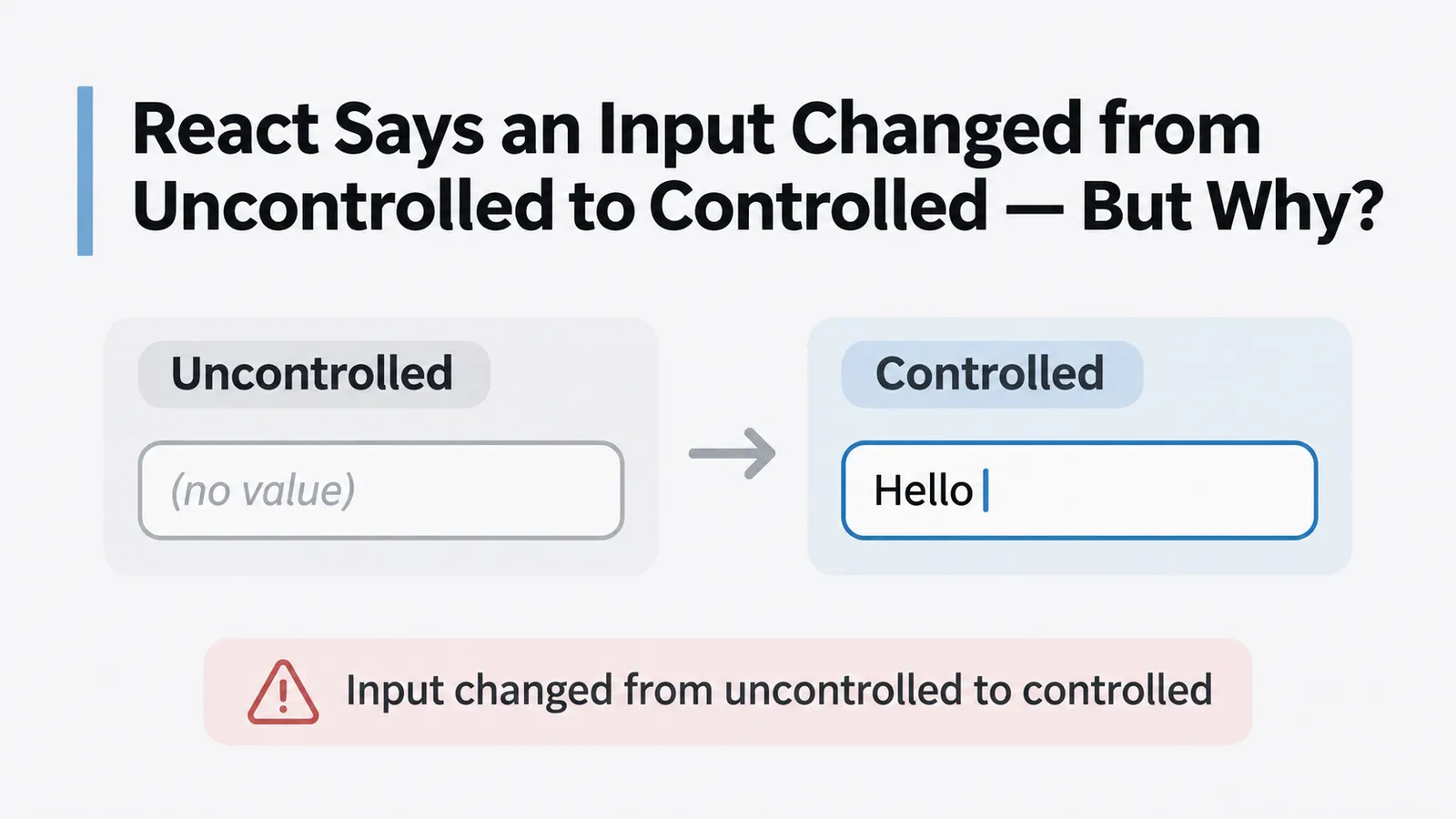
You open a profile form, wait for the user information to load, and everything appears to work. The fields display the correct values, and editing them updates the interface as expected.
But React prints a warning:
A component is changing an uncontrolled input to be controlled.The warning may also explain that an input value changed from undefined to a defined value.
You inspect the input:
<input
  value={name}
  onChange={(event) => setName(event.target.value)}
/>
Nothing seems wrong.
The value comes from state, and the event handler updates that state. This is the same pattern used in ordinary controlled React forms.
So why does React complain?
The answer may have nothing to do with the event handler. The problem can occur before the user types anything, during the first render of the component.
Consider what name contains before the API request finishes.
The input was already rendered before the data arrived
Suppose the component retrieves a user’s profile from an API.
import { useEffect, useState } from "react";

function ProfileForm() {
  const [name, setName] = useState();

  useEffect(() => {
    async function loadProfile() {
      const response = await fetch("/api/profile");
      const profile = await response.json();

      setName(profile.name);
    }

    loadProfile();
  }, []);

  return (
    <input
      value={name}
      onChange={(event) => setName(event.target.value)}
    />
  );
}
The code is relatively ordinary.
The component starts with an empty state, retrieves the profile, and updates the input when the response arrives.
But look at this line:
const [name, setName] = useState();No initial value is provided.
That means name is initially undefined.
During the first render, React receives:
<input value={undefined} />For a text input, this does not establish a controlled value. The browser can manage the field’s value itself.
Later, the API request completes.
Suppose it returns:
{
  "name": "Alice"
}
The component calls:
setName("Alice");React renders again, now with:
<input value="Alice" />The input that was previously uncontrolled has received a defined value prop.
It has effectively changed its mode of operation.
That is what React is warning about.
The problem is not that the string arrived asynchronously. Loading form data after the first render is perfectly normal.
The problem is that the input began its lifetime without a controlled value and later received one.
What controlled actually means here
A controlled text input receives its current value from React.
For example:
function NameField() {
  const [name, setName] = useState("");

  return (
    <input
      value={name}
      onChange={(event) => setName(event.target.value)}
    />
  );
}
The browser reports edits through onChange, and the component updates the state that determines what the input displays.
React remains responsible for the current value.
An uncontrolled input works differently:
function NameField() {
  return <input defaultValue="Alice" />;
}
Here, "Alice" is the initial value.
After the input has been created, the browser manages subsequent edits. React does not continuously force the field to match a state variable.
Both approaches are valid.
The problem appears when the same input starts under one arrangement and later switches to the other.
React documents that an input cannot switch between controlled and uncontrolled during its lifetime.
For controlled text inputs, the value prop should remain a string rather than becoming undefined or null.
This also means an empty string is not equivalent to an undefined value.
<input value="" />The field is empty, but it is controlled.
By contrast:
<input value={undefined} />does not provide a controlled string value.
Visually, both inputs may look identical.
Their behavior, however, is governed by different rules.
The simplest correction: initialize state properly
If the form is intended to be controlled from the beginning, initialize the field with an empty string.
const [name, setName] = useState("");Now the first render produces:
<input value="" />When the API response arrives:
setName(profile.name);the field changes from one string to another.
It was controlled before the request and remains controlled afterward.
A corrected version of the component might look like this:
import { useEffect, useState } from "react";

function ProfileForm() {
  const [name, setName] = useState("");

  useEffect(() => {
    let active = true;

    async function loadProfile() {
      const response = await fetch("/api/profile");

      if (!response.ok) {
        throw new Error("Failed to load profile");
      }

      const profile = await response.json();

      if (active) {
        setName(profile.name ?? "");
      }
    }

    loadProfile().catch(console.error);

    return () => {
      active = false;
    };
  }, []);

  return (
    <input
      value={name}
      onChange={(event) => setName(event.target.value)}
    />
  );
}
Two details matter here.
First, the state starts as an empty string.
Second, the API result is normalized using:
profile.name ?? ""This prevents a missing or nullish name property from introducing the same problem later.
The active flag is unrelated to the controlled-input warning. It simply prevents this example from applying the response after the effect has been cleaned up. A production form should also have an appropriate loading and error state.
One additional consideration: if a user can begin typing before the initial request finishes, the arriving response might overwrite their edits. Initial loading and subsequent form editing may therefore need to be coordinated.
But none of that changes the basic rule: the input should receive a consistent kind of value throughout its lifetime.
Why the warning can appear even with correct state initialization
Sometimes the state is initialized correctly, yet the warning remains.
For example:
function ProfileForm({ profile }) {
  const [name, setName] = useState("");

  return (
    <input
      value={profile?.name}
      onChange={(event) => setName(event.target.value)}
    />
  );
}
The state starts as a string.
But the input does not actually use that state as its value.
Instead, it receives:
profile?.nameIf profile is initially undefined, the optional chaining expression evaluates to undefined.
When the profile becomes available, the expression returns a string.
The input therefore switches modes, regardless of how name state was initialized.
This is why the relevant question is not simply whether the component contains a useState("") call.
It is what value the input actually receives on each render.
You could normalize the prop:
<input
  value={profile?.name ?? ""}
  onChange={handleChange}
/>
However, there is another problem in the original example: the input’s value comes from profile, while onChange updates a separate name state variable.
If handleChange only updates that separate state, the visible value may refuse to change because React continues rendering the value from profile.
For an editable form, the state updated by onChange should normally be the state that supplies the input’s value.
For example:
<input
  value={name}
  onChange={(event) => setName(event.target.value)}
/>
The API data can initialize name when it arrives, after which the form manages the user’s edits.
This distinction becomes particularly important when an input is wrapped in several custom components. The state may be correct at one level while a different, potentially undefined value is passed to the actual DOM input.
Why ?? is usually better than ||
Another commonly suggested correction is:
<input value={name || ""} />For a text field whose value is always a string, this often produces the intended result.
But the || operator replaces every falsy value with the fallback.
That includes:
0
false
""
null
undefined
For some fields, those values are meaningful.
Imagine a numeric input:
<input
  type="number"
  value={quantity || ""}
/>
If quantity is zero, JavaScript evaluates:
0 || ""and returns the empty string.
The field appears blank even though zero was the intended value.
Using nullish coalescing avoids that problem:
<input
  type="number"
  value={quantity ?? ""}
  onChange={(event) => {
    const raw = event.target.value;

    setQuantity(raw === "" ? null : Number(raw));
  }}
/>
Now zero remains zero, while null and undefined become an empty input value.
There are other considerations when managing numeric inputs, particularly intermediate values such as an empty field or a partially entered decimal number. Some forms are easier to manage by storing the raw text and converting it during validation or submission.
But for the uncontrolled-to-controlled warning, the relevant point is straightforward.
The value supplied to the input should not unexpectedly switch between nullish and defined values.
Checkboxes have a similar problem
The same general issue can occur with checkboxes.
However, a checkbox is controlled through checked, not through a string value.
Consider:
function Preferences({ settings }) {
  return (
    <input
      type="checkbox"
      checked={settings?.notifications}
      onChange={handleNotificationsChange}
    />
  );
}
If settings is initially undefined, checked is also undefined.
When the settings load, checked may become true or false.
This can create the corresponding uncontrolled-to-controlled warning.
A controlled checkbox should receive a Boolean consistently.
<input
  type="checkbox"
  checked={settings?.notifications ?? false}
  onChange={handleNotificationsChange}
/>
The input now receives false before settings are loaded and a Boolean afterward.
As with text inputs, the handler must update the state or data source actually controlling the field.
The distinction between value and checked matters when diagnosing forms containing several kinds of inputs.
For text inputs, the initial controlled value is commonly "".
For checkboxes and radio buttons, it is usually a Boolean.
Passing the same fallback value to every field type is not necessarily correct.
What if the form should not appear before loading?
There is another approach that avoids rendering the input until its initial data exists.
Suppose a profile editor should only become available once the server has returned the profile.
Instead of rendering an empty form and populating it afterward, the parent can wait for the data:
function ProfilePage() {
  const [profile, setProfile] = useState(null);

  // Load profile and update state here.

  if (profile === null) {
    return <p>Loading profile...</p>;
  }

  return <ProfileForm profile={profile} />;
}
Then the form initializes its editing state:
function ProfileForm({ profile }) {
  const [name, setName] = useState(profile.name ?? "");

  return (
    <input
      value={name}
      onChange={(event) => setName(event.target.value)}
    />
  );
}
The input is created only after the profile exists.
It starts as controlled, with a string value.
This can be a reasonable design when showing the form before data arrives would serve little purpose.
There is one limitation: the initial argument passed to useState() is used when that component first mounts. Changing profile later does not automatically reset the editing state.
If the form must switch between different users without unmounting, the application needs an explicit strategy for handling those changes.
For example, a form keyed by a stable profile ID can be remounted when the user switches to another record.
That should be a deliberate decision, since remounting also resets unsaved local edits.
The important part is that the form’s lifecycle matches how its data is expected to change.
Why defaultValue is not an interchangeable fix
You may also encounter advice to replace:
<input value={name} />with:
<input defaultValue={name} />This can eliminate the controlled-input warning because the input is now intended to be uncontrolled.
But it changes how the field works.
defaultValue provides an initial value. It does not continuously synchronize the browser’s current input value with React state.
Consider:
<input defaultValue={profile?.name} />If the input mounts while profile is undefined, its initial value is empty.
When the profile arrives later, updating defaultValue does not make the existing uncontrolled input behave like a controlled input with the newly loaded value.
So replacing value with defaultValue may hide the warning while creating another problem: the form never displays the fetched data as intended.
Uncontrolled inputs are useful when the browser should manage the current value and the application reads it when needed, often through a form submission or a ref.
Controlled inputs are useful when React needs to manage edits, validation, dependent fields, or live state.
The choice should follow the form’s requirements.
It should not be made solely to silence a warning.
Where to look when the warning remains
If the problem persists, inspect the actual value passed to the affected input during its first render.
A temporary diagnostic can be useful:
console.log("Input value:", name, typeof name);If the output begins with:
Input value: undefined undefinedand later becomes:
Input value: Alice stringthe transition is visible.
The next question is where that initial undefined value comes from.
It may be an uninitialized useState() call, an optional property on an API response, or optional chaining through data that has not arrived yet.
It may also come from a form library or a custom field wrapper that initially passes undefined to the underlying DOM element.
The correction belongs at the point where the field’s value is established, not necessarily in the component containing the API request.
Also pay attention to the warning’s direction.
An uncontrolled-to-controlled warning suggests the input began without a defined controlling value and later received one.
The reverse warning can occur when a controlled input initially receives a string and later receives undefined or null.
Both indicate that the same field is switching between two different arrangements.
The problem starts before anyone types
Return to the original component:
const [name, setName] = useState();Its event handler may be completely correct.
The API may return valid JSON.
The input may even look and behave normally once the data has loaded.
Yet the warning is already explained by what happened during the first render.
React created an input without a controlled value. Later, the same input received a string through value.
The browser and React were effectively asked to change who manages that field.
The correction is usually small:
const [name, setName] = useState("");Or, when values may arrive from an optional source:
value={name ?? ""}The broader principle is to decide how a field will be managed before it is rendered.
If React controls it, provide a valid controlled value from the beginning and update that value when the user edits the field.
If the browser controls it, use an uncontrolled input intentionally and do not expect defaultValue to behave like a continuously updated state binding.
The warning can appear after an API request, but the request itself is rarely the interesting part.
What matters is the transition between the input’s initial state and the value it receives later.
And that transition often begins one render earlier than the developer was looking.