Programming
Why removeEventListener Doesn't Remove the Listener in React
A React component removes its event listener during cleanup, yet the handler continues firing. The cleanup may be running correctly while passing a different function to the browser.
You open a component, add a keyboard listener, and everything works. Pressing a key triggers the expected action.
Then you close the component.
The listener should disappear. After all, there is a cleanup function inside useEffect, and it calls removeEventListener().
Yet pressing the same key still triggers the handler.
Open the component again, close it, and now the event might fire twice. Repeat the process several times, and the number of calls keeps growing.
The cleanup code is there. React even executes it.
So why does the listener remain?
Consider this example:
import { useEffect } from "react";

function KeyboardTracker() {
  useEffect(() => {
    window.addEventListener("keydown", (event) => {
      console.log("Key pressed:", event.key);
    });

    return () => {
      window.removeEventListener("keydown", (event) => {
        console.log("Key pressed:", event.key);
      });
    };
  }, []);

  return <p>Press any key</p>;
}
The event names match. Both callbacks contain the same code, and the cleanup is returned correctly from the effect.
But the listener is never removed.
The reason is hidden in something that JavaScript treats differently from how we might initially read the code: the two arrow functions are separate function objects.
Two functions can look identical without being the same function
Take React out of the picture for a moment.
Consider:
const first = () => console.log("Hello");
const second = () => console.log("Hello");

console.log(first === second);
// false
The functions do exactly the same thing.
Their source code is identical.
Yet JavaScript considers them different objects.
Each arrow function expression creates a function object, and the two variables hold different references.
Compare that with:
const first = () => console.log("Hello");
const second = first;

console.log(first === second);
// true
Now both variables refer to the same function.
This distinction matters because removeEventListener() does not search for a function with equivalent code.
It attempts to find an existing event listener registration that matches the supplied information.
For ordinary DOM event listeners, that includes the event type, the callback’s identity, and the capture setting.
So when we write:
window.addEventListener("resize", () => {
  console.log("Resized");
});
and later:
window.removeEventListener("resize", () => {
  console.log("Resized");
});
the browser receives two different callback references.
The first one is registered.
The second one was just created and has never been registered.
As a result, there is no matching listener to remove.
The browser does not throw an exception. The removal simply has no effect on the original registration.
That explains why the cleanup can execute successfully while leaving the listener active.
Keep the callback reference inside useEffect
Return to our React component.
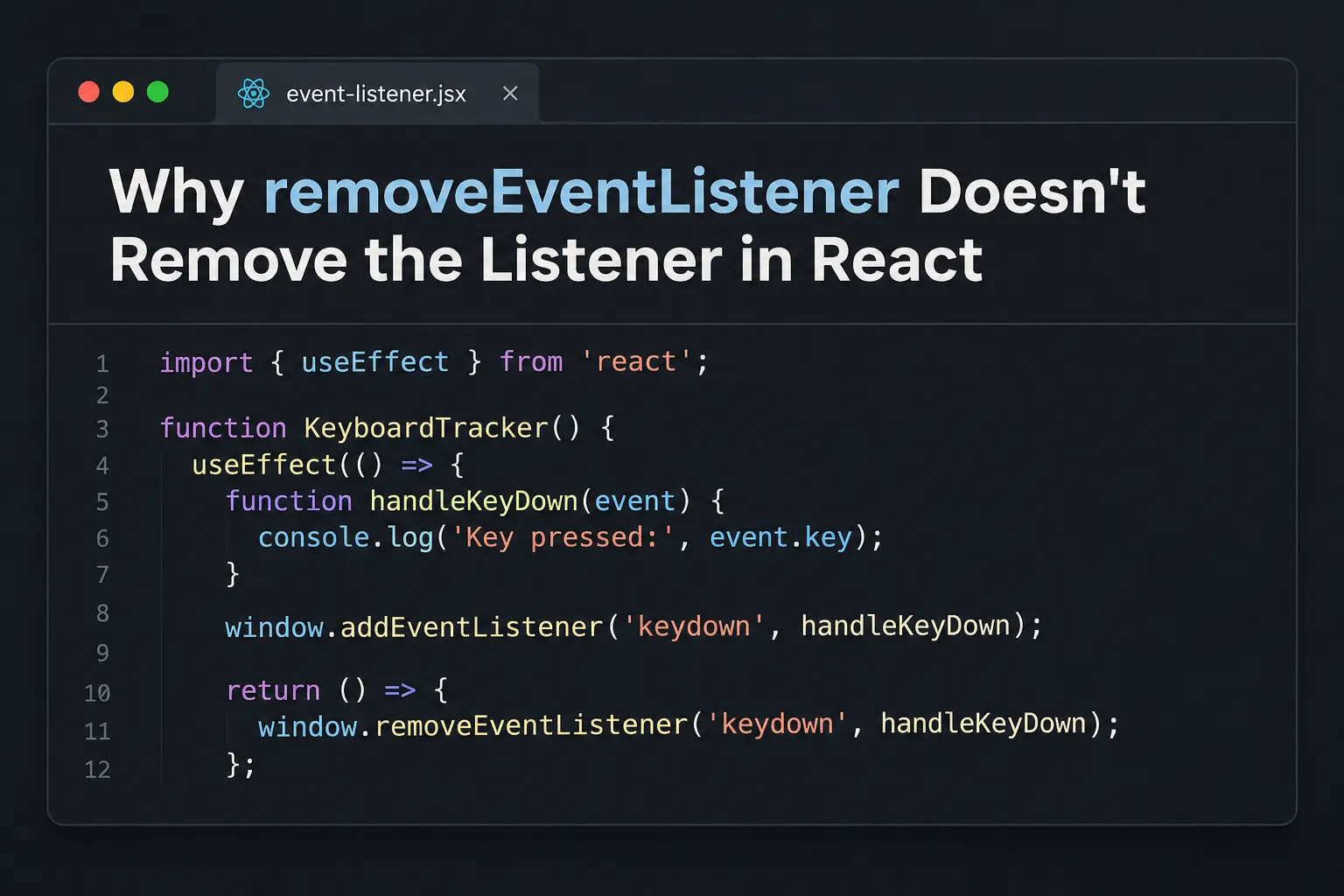
The correction is to create one handler function and use that same reference for both operations.
import { useEffect } from "react";

function KeyboardTracker() {
  useEffect(() => {
    function handleKeyDown(event) {
      console.log("Key pressed:", event.key);
    }

    window.addEventListener("keydown", handleKeyDown);

    return () => {
      window.removeEventListener("keydown", handleKeyDown);
    };
  }, []);

  return <p>Press any key</p>;
}
Notice where handleKeyDown is declared.
It lives inside the effect.
When React runs the effect’s setup, JavaScript creates the function and passes it to addEventListener().
The cleanup function closes over that same reference.
When React later calls the cleanup, removeEventListener() receives the exact function that was previously registered.
This time, the browser can find and remove the listener.
There is no need to wrap handleKeyDown in useCallback.
Its identity only needs to remain consistent between the setup and cleanup belonging to the same effect execution.
If React needs to run the effect again, it will call the previous cleanup before running the next setup. The next setup can create a new handler, as long as its own cleanup retains the matching reference.
That is an important distinction: a function does not need to exist forever to be removable. It only needs to be the same function within a particular registration and removal pair.
When the handler is declared outside the effect
Sometimes the callback needs access to props or component state.
Consider:
function RoomListener({ roomId }) {
  function handleMessage(event) {
    console.log(roomId, event.data);
  }

  useEffect(() => {
    window.addEventListener("message", handleMessage);

    return () => {
      window.removeEventListener("message", handleMessage);
    };
  }, [handleMessage]);

  return <p>Room: {roomId}</p>;
}
This cleanup is correct.
Even though handleMessage is recreated on each render, the cleanup closes over the handler from the effect that registered it.
But there is another issue.
Because the function is recreated during every render, its reference changes.
React notices that handleMessage is a changed dependency and runs the effect again after the commit.
The previous listener is removed, and the new one is registered.
This is not necessarily a memory leak, but it causes unnecessary subscription work on unrelated renders.
And if the cleanup were incorrect, every new subscription could leave another listener behind.
A simpler implementation is:
function RoomListener({ roomId }) {
  useEffect(() => {
    function handleMessage(event) {
      console.log(roomId, event.data);
    }

    window.addEventListener("message", handleMessage);

    return () => {
      window.removeEventListener("message", handleMessage);
    };
  }, [roomId]);

  return <p>Room: {roomId}</p>;
}
Now the effect depends directly on roomId.
When the room changes, React removes the old listener and registers one that uses the new room ID.
When an unrelated render occurs, the effect does not need to restart.
An empty dependency array would be inappropriate here because the handler needs to use the current roomId.
With an empty array, it could continue logging an outdated room ID after the prop changes.
The correct dependencies are determined by what the handler reads, not merely by how often we want the effect to execute.
The less obvious mistake: capture does not match
Suppose you have already corrected the callback reference.
The listener still remains.
There is another property worth checking: capture.
When an event listener is registered, it can run during the capturing phase or the usual non-capturing phase.
Consider:
function handleClick(event) {
  console.log("Clicked:", event.target);
}

window.addEventListener("click", handleClick, {
  capture: true
});
Now attempt to remove it:
window.removeEventListener("click", handleClick);The callback reference is correct.
The event type is also correct.
But the removal does not match the original listener because the capture setting differs.
The listener was registered with capture: true, while the removal call defaults to capture: false.
To remove it, use:
window.removeEventListener("click", handleClick, {
  capture: true
});
Interestingly, not every option needs to match.
According to the DOM API rules, removeEventListener() checks the capture flag when matching registration options. It does not require the original passive or once values to be repeated.
For example:
window.addEventListener("scroll", handleScroll, {
  passive: true
});

window.removeEventListener("scroll", handleScroll);
This can remove the listener because both registrations use the default capture: false.
That is different from a mismatch in function identity, which cannot be ignored.
Also, the event target must match. A listener registered on window is not removed by calling document.removeEventListener().
When inspecting a failed cleanup, the callback is the first thing to check, but it is not the only relevant part of the registration.
Why Strict Mode makes the problem more visible
There is a reason this problem may become particularly noticeable in development.
React Strict Mode performs additional effect checks.
When Strict Mode is enabled at the root, React can run an extra setup-and-cleanup cycle during development before the regular setup.
For a correctly implemented listener, that sequence is harmless:
Register listener
Remove listener
Register listener
Only one registration remains active.
But return to the original broken example.
The cleanup passes a new anonymous function, so the removal fails.
The sequence effectively becomes:
Register listener A
Attempt to remove listener B
Register listener C
Listener A remains active because B was never registered.
Now A and C can both respond to the same event.
This may produce duplicate logs immediately after the component mounts in development.
It is tempting to blame Strict Mode and disable it.
But Strict Mode is exposing a cleanup problem that already exists.
Even without the extra development check, the original listener would remain when the component unmounted.
React’s effect lifecycle requires cleanup to reverse whatever the setup performed. If setup registers a listener, cleanup should remove that registration.
Strict Mode makes mistakes in that relationship easier to notice.
An alternative: AbortController
There is another way to manage event listener cleanup without passing the original callback to removeEventListener().
The DOM API supports associating event listeners with an AbortSignal.
For example:
import { useEffect } from "react";

function KeyboardTracker() {
  useEffect(() => {
    const controller = new AbortController();

    window.addEventListener(
      "keydown",
      (event) => {
        console.log("Key pressed:", event.key);
      },
      {
        signal: controller.signal
      }
    );

    return () => {
      controller.abort();
    };
  }, []);

  return <p>Press any key</p>;
}
The effect creates an AbortController.
Its signal is passed when registering the listener.
During cleanup, calling abort() removes listeners associated with that signal.
This avoids the need to preserve a callback reference specifically for manual removal.
It can be convenient when an effect registers several listeners:
useEffect(() => {
  const controller = new AbortController();

  window.addEventListener("resize", handleResize, {
    signal: controller.signal
  });

  window.addEventListener("scroll", handleScroll, {
    signal: controller.signal
  });

  return () => {
    controller.abort();
  };
}, []);
Both listeners use the same signal, so one cleanup operation can remove them.
This example assumes handleResize and handleScroll are stable functions defined outside the component or otherwise don’t depend on changing reactive values.
If they need current props or state, those dependencies must still be handled correctly.
AbortController solves the problem of listener removal. It does not automatically solve stale closures or incorrect React dependencies.
For a single event listener, the ordinary named-handler approach is often just as clear.
How to confirm that cleanup is actually working
Suppose an application still responds to events after a component disappears.
Before rewriting its effects, establish whether the listener is genuinely being retained.
A simple diagnostic is to log both setup and cleanup:
useEffect(() => {
  function handleResize() {
    console.log("Resize event");
  }

  console.log("Adding listener");

  window.addEventListener("resize", handleResize);

  return () => {
    console.log("Removing listener");

    window.removeEventListener("resize", handleResize);
  };
}, []);
Now mount the component, resize the browser, and unmount it.
The cleanup message confirms that React executed the cleanup function.
But remember: a console message alone does not prove that the browser removed the listener.
If removeEventListener() receives a mismatched callback or capture setting, it can return without removing the registration.
The actual verification is whether the handler stops responding after cleanup.
If it still responds, inspect the target, event type, function reference, and capture setting.
Also check whether another component independently registered its own handler for the same event.
Multiple active listeners are not necessarily duplicates caused by a leak. They may be separate valid registrations.
The problem is only established when a registration remains active after its owner should have released it.
The cleanup can be correct while the effect is wrong
There is one final distinction.
An effect that re-registers a listener after every render is not automatically leaking listeners.
If every cleanup correctly removes the previous handler, the browser may still end up with only one active registration.
That is different from an effect whose cleanup fails to remove the original callback.
The first issue concerns unnecessary setup and cleanup work.
The second concerns retained event listeners.
Both may appear together, but their solutions are not identical.
Moving a handler inside the effect and depending on the actual reactive values can reduce unnecessary subscriptions.
Using the same callback reference, matching the capture setting, or relying on an AbortSignal ensures that an existing listener can be removed.
Return to the first example:
window.addEventListener("keydown", () => {
  console.log("Key pressed");
});

window.removeEventListener("keydown", () => {
  console.log("Key pressed");
});
Nothing in the browser tells us that these two functions should be treated as equivalent.
They look identical to a reader, but JavaScript creates two different objects.
The browser registered one and was asked to remove the other.
React can execute the cleanup exactly as written, but it cannot make an unmatched callback remove a different event listener.
Once the same reference is used for registration and removal, the issue becomes straightforward.
The lesson extends beyond React. Any code that uses addEventListener() and removeEventListener() needs to respect the identity of the listener it registered.
And in React, useEffect gives us a convenient place to keep both operations together, so each subscription has a cleanup that belongs to it.