Programming
Why React useEffect Runs Forever Even When Dependencies Look Correct
An effect lists its dependencies correctly, yet continues running after every render. The missing detail may be an object recreated each time, even when none of its properties change.
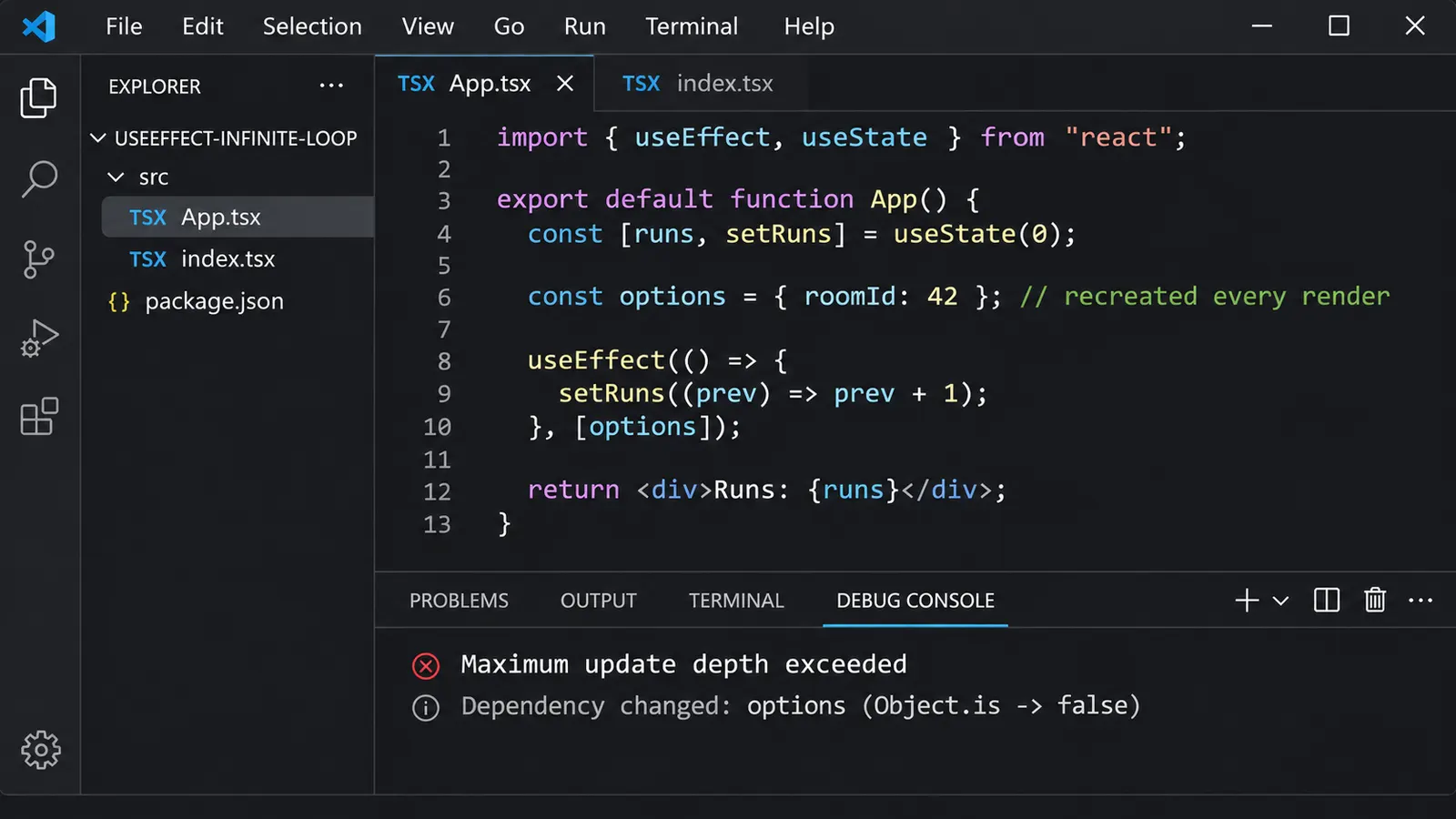
You have a component with an effect. Its dependency array contains exactly the values the effect uses, and there are no obvious mistakes.
Yet the component keeps rendering.
The console fills with messages, the browser becomes less responsive, and eventually React may report:
Maximum update depth exceeded.The first thought is probably that something is wrong with the state update. Perhaps setState is called too often, or the effect is missing a dependency.
But then you look at the code.
useEffect(() => {
  // Some operation
}, [options]);
The dependency is there. React should run the effect when options changes.
And the properties inside options haven’t changed.
So why does the effect keep executing?
The answer becomes clearer once we distinguish an object’s contents from the object itself.
React does not recursively compare everything stored inside a dependency. It compares each dependency with its previous value using Object.is().
For primitive values, this often behaves exactly as we expect.
For objects and functions, the result can be rather different.
And if an effect updates state while depending on an object recreated during every render, the component can enter a cycle that continues until React intervenes.
A small component that never settles
Consider this component:
import { useEffect, useState } from "react";

export default function CounterExample() {
  const [runs, setRuns] = useState(0);

  const options = {
    mode: "compact"
  };

  useEffect(() => {
    setRuns((previous) => previous + 1);
  }, [options]);

  return <p>Effect runs: {runs}</p>;
}
There is nothing particularly complicated here.
The component contains a state variable, an object with one property, and an effect that increments a counter.
The dependency array includes options, which is the object associated with the effect.
Yet this component can enter an infinite update cycle.
To see why, follow what happens after the component first renders.
React executes CounterExample, creating an object:
const options = {
  mode: "compact"
};
After the component commits, the effect runs and updates the counter from zero to one.
That state update requests another render.
React executes the component again.
And here is the detail that matters: JavaScript evaluates the object literal again.
const options = {
  mode: "compact"
};
The properties are identical, but the result is a new object.
React compares the new dependency with the previous one and considers them different.
The effect runs again, increments the counter, and requests another render.
Another object is created.
Another dependency change is detected.
The cycle continues.
The runs state is not needed for a real application feature here; it simply makes the problem reproducible. In practice, an effect that derives state from props or other state can create the same cycle.
The surprising part is that the value inside options never changes.
But React is not comparing that value directly.
It is comparing the objects that contain it.
Why two identical objects are different in JavaScript
Consider a simple JavaScript example outside React:
const first = {
  mode: "compact"
};

const second = {
  mode: "compact"
};
The objects have the same properties and values.
Now compare them:
console.log(first === second);
// false
Perhaps that is familiar.
But React uses Object.is(), so let’s check that too:
console.log(Object.is(first, second));
// false
The result is still false.
Both variables refer to different objects.
JavaScript does not consider two separately created objects identical merely because their contents match.
Now compare two references to the same object:
const first = {
  mode: "compact"
};

const second = first;

console.log(Object.is(first, second));
// true
Here the variables refer to the same object.
That is the distinction.
React compares dependencies according to their values and identities, not by performing a deep comparison of nested properties.
For ordinary objects, arrays, and functions, identity is especially important.
Consider:
Object.is(
  ["React", "TypeScript"],
  ["React", "TypeScript"]
);
// false
Or:
Object.is(
  () => console.log("Hello"),
  () => console.log("Hello")
);
// false
Each expression creates a new array or function.
The contents may appear equivalent, but the references are not identical.
Now return to the React component.
const options = {
  mode: "compact"
};
Every render creates a new object.
Consequently:
useEffect(() => {
  // ...
}, [options]);
sees a changed dependency after every render.
This is precisely what React is designed to do.
The effect itself is not malfunctioning. The dependency value is changing, even though its visible contents are not.
Why Object.is instead of deep equality?
It would be tempting to suggest that React should compare the properties of both objects.
After all, if both contain { mode: "compact" }, perhaps the effect should not run again.
But objects can contain other objects, arrays, functions, circular references, and mutable values.
A recursive comparison would introduce its own questions.
How deeply should React compare?
Should two functions be considered equal if their source code looks identical? What about different closures capturing different variables?
And what happens if a dependency contains a large or cyclic object graph?
React avoids this ambiguity by using a defined comparison operation for each dependency.
The result is predictable, although developers need to understand which values are stable between renders.
There is another consequence.
Mutating the contents of an existing object does not automatically make React consider that object’s reference changed.
const options = {
  mode: "compact"
};

const previous = options;

options.mode = "expanded";

console.log(Object.is(previous, options));
// true
The object is still the same object.
Its contents changed, but its identity did not.
This is one reason directly mutating React state can produce unexpected behavior.
Dependency comparison is concerned with the values supplied in the dependency array. For an object, changing a nested property is not equivalent to supplying a different object.
Re-running an effect is not necessarily an infinite loop
There is a distinction worth making before changing anything.
An object recreated during rendering can cause an effect to run after every committed render.
But that alone does not guarantee an infinite loop.
Consider:
import { useEffect, useState } from "react";

function Example() {
  const [count, setCount] = useState(0);

  const options = {
    mode: "compact"
  };

  useEffect(() => {
    console.log("Effect executed");
  }, [options]);

  return (
    <button onClick={() => setCount(count + 1)}>
      Count: {count}
    </button>
  );
}
Clicking the button updates state.
The component renders again and creates another options object.
React notices the changed dependency and runs the effect.
But the effect only logs a message.
It does not request another state update.
So the component settles until something else causes another render.
The effect may be running more frequently than intended, but it is not sustaining a loop by itself.
React’s documentation describes two conditions for an effect to enter an infinite cycle:
- The effect updates some state.
- That state update causes a render in which at least one dependency changes.
Our original example satisfies both conditions.
The effect increments runs, and that update causes the component to recreate options.
But suppose the effect always sets a primitive state value to the same value:
useEffect(() => {
  setConnected(true);
}, [options]);
If connected is already true, React can skip a state update whose next value is identical according to Object.is.
The endless cycle may therefore stop.
This does not mean the effect is correctly designed.
Its dependency is still unstable, and unrelated renders can still cause it to run again.
The distinction matters because the same dependency problem can appear as several different symptoms: repeated logs, unnecessary network requests, repeated subscriptions, or a genuine infinite update cycle.
Not every one of these produces the same error message.
The object that makes a connection restart
Consider a more realistic component.
Suppose a chat interface needs to connect to a room.
The component receives a roomId prop and passes connection options to an external API.
import { useEffect, useState } from "react";

function ChatRoom({ roomId }) {
  const [message, setMessage] = useState("");

  const options = {
    serverUrl: "wss://example.com",
    roomId
  };

  useEffect(() => {
    const connection = createConnection(options);

    connection.connect();

    return () => {
      connection.disconnect();
    };
  }, [options]);

  return (
    <input
      value={message}
      onChange={(event) => setMessage(event.target.value)}
      placeholder="Write a message..."
    />
  );
}
Here, createConnection() represents an external connection API that accepts the supplied options.
The code seems reasonable.
When the selected room changes, the connection should be updated.
The effect also returns a cleanup function, which disconnects the previous connection.
But notice what happens when the user types into the input.
setMessage() updates state.
The component renders again.
Another options object is created.
React compares it with the previous dependency and finds a different reference.
The effect runs its cleanup, disconnecting the existing connection, and then establishes a new one.
The selected room has not changed.
The server URL has not changed.
Only the input’s text changed.
Yet the connection restarts.
This example may not enter an infinite loop because the effect does not itself continuously update component state.
Still, its behavior is wrong.
A harmless input change has become a reason to reconnect to an external service.
With a real network connection, that can mean additional requests, interruptions, duplicated work, or temporary loss of connection state.
The problem is not that the dependency array contains the wrong variable.
It contains an object whose identity changes for reasons unrelated to the connection.
Move the object inside the effect
The simplest correction is often to stop creating the dependency object during rendering.
Instead, construct it inside the effect.
import { useEffect, useState } from "react";

function ChatRoom({ roomId }) {
  const [message, setMessage] = useState("");

  useEffect(() => {
    const options = {
      serverUrl: "wss://example.com",
      roomId
    };

    const connection = createConnection(options);

    connection.connect();

    return () => {
      connection.disconnect();
    };
  }, [roomId]);

  return (
    <input
      value={message}
      onChange={(event) => setMessage(event.target.value)}
      placeholder="Write a message..."
    />
  );
}
Now the dependency array contains roomId.
Assuming it is a string, React compares its value directly.
Typing into the input still updates the component’s state and causes a render.
However, if roomId remains unchanged, the effect does not need to run again.
The options object is created when the effect actually performs the connection setup.
This is a more direct relationship between the dependency and the operation.
The connection depends on the selected room.
It does not depend on the identity of a temporary object created during rendering.
If the server URL is also supplied as a prop, include it as a dependency:
useEffect(() => {
  const options = {
    serverUrl,
    roomId
  };

  const connection = createConnection(options);

  connection.connect();

  return () => connection.disconnect();
}, [serverUrl, roomId]);
Now both reactive values are explicit.
There is no need to create a separate object outside the effect merely to pass it back into the effect.
This is one of the approaches React recommends for removing unnecessary object dependencies.
What if the object is genuinely needed elsewhere?
Moving an object into an effect is convenient when only that effect uses it.
But suppose the component also needs the same object for another operation.
For example, it might pass configuration to a child component or a library that relies on reference stability.
Now recreating the object in different places may be undesirable.
In this situation, useMemo becomes relevant.
import { useMemo } from "react";

const options = useMemo(() => {
  return {
    serverUrl,
    roomId
  };
}, [serverUrl, roomId]);
The object is recalculated when its dependencies change.
If both values remain the same, React can reuse the cached result.
An effect using options will therefore usually receive a stable reference across unrelated renders.
useEffect(() => {
  const connection = createConnection(options);

  connection.connect();

  return () => connection.disconnect();
}, [options]);
This can be appropriate when the object really needs to be shared or stabilized.
But it raises another question.
Do we actually need useMemo here?
If the only reason for creating options is to pass it to the effect, moving the object into the effect avoids the dependency problem without adding another Hook.
The React documentation also describes useMemo as a performance optimization rather than a semantic guarantee.
React may discard a cached value under certain circumstances.
This means an application should not depend on a memoized object as though it were a permanent identity token with an absolute lifetime guarantee.
For effect dependencies, removing unnecessary object identity from the synchronization logic is often preferable.
useMemo is useful when it solves a real problem.
It is not a requirement for every object written inside a React component.
Sometimes the effect should not exist
Now consider another example.
We have a list of products and want to display only those matching a particular status.
import { useEffect, useState } from "react";

function ProductList({ products, status }) {
  const [visibleProducts, setVisibleProducts] = useState([]);

  const filters = {
    status
  };

  useEffect(() => {
    setVisibleProducts(
      products.filter(
        (product) => product.status === filters.status
      )
    );
  }, [products, filters]);

  return (
    <ul>
      {visibleProducts.map((product) => (
        <li key={product.id}>
          {product.name}
        </li>
      ))}
    </ul>
  );
}
At first glance, the implementation seems logical.
Whenever the products or filters change, update the visible list.
But this code can enter an infinite loop.
The effect creates a new array using filter() and stores it in state.
That update causes a render.
The render creates another filters object.
React considers the dependency changed and runs the effect again.
filter() produces another array, so the state receives a new reference.
Another render follows.
The cycle continues.
We could stabilize filters with useMemo.
We could also replace the object dependency with status.
But before choosing either solution, examine what the effect is doing.
It is calculating a value from two inputs that are already available during rendering.
There is no external system to synchronize.
No network connection, browser event listener, or third-party widget is involved.
The component simply needs a filtered list.
Why store that derived list in another state variable?
We can calculate it directly:
function ProductList({ products, status }) {
  const visibleProducts = products.filter(
    (product) => product.status === status
  );

  return (
    <ul>
      {visibleProducts.map((product) => (
        <li key={product.id}>
          {product.name}
        </li>
      ))}
    </ul>
  );
}
The effect disappears.
So does the extra state variable.
There is no longer a cycle where rendering schedules an effect that schedules another render.
The visible products are derived from the current props.
If the filtering is computationally expensive and profiling demonstrates a meaningful cost, it may be worth memoizing the calculation:
const visibleProducts = useMemo(() => {
  return products.filter(
    (product) => product.status === status
  );
}, [products, status]);
But that is a performance decision.
It is not necessary to make the simpler component correct.
This illustrates a broader point from React’s guidance: if something can be calculated from props or state during rendering, an effect is often unnecessary.
Sometimes the most effective way to fix an infinite effect loop is to remove the effect rather than adjust its dependencies.
Arrays can produce the same problem
Objects are not the only values affected by reference comparison.
Consider:
function Dashboard() {
  const selectedCategories = ["React", "TypeScript"];

  useEffect(() => {
    console.log("Categories changed");
  }, [selectedCategories]);

  return <p>Dashboard</p>;
}
Every render creates a new array.
Even though it always contains the same two strings, its reference changes.
React therefore considers the dependency different.
If the effect updates state in a way that causes another render, the same kind of loop can emerge.
If the categories are truly constant, they do not need to be created inside the component.
const SELECTED_CATEGORIES = [
  "React",
  "TypeScript"
];

function Dashboard() {
  useEffect(() => {
    console.log("Categories changed");
  }, []);

  return <p>Dashboard</p>;
}
In this example, the values are a fixed module-level constant. They are not reactive component values, so the effect does not need to track them as a changing dependency.
But if the categories depend on props or state, moving them outside the component would not be appropriate.
Instead, identify which values actually determine their contents.
Perhaps the effect can depend on a primitive category ID, or perhaps the array can be created inside the effect.
The correct solution follows the relationship between the data and the operation.
It does not follow a universal rule that all arrays must be memoized.
Functions are dependencies too
A similar problem appears with functions defined inside components.
Consider:
function ChatRoom({ roomId }) {
  function createOptions() {
    return {
      serverUrl: "wss://example.com",
      roomId
    };
  }

  useEffect(() => {
    const connection = createConnection(createOptions());

    connection.connect();

    return () => connection.disconnect();
  }, [createOptions]);

  return <p>Connected room: {roomId}</p>;
}
The function createOptions is declared each time ChatRoom renders.
JavaScript creates a new function object.
React compares that function with the previous one using Object.is().
The references differ.
Consequently, the effect may run after every render, even when roomId remains the same.
A developer might reach immediately for useCallback.
That can stabilize a function reference under appropriate dependencies.
But in this case, the helper is only needed by the effect.
Move it inside:
function ChatRoom({ roomId }) {
  useEffect(() => {
    function createOptions() {
      return {
        serverUrl: "wss://example.com",
        roomId
      };
    }

    const connection = createConnection(createOptions());

    connection.connect();

    return () => connection.disconnect();
  }, [roomId]);

  return <p>Connected room: {roomId}</p>;
}
Now the effect depends directly on the reactive value it uses.
There is no unnecessary function dependency.
useCallback remains useful when the function identity itself matters, such as when passing a callback to a memoized child or coordinating with another Hook that legitimately needs a stable reference.
But memoizing a function solely because it was unnecessarily declared outside an effect can complicate otherwise simple code.
How to identify which dependency keeps changing
In a small component, an object literal inside the render function is easy to notice.
In a larger component, an effect might depend on several values:
useEffect(() => {
  synchronize(options, selectedUser, onComplete);
}, [options, selectedUser, onComplete]);
The dependency array appears correct.
But one of those values changes on every render.
Which one?
React’s documentation suggests logging the dependencies and comparing them between renders.
For example:
const dependencies = [
  options,
  selectedUser,
  onComplete
];

console.log(dependencies);

useEffect(() => {
  synchronize(options, selectedUser, onComplete);
}, [options, selectedUser, onComplete]);
Open the browser’s developer console and examine two consecutive dependency arrays.
In Chromium DevTools, you can store logged values as temporary variables using the console’s context menu.
Then compare their entries:
Object.is(temp1[0], temp2[0]);
Object.is(temp1[1], temp2[1]);
Object.is(temp1[2], temp2[2]);
A result of false means the corresponding dependency is not identical between those renders.
If options is the first entry and returns false, inspect where that object is created.
If onComplete is the third entry and returns false, inspect whether the function is recreated during rendering.
There is an important distinction here.
Logging the dependencies does not automatically identify the reason the component rendered.
It only shows which dependency values changed between the captured renders.
The render itself could have been triggered by local state, updated props, context, or another mechanism.
React DevTools Profiler can help investigate rendering behavior, but the dependency comparison remains the more direct way to confirm the specific problem discussed here.
It is also useful to examine whether the effect updates state.
If it does, ask what changes after that update.
Does the effect produce a new array? Does it replace an object in state? Does it cause a parent to update a prop?
A loop is a chain of causes, not merely a suspicious dependency array.
Finding the dependency that changes is one step. Understanding what repeatedly causes it to change is the next.
Why an empty dependency array appears to fix the problem
Suppose we have:
useEffect(() => {
  synchronize(options);
}, [options]);
And React repeatedly executes the effect because options is recreated.
One tempting solution is:
useEffect(() => {
  synchronize(options);
}, []);
The effect no longer reacts to changed dependencies.
The repeated execution may disappear.
But what happens when a value inside options genuinely changes?
React will not rerun the effect because the dependency array says that nothing reactive needs to be tracked.
The effect keeps the values from the render in which its setup ran.
In the chat example, this could mean continuing to use an old room ID after the user selects another room.
The code has stopped responding to changes it was supposed to handle.
The warning is gone because the relationship between the effect and its inputs has been hidden.
That is not the same as correcting the dependency.
If an effect reads a reactive value, React’s dependency rules generally require that value to be included.
To remove a dependency properly, change the code so the effect no longer needs to read that reactive value, or restructure the data so that the dependency expresses the actual synchronization requirement.
Moving a temporary object into the effect is one way to accomplish that.
Replacing derived state with a calculation during rendering is another.
Simply removing a dependency because it changes too often leaves the underlying design problem unresolved.
Why Strict Mode makes the situation harder to recognize
There is another React behavior that can be mistaken for an infinite effect loop.
In development, React Strict Mode performs additional checks.
For effects, it can run an extra setup-and-cleanup cycle to reveal missing cleanup logic.
For example:
useEffect(() => {
  console.log("Connected");

  return () => {
    console.log("Disconnected");
  };
}, []);
With Strict Mode enabled at the root, development output can resemble:
Connected
Disconnected
Connected
This is expected.
React is checking whether the effect can be set up, cleaned up, and set up again without leaving the application in an inconsistent state.
Production behavior does not include this additional development-only check.
There is also a qualification: when <StrictMode> is enabled only for a subtree rather than at the root, React does not perform the extra initial effect cycle in exactly the same way.
Now compare that with an unstable dependency:
const options = {
  mode: "compact"
};

useEffect(() => {
  setRuns((previous) => previous + 1);
}, [options]);
Here the cycle is not caused by Strict Mode.
The effect updates state, the component renders, and the dependency changes.
Removing Strict Mode may change how many additional development checks occur, but it does not repair the underlying dependency cycle.
That distinction is especially useful when a problem appears more obvious after moving a project to React 18 or 19.
A developer may notice more effect activity during development and conclude that React introduced a new infinite-loop behavior.
But object identity has affected Hook dependencies since Hooks were introduced.
Strict Mode can expose problems more visibly. It does not create the basic dependency rule.
Which React versions are affected?
This behavior is not specific to React 19.
Hooks became available in the stable React 16.8 release in February 2019, and useEffect has followed dependency comparison semantics since that generation of the API.
The issue applies to applications using:
- React 16.8 and later React 16 releases with Hooks.
- React 17.
- React 18.
- React 19, including the React 19.3 release line.
React 19.3 was released in September 2026. The dependency behavior described here remains relevant.
There are differences between these React generations in areas such as development diagnostics, Strict Mode behavior, scheduling, and other runtime features.
Those differences can affect how symptoms appear.
For example, developers working with React 18 or 19 may observe development-only effect setup and cleanup activity under Strict Mode that they did not previously notice.
But the essential problem remains the same.
A newly created object is not identical to an object created during the previous render.
React does not deep-compare the contents of an effect’s dependency array.
And an effect that continuously causes state updates while receiving changed dependencies can create a self-sustaining render cycle.
This applies whether the application uses Vite, Next.js, a custom React setup, or another framework running React.
The surrounding tooling may influence rendering and development behavior, but it does not change JavaScript object identity.
A note about React Compiler
Modern React tooling may also use React Compiler, which can automatically memoize certain calculations and values.
This can change how often some objects or functions are recreated in optimized code.
However, applications should not rely on an optimizer to correct effects that synchronize the wrong values or unnecessarily copy derived data into state.
An effect should still describe which reactive values determine its synchronization.
If an object exists only to pass a few primitive values to an external API, constructing it inside the effect remains a straightforward solution.
If data can be derived during rendering, removing the unnecessary effect is still preferable to maintaining a redundant state synchronization loop.
Compiler optimizations can reduce work.
They do not eliminate the need to understand why an effect exists or when it should run.
What to examine before adding useMemo
Consider an effect that keeps executing.
The dependency array may be complete. The object may contain the expected values. The component may even work correctly for a few seconds before the repeated updates become visible.
Before wrapping everything in useMemo, examine what happens during one complete update.
Does the effect update React state?
If it does, that update may trigger another render.
During that render, are any dependencies recreated as new objects, arrays, or functions?
If so, React can consider them changed even when their contents remain identical.
Now examine what the effect is supposed to accomplish.
If it synchronizes an external system, depend on the values that actually determine that synchronization. An object assembled only for that operation can often be created inside the effect.
If the effect calculates information from existing props or state, the calculation may belong directly in rendering instead.
If a stable reference is genuinely required elsewhere, memoization may be appropriate.
But those are different situations, and they should not receive the same automatic fix.
The original component demonstrates the problem clearly:
const options = {
  mode: "compact"
};

useEffect(() => {
  setRuns((previous) => previous + 1);
}, [options]);
The object looks unchanged.
Its contents are unchanged.
Yet the reference is different after every render.
React sees that difference, executes the effect, and the effect requests another update.
There is no mysterious comparison failure here.
The dependency behaves exactly according to JavaScript’s reference semantics.
What makes the loop confusing is that the visible data appears stable while the values React actually compares are not.
Once that difference is recognized, the solution is usually much smaller than expected.
Sometimes moving an object into the effect is enough.
Sometimes depending on a string or number is clearer.
And sometimes the entire effect can be removed because the component never needed a second state update to calculate what it already knew.