Programming
Why response.json() Fails the Second Time: Body Is Already Read
A response contains valid JSON, and the first read succeeds. Yet the next call to response.json() throws a TypeError. The cause is hidden in how Fetch handles the response body.
You receive a response from an API, inspect its JSON, and everything appears correct. The server returned the expected data, the request succeeded, and there is no obvious reason for the next operation to fail.
Yet the application throws an error:
TypeError: Body is unusableOr perhaps something more descriptive:
TypeError: Body is unusable: Body has already been readThe error points toward response.json(), which seems strange. The response contains JSON, and the application has already managed to parse it successfully.
Why would the same method fail when called again?
Consider this code:
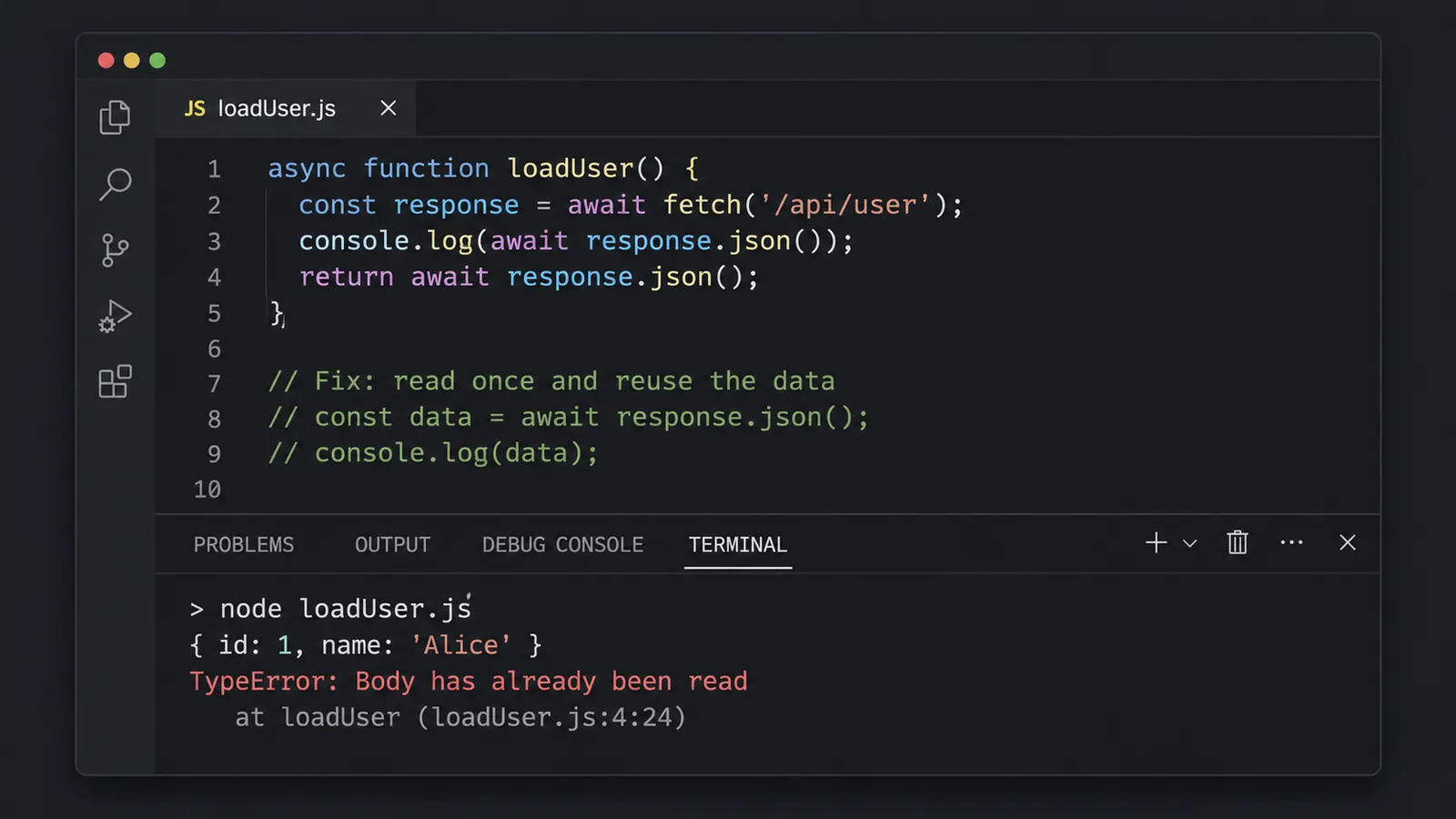
async function loadUser() {
  const response = await fetch("/api/user");

  console.log(await response.json());

  return await response.json();
}
The intention is ordinary enough. Read the response, print its contents for debugging, and return the data to the rest of the application.
But there is a problem hidden in those two calls.
The first response.json() consumes the response body. By the time the second call executes, that body has already been read.
JavaScript still has the response object, of course. Its status, headers, and other metadata remain accessible. What is no longer available for another read is the original body stream.
That distinction explains the error. It also raises another question: why does response.json() behave this way in the first place?
The JSON is not stored as a reusable object
It is easy to imagine a Fetch response as an object containing several ordinary properties.
Perhaps something like this:
{
  status: 200,
  headers: {...},
  data: {...}
}
With such an object, retrieving data twice would be unremarkable.
However, the Fetch API does not work quite like that.
When fetch() resolves, it provides a Response object representing an HTTP response. The body is exposed through a ReadableStream, provided the response has a body.
This stream allows data to be received and processed as it becomes available.
The complete response does not necessarily need to arrive before fetch() resolves. Once the response headers are available, the body may still be arriving over the network.
Consider a large JSON document. It could contain hundreds of thousands of records.
If every response had to be stored in memory as a complete JavaScript value before the application could interact with it, handling large responses would become unnecessarily restrictive.
A stream offers more flexibility.
An application can consume the body using methods such as:
response.json()
response.text()
response.blob()
response.arrayBuffer()
Or it can work with response.body directly.
Each of the convenience methods reads the body and converts the received bytes into a particular representation.
For json(), the body is read and its contents are parsed as JSON.
The resulting JavaScript value is returned through a Promise.
But json() does not turn the Response object into a permanently reusable JSON container.
Once the stream has been consumed, another call cannot simply start reading it from the beginning.
That is where the unexpected behavior originates.
Reproducing the problem without an API
We do not actually need a server to demonstrate this behavior.
JavaScript allows us to create a Response object directly:
const response = new Response(
  JSON.stringify({
    id: 42,
    name: "Alice"
  }),
  {
    headers: {
      "Content-Type": "application/json"
    }
  }
);
This creates a response containing a small JSON document.
Now read it:
const data = await response.json();

console.log(data);
The result is:
{ id: 42, name: "Alice" }Everything works.
But attempt to read the response again:
const secondRead = await response.json();And the second operation rejects with a TypeError.
The JSON itself has not changed. Nor does it suddenly become invalid after the first read.
The difference is the state of the response body.
The first call consumed the stream. The second call attempts to consume the same stream again.
The Fetch Standard defines this as an invalid operation.
Different JavaScript runtimes may use different wording for the error, but the underlying restriction is the same.
What about response.bodyUsed?
Fortunately, the Response object exposes a property that helps identify whether its body has already been consumed.
It is called bodyUsed.
Try:
const response = new Response(
  JSON.stringify({ id: 42 })
);

console.log(response.bodyUsed);

const data = await response.json();

console.log(response.bodyUsed);
The expected output is:
false
true
Before reading, the body has not been consumed.
After json() finishes, the property becomes true.
The result gives us a useful way to inspect the response without attempting another read.
For example:
console.log("Body already used:", response.bodyUsed);But there is a limitation to what this property tells us.
A body can be unavailable for reading even when bodyUsed is still false.
To understand that situation, we need to distinguish two states of a stream.
A stream can be locked without being consumed
The Fetch Standard describes a response body as unusable when its stream is either disturbed or locked.
These conditions sound similar, but they describe different situations.
A stream becomes disturbed when it has been read from or canceled.
A stream becomes locked when a reader has acquired exclusive access to it.
Consider this example:
const response = new Response(
  JSON.stringify({ id: 42 })
);

const reader = response.body.getReader();
We have obtained a reader for the response body.
However, we have not read any data yet.
Check the state:
console.log(response.bodyUsed);
console.log(response.body.locked);
The result is:
false
true
Interesting.
bodyUsed is false because the stream has not been disturbed. But locked is true because a reader currently owns access to it.
Now attempt:
await response.json();The operation fails.
Why?
Because json() cannot obtain another reader while the stream is locked by the existing one.
If the reader has not consumed anything, releasing its lock can make the body available again:
reader.releaseLock();

const data = await response.json();
This works in the simple example because the stream was locked but never read.
If data had already been consumed, releasing the lock would not restore those bytes.
That distinction matters during debugging.
Checking only response.bodyUsed can miss a stream that is currently locked.
If a response is unexpectedly unusable, both properties may be relevant:
console.log({
  bodyUsed: response.bodyUsed,
  locked: response.body?.locked
});
The optional chaining accounts for responses that have no body stream.
It is a small diagnostic check, but it can distinguish two problems that otherwise produce similar errors.
The debugging statement that consumes the response
Return to our original example:
async function loadUser() {
  const response = await fetch("/api/user");

  console.log(await response.json());

  return await response.json();
}
The developer wanted to inspect the data before returning it.
That is a perfectly reasonable thing to do, especially when an API behaves unexpectedly.
But the debugging statement is doing more than printing information.
It reads the entire response.
The second call then fails because there is nothing left to read from that stream.
The simplest correction is to store the parsed result:
async function loadUser() {
  const response = await fetch("/api/user");

  const data = await response.json();

  console.log(data);

  return data;
}
Now the response body is consumed only once.
The parsed value is an ordinary JavaScript object, which can be used repeatedly.
You can inspect its properties, pass it to another function, or return it from the current function.
For example:
const data = await response.json();

console.log(data.name);
console.log(data.id);

processUser(data);
None of these operations needs to read the response stream again.
The original bytes were already converted into a JavaScript value.
This is generally the most appropriate solution when several parts of the same function need access to the parsed data.
There is little reason to read the body repeatedly if we only want to use the same result more than once.
What if we need the original response text?
Sometimes logging the parsed object is insufficient.
Perhaps an API sends malformed JSON, and we want to inspect exactly what arrived.
That becomes difficult if response.json() immediately attempts to parse the contents.
Consider:
const response = await fetch("/api/data");

const data = await response.json();
If the server returns malformed JSON, the parsing operation rejects.
A developer may then attempt:
const raw = await response.text();But that fails too.
Even though JSON parsing was unsuccessful, the response body was already consumed while attempting to parse it.
The original stream is not restored merely because the resulting data could not be decoded as JSON.
We need to choose how to inspect the response before consuming it.
One approach is to read the body as text and parse the resulting string ourselves.
const response = await fetch("/api/data");

const raw = await response.text();

console.log("Raw response:", raw);

const data = JSON.parse(raw);
Here, response.text() consumes the stream once.
The returned string is then available for both logging and parsing.
Calling JSON.parse(raw) does not consume another stream. It operates on an ordinary JavaScript string.
If parsing fails, the raw text is still available for inspection.
This is useful when investigating an API that occasionally returns unexpected content.
For example, a server might return an HTML error page instead of JSON.
Attempting to parse that page with response.json() could produce a SyntaxError, while reading it as text allows us to examine the actual response.
There is a trade-off, though.
Both response.text() and response.json() read the complete body into a representation suitable for their operation. Reading the raw text and then parsing it also means holding the text and potentially the parsed data in memory.
For ordinary API responses, this is often acceptable.
For very large responses, the additional memory usage may be undesirable.
And if the response contains sensitive information, printing the complete body to a production log can introduce a separate security problem.
The fact that we can log the raw data does not necessarily mean we should.
Reading the response twice with clone()
But suppose we genuinely need two separate consumers.
One part of the application expects to call response.json(), while another needs the original text for diagnostics.
We cannot simply consume the body twice.
The Fetch API provides Response.clone() for situations like this.
Consider:
const response = await fetch("/api/data");

const copy = response.clone();

const raw = await copy.text();
const data = await response.json();

console.log(raw);
console.log(data);
The important detail is where clone() is called.
It happens before either response body is consumed.
The clone provides a second Response object with its own readable branch of the underlying body stream.
One branch can be consumed using text(), while the other can be consumed using json().
This allows both operations to obtain the response contents.
It may appear that clone() simply duplicates the entire response in memory at the moment it is called.
But that is not quite how it works.
The underlying stream is split into branches, using behavior associated with ReadableStream.tee().
The branches share the same original source of data.
This means cloning does not normally initiate another HTTP request. It allows the existing response body to be delivered to two consumers.
The distinction becomes important when considering memory usage.
You must clone before reading
Suppose we change the order:
const response = await fetch("/api/data");

const data = await response.json();

const copy = response.clone();
The clone operation throws a TypeError.
The original body has already been consumed.
It is too late to create another usable branch from that response.
The same restriction applies if the body stream is currently locked by another reader.
Consequently, clone() needs to be part of the original handling of the response, not a recovery step attempted after a failed second read.
If the body has already been consumed, the practical options are to reuse whatever data was saved from the first read or obtain another response through a new request when that is appropriate.
Why cloning large responses can become expensive
At first glance, response.clone() seems like an ideal solution.
It allows two reads, requires little code, and avoids making another network request.
Why not use it everywhere?
The answer lies in how the two stream branches are consumed.
Imagine an API returns a very large dataset.
One branch is read quickly, while the other is processed much more slowly.
The underlying stream must supply data to both consumers.
If one branch falls behind, unread data can accumulate in memory.
The MDN documentation specifically warns that the slower branch can accumulate unread data without a limit imposed by backpressure between the branches.
This can become particularly problematic when only one branch is consumed.
For example:
const response = await fetch("/api/large-export");

const copy = response.clone();

const data = await response.json();

// copy is never consumed
The clone is never read.
Yet the original branch is consumed completely.
The mechanism used to split the response can cause the unread data for the clone to be buffered.
For a small JSON response, this may be insignificant.
For a very large response, unnecessary buffering can consume substantial memory.
The same concern applies when both branches are read at very different speeds.
clone() therefore should not be treated as a free way to obtain unlimited independent copies of a response.
If the application merely needs to inspect the parsed JSON and then return it, reading once and reusing the value is simpler.
If two genuinely independent consumers require the original body, cloning may be appropriate, provided that the response size and reading behavior are understood.
There is little benefit in introducing a second stream branch solely to print data that is already available as a parsed object.
When another function consumes the response
The situation becomes less obvious when the same response passes through several functions.
Consider an application that has a helper for handling API errors.
async function logFailedRequest(response) {
  const body = await response.text();

  console.error("Request failed:", body);
}
Elsewhere:
async function loadSettings() {
  const response = await fetch("/api/settings");

  if (!response.ok) {
    await logFailedRequest(response);

    const details = await response.json();

    throw new Error(details.message);
  }

  return response.json();
}
There is only one visible call to response.json() in the error-handling branch.
Yet it still fails.
The reason is in the helper.
logFailedRequest() already consumed the body using response.text().
When control returns to loadSettings(), the body is no longer available.
This can be particularly confusing in applications with several layers of abstraction.
A logging function, response interceptor, debugging utility, or wrapper around fetch() may consume the body before the caller receives it.
The caller sees a Response object and assumes it has not been read.
But its state has already changed.
One solution is to let the function responsible for handling the response read it once and pass the resulting data to other functions.
For example:
async function loadSettings() {
  const response = await fetch("/api/settings");

  const raw = await response.text();

  if (!response.ok) {
    console.error("Request failed:", raw);

    let message = `HTTP ${response.status}`;

    try {
      const details = JSON.parse(raw);

      if (typeof details.message === "string") {
        message = details.message;
      }
    } catch {
      // The error response was not valid JSON.
    }

    throw new Error(message);
  }

  return JSON.parse(raw);
}
This example reads the body once.
It then decides how to interpret the resulting string.
There is no attempt to read the stream again.
However, the code assumes a successful response contains valid JSON. If the server returns an empty successful response, JSON.parse(raw) will still fail.
That brings us to another source of confusion surrounding response.json().
Not every json() error means the body was read twice
The same method can fail for several reasons.
A previously consumed body is only one of them.
Consider a response with a successful HTTP status but no content:
HTTP/1.1 204 No ContentA 204 response is not supposed to contain a response body.
If the application calls:
await response.json();It cannot obtain a JSON value from an empty body.
In a typical Fetch implementation, the parsing attempt rejects with a SyntaxError.
This is different from attempting to consume a disturbed or locked stream.
Another possibility is an API returning invalid JSON:
{"id": 42, "name": Alice}The value Alice is not enclosed in double quotes, so the text is not valid JSON.
Again, response.json() can reject with a SyntaxError.
The body was available for reading, but its contents could not be parsed.
Now compare that with a response that has already been consumed:
await response.text();
await response.json();
The second call fails because the stream is no longer usable.
This normally results in a TypeError.
The distinction is useful during debugging.
A SyntaxError often points toward the contents of the response.
A TypeError can indicate that the body is disturbed or locked, although it can also arise from other problems, such as decoding errors.
MDN documents these error categories separately.
The exact exception message varies between environments, so the message alone should not be treated as a complete diagnosis.
Does Content-Type make a difference?
Suppose the server returns:
Content-Type: application/jsonThat header indicates the intended media type of the response.
It does not guarantee that the body contains valid JSON.
Nor does it make the response body reusable.
Likewise, an HTTP 200 OK status does not mean the body can be read repeatedly.
HTTP status, content type, and stream state describe different aspects of the response.
A useful diagnostic check is:
console.log({
  status: response.status,
  contentType: response.headers.get("content-type"),
  bodyUsed: response.bodyUsed,
  locked: response.body?.locked
});
These properties can be inspected without consuming the body.
They will not reveal every possible parsing problem, but they can help determine whether another part of the application has already interacted with the stream.
One detail remains: bodyUsed is only a diagnostic property.
Checking it before reading does not reserve the body for your function. Another consumer could begin reading the stream afterward.
If several functions share a response, the better solution is to establish which part of the application is responsible for consuming it.
Why the error looks different in Node.js
Developers working with the Fetch API in browsers may encounter errors such as:
TypeError: body stream already readIn Node.js, particularly in environments using Undici, the message may instead resemble:
TypeError: Body is unusableNewer implementations may include a more descriptive explanation that the body has already been read.
Undici is the HTTP client library that provides the implementation behind Node.js’s built-in Fetch API.
Its developers have discussed the ambiguity of the original Body is unusable message, since it does not tell the developer exactly what made the body unavailable.
The Fetch Standard specifies the conditions under which consuming a body must reject with a TypeError. It does not require every runtime to use identical wording.
Consequently, searching for only one error message may give the impression that browser Fetch and Node.js Fetch behave differently.
In this case, they share the same fundamental single-consumption rule.
The error message is an implementation detail.
What matters is whether the stream has already been disturbed or is currently locked.
What if we fetch the URL again?
There is another possible approach.
Instead of cloning the response, we could make two separate requests:
const first = await fetch("/api/data");
const second = await fetch("/api/data");

const raw = await first.text();
const data = await second.json();
Each request produces its own response.
Therefore, reading the body of one response does not consume the body of the other.
But this introduces a different set of concerns.
The server receives two requests rather than one, subject to any applicable caching behavior.
The data could change between requests.
If the endpoint is expensive, rate-limited, or depends on changing application state, repeating the request may be undesirable.
And for operations that modify data, blindly repeating a request can have more serious consequences.
For example, making another purchase request merely to read its response again would be an obvious mistake.
Even for a simple GET endpoint, making a second request solely because the first response was already consumed is usually unnecessary.
If the goal is to reuse parsed information, save the result of the first read.
If the goal is to inspect raw data, choose an appropriate logging strategy before consuming the body.
If two consumers genuinely need the stream, consider cloning it before reading, while accounting for the buffering behavior.
The appropriate solution depends on why the second read was needed in the first place.
A simple rule for response handling
A useful convention is to give one part of the application responsibility for consuming each response body.
For example, a small API helper might look like this:
async function fetchJson(url, options) {
  const response = await fetch(url, options);

  if (!response.ok) {
    throw new Error(
      `Request failed with HTTP ${response.status}`
    );
  }

  return response.json();
}
The helper returns the parsed result rather than the original Response.
Its callers receive ordinary JavaScript data.
const user = await fetchJson("/api/user");

console.log(user);
renderUser(user);
No other function needs to guess whether the response body has already been consumed.
This approach is suitable when callers only need the parsed JSON.
If they also need headers or status information, the helper can return those alongside the parsed data:
async function fetchJson(url, options) {
  const response = await fetch(url, options);

  if (!response.ok) {
    throw new Error(`HTTP ${response.status}`);
  }

  const data = await response.json();

  return {
    data,
    status: response.status,
    headers: response.headers
  };
}
The response body is still read only once.
There is one limitation in these simplified helpers: they expect successful responses to contain valid JSON. An API that legitimately returns 204 No Content, or another response without a JSON body, requires explicit handling.
The point is not to make every API wrapper identical.
It is to decide where the body is consumed and avoid accidentally spreading that responsibility across unrelated functions.
The response still exists, but its body has changed state
Return once more to the original code:
const response = await fetch("/api/user");

console.log(await response.json());

return await response.json();
The second call looks harmless because it uses the same method on the same object.
But that is exactly why it fails.
The Response object is still present, although the stream it represents has already been consumed.
Calling json() again does not retrieve the object produced by the previous call. It attempts another body read.
Once that distinction is understood, the error becomes much less mysterious.
response.bodyUsed can help reveal whether the stream has been disturbed. response.body.locked can expose an active reader. Response.clone() can provide another branch when called before consumption, though it introduces buffering considerations.
And for ordinary API handling, the simplest solution is usually already available:
const data = await response.json();Keep the returned value and use it wherever it is needed.
The response body only has to be consumed once. The resulting JavaScript data does not share that restriction.