Programming
structuredClone Throws DataCloneError: Which JavaScript Values Cannot Be Copied?
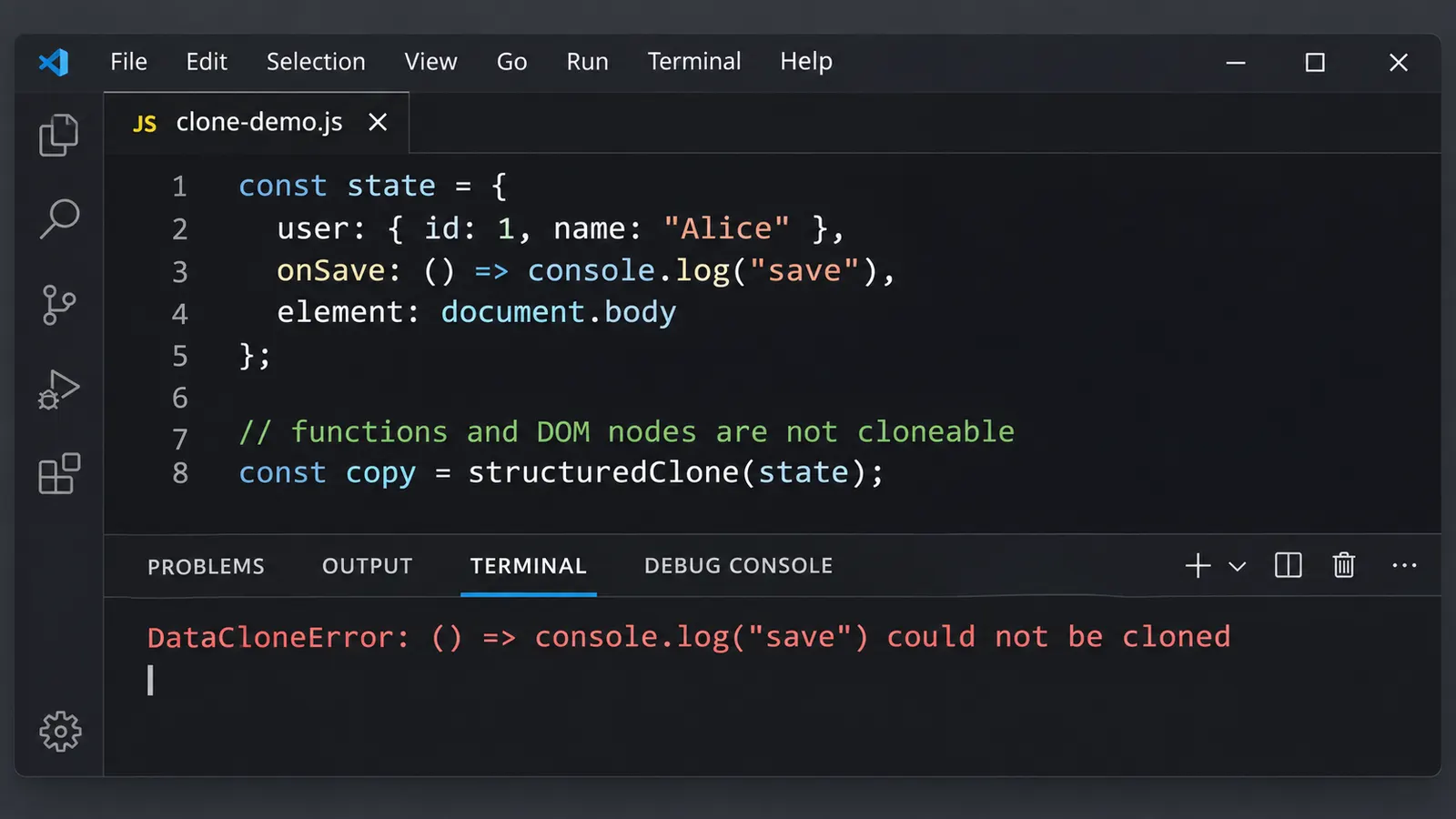
An object can look completely ordinary and still fail when passed to structuredClone(). A function, DOM element, or Proxy hidden several levels deep may be enough to stop the entire copy.
You have an object containing application data. It has an ID, several settings, a few nested objects, and nothing that appears particularly unusual.
You want to copy it without sharing references to the original, so you use:
const copy = structuredClone(data);Instead of receiving a copy, JavaScript throws:
DOMException [DataCloneError]:
... could not be cloned.
Perhaps the object was returned by a library. Perhaps it came from a state manager, or was assembled from several smaller objects. Either way, the error does not immediately explain which part of the data caused it.
You inspect the object in DevTools. The values look ordinary.
Strings, numbers, arrays, some nested properties. Everything appears to be there.
So what exactly cannot be cloned?
The answer is usually somewhere inside the object. structuredClone() can copy many JavaScript values, including types that JSON serialization handles poorly. But it cannot copy every possible value.
And if even one unsupported value is encountered while traversing the data, the entire operation can fail.
A small function hidden inside an ordinary object
Consider this object:
const settings = {
  theme: "dark",
  language: "en",
  notifications: {
    enabled: true,
    volume: 70
  }
};
Cloning it works:
const copy = structuredClone(settings);

copy.notifications.volume = 20;

console.log(settings.notifications.volume); // 70
console.log(copy.notifications.volume);     // 20
The original nested object remains unchanged.
That is the behavior we usually expect from a deep copy. Unlike a shallow spread operation, structuredClone() recursively copies supported nested values.
Now modify the object slightly:
const settings = {
  theme: "dark",
  language: "en",
  notifications: {
    enabled: true,
    volume: 70
  },
  reset() {
    console.log("Resetting settings");
  }
};
Try again:
const copy = structuredClone(settings);This time, the operation throws DataCloneError.
The problem is the reset method.
A method defined this way is a function stored in an object property. And functions are not supported by the structured clone algorithm.
The surrounding data is perfectly valid. The strings can be copied, and so can the nested notification settings.
But the function cannot.
The algorithm does not simply skip that property and continue. It encounters an unsupported value and fails the cloning operation.
This explains why the error can appear unexpectedly in larger applications.
A data object may contain dozens of perfectly cloneable properties, yet a single callback buried several levels deep is enough to prevent the entire copy.
Why doesn’t structuredClone copy functions?
A function is a JavaScript value, so the restriction might seem strange at first.
After all, functions can be stored in objects, passed as arguments, and returned from other functions.
Why should copying them be different?
Consider a closure:
function createCounter() {
  let count = 0;

  return function increment() {
    count++;
    return count;
  };
}

const counter = createCounter();
The returned function has access to count, even though the outer function has already finished executing.
That variable belongs to the function’s lexical environment.
Now imagine trying to create a deep copy of counter.
What should happen to count?
Should the copy share the original variable? Should it receive a separate variable initialized with the current value? How would that work for closures referencing DOM elements, network connections, or other mutable objects?
Copying the function’s source code would not be sufficient to reconstruct its captured environment.
And treating the function as a shared reference would contradict the expectation of creating an independent deep copy.
The structured clone algorithm does not attempt to solve these questions. It rejects function objects.
This includes arrow functions, ordinary functions, and methods stored as properties.
For example:
structuredClone(() => 42);Throws DataCloneError.
So does:
structuredClone({
  user: {
    id: 1,
    actions: {
      save: () => console.log("Saved")
    }
  }
});
The nesting makes no difference.
Once the algorithm reaches the function, it cannot complete the copy.
Why DOM elements cannot be cloned this way
Functions are a common cause, but DOM elements can produce the same error.
Suppose a form handler stores information about an input:
const input = document.querySelector("#username");

const formState = {
  username: input.value,
  inputElement: input
};
The object contains a string and a reference to a DOM element.
Now attempt:
const copy = structuredClone(formState);The operation throws DataCloneError.
The reason is the inputElement property.
A DOM element is not an ordinary data object. It belongs to a document and participates in the browser’s DOM tree.
It has relationships with parent and child nodes, browser-managed state, event handling, and other behavior that cannot be represented as an ordinary structured data copy.
There is a separate DOM method for copying nodes:
const copiedInput = input.cloneNode(true);But this performs a DOM-specific operation, not a structured clone.
For instance, event listeners registered using addEventListener() are not automatically copied by cloneNode().
The two APIs solve different problems.
If the goal is to copy form data, there is usually no reason to include the DOM element itself.
Instead, extract the relevant values:
const formData = {
  username: input.value,
  disabled: input.disabled,
  placeholder: input.placeholder
};

const copy = structuredClone(formData);
Now the object contains ordinary data rather than browser objects.
This distinction is useful when designing application state.
A DOM element may be necessary for focusing an input or measuring its dimensions, but it rarely belongs inside a serializable data snapshot.
The less obvious cases: Proxy, Promise, and WeakMap
Some unsupported values are more difficult to recognize than a function or DOM element.
Consider a Proxy:
const user = new Proxy(
  { id: 1, name: "Alice" },
  {}
);
The proxy has an ordinary object as its target.
It even appears to contain the same properties.
But this fails:
structuredClone(user);A Proxy is a special object capable of intercepting operations such as property access, assignment, and enumeration.
The structured clone algorithm does not treat it as though it were simply its underlying target.
The proxy itself is not cloneable.
This becomes particularly relevant when working with reactive state libraries that expose proxied objects.
The data may appear to be a plain object in DevTools, but the value passed to structuredClone() is still a Proxy.
In such situations, the appropriate solution is generally to obtain a supported plain-data snapshot using the state library’s documented API.
Do not assume that repeatedly spreading the object or applying JSON.stringify() will preserve everything important.
Other unsupported values include WeakMap, WeakSet, and Promise objects.
For example:
structuredClone(new WeakMap());
structuredClone(new WeakSet());
structuredClone(Promise.resolve(42));
Each of these fails.
A Promise represents an asynchronous operation and its eventual result. If you need to clone the resolved data, wait for the promise first:
const result = await Promise.resolve({
  id: 42,
  name: "Alice"
});

const copy = structuredClone(result);
This works because the resolved value is an ordinary object containing supported properties.
For weak collections, the situation is different.
A WeakMap or WeakSet does not expose its entries for normal enumeration. Such collections are designed around weak references and particular garbage-collection behavior.
They cannot be copied as ordinary data collections.
If the application needs a cloneable collection of entries, a regular Map or Set may be more appropriate, provided weak-reference semantics are not required.
What about Symbols?
Symbols introduce a particularly subtle distinction.
A Symbol value cannot be cloned.
For example:
const id = Symbol("user");

structuredClone(id);
Throws DataCloneError.
The same happens when a Symbol is stored as an ordinary property value:
const user = {
  id: Symbol("user"),
  name: "Alice"
};

structuredClone(user);
The object contains an unsupported value.
However, using a Symbol as a property key produces different behavior.
Consider:
const secret = Symbol("secret");

const user = {
  name: "Alice",
  [secret]: "internal"
};

const copy = structuredClone(user);
The operation can succeed, but the symbol-keyed property is not preserved in the cloned plain object.
Check:
console.log(copy.name); // "Alice"

console.log(
  Object.getOwnPropertySymbols(copy)
); // []
So we have two different outcomes.
A Symbol stored as a value causes the cloning operation to fail. A property identified by a Symbol key is not included in the ordinary object’s cloned properties.
This is why a successful structuredClone() call does not necessarily mean that every property or piece of metadata survived.
The algorithm has specific rules about which properties are serialized.
What structuredClone can copy successfully
After seeing several failures, it may seem as though structuredClone() only supports plain objects and arrays.
But its supported types are considerably broader.
For example:
const original = {
  createdAt: new Date("2026-11-17T12:00:00Z"),
  tags: new Set(["javascript", "debugging"]),
  permissions: new Map([
    ["read", true],
    ["write", false]
  ]),
  pattern: /user-\d+/g,
  count: 9007199254740993n
};

const copy = structuredClone(original);
This works in modern environments supporting the structured clone API.
The cloned values retain their supported built-in types.
For example:
console.log(copy.createdAt instanceof Date);
// true

console.log(copy.tags instanceof Set);
// true

console.log(copy.permissions instanceof Map);
// true

console.log(copy.pattern instanceof RegExp);
// true

console.log(typeof copy.count);
// "bigint"
The algorithm also supports ArrayBuffer, typed arrays, and several browser-specific types such as Blob and File, where those APIs are available.
Native error objects are supported as well, although the details preserved for different error subclasses and their additional properties can vary.
The existence of all these supported types explains why structuredClone() is often more suitable for JavaScript data than a JSON-based copying technique.
But support for a type does not mean every characteristic of the original object is reproduced.
For example, RegExp objects can be cloned, yet their lastIndex property is not preserved.
const pattern = /hello/g;

pattern.lastIndex = 4;

const copy = structuredClone(pattern);

console.log(copy.lastIndex); // 0
The regular expression itself survives.
Its current matching position does not.
This is one of several cases where cloning succeeds but the result is not an exact reproduction of all the original object’s internal or observable state.
An instance of a class may lose its identity
Consider a custom class:
class User {
  constructor(name) {
    this.name = name;
  }

  greet() {
    return `Hello, ${this.name}`;
  }
}
Create an instance:
const original = new User("Alice");

console.log(original.greet());
// "Hello, Alice"
Now clone it:
const copy = structuredClone(original);The cloning operation can succeed.
But try:
console.log(copy instanceof User);
// false
And:
copy.greet();This throws a TypeError because greet is not available on the cloned result.
Why?
The name property was stored directly on the instance. It can be copied as ordinary data.
The greet method, however, is defined on User.prototype.
The structured clone algorithm does not preserve the custom prototype chain of an ordinary class instance.
Consequently, the cloned result behaves like a plain object containing the serialized instance data rather than a new fully functioning User instance.
That is a different problem from the earlier example in which a function was stored directly as an object property.
In that case, cloning failed.
Here, the prototype method is not serialized, so cloning can succeed while the method disappears.
If the application needs a real class instance, it may have to reconstruct one:
const data = structuredClone(original);

const restored = new User(data.name);

console.log(restored instanceof User);
// true
For more complicated classes, reconstruction might require a factory, custom deserialization logic, or explicit restoration of invariants.
Private fields are another consideration.
JavaScript class private elements are not duplicated by structured cloning. A clone of the publicly stored data does not recreate the original class’s private state.
This makes structuredClone() unsuitable as a universal replacement for object construction.
It copies supported data. It does not promise to reproduce arbitrary application objects with all their behavior.
The clone succeeds, but property descriptors change
There is another less visible difference.
Suppose an object contains a read-only property:
const original = {};

Object.defineProperty(original, "id", {
  value: 42,
  writable: false,
  enumerable: true,
  configurable: false
});
Attempting to change original.id cannot modify its value.
Now clone it:
const copy = structuredClone(original);The cloned object contains the same property value:
console.log(copy.id); // 42But the property descriptor is not preserved.
Check:
console.log(
  Object.getOwnPropertyDescriptor(copy, "id")
);
The cloned property is an ordinary writable, enumerable, configurable data property.
The value survived, while the restrictions attached to the original property did not.
Getters and setters have similar limitations.
Consider:
const original = {
  firstName: "Alice",
  lastName: "Smith",

  get fullName() {
    return `${this.firstName} ${this.lastName}`;
  }
};
When the object is cloned, the getter can be evaluated and its returned value serialized.
The result contains ordinary data:
const copy = structuredClone(original);

console.log(copy.fullName);
// "Alice Smith"
But fullName is no longer backed by the original getter.
If you change copy.firstName, the stored fullName value will not automatically update.
And because getters execute code, they introduce another possible complication: a getter may throw its own exception or return an unsupported value.
For example, a getter returning a function can lead to DataCloneError.
This is another reason not to assume that cloning an unfamiliar object is completely free of observable effects.
Why circular references work
One of the strengths of structuredClone() is its ability to handle circular references.
Consider:
const user = {
  id: 1,
  name: "Alice"
};

user.self = user;
The object refers to itself.
A naive recursive copying function might continue following that reference indefinitely.
But structuredClone() keeps track of previously visited objects.
const copy = structuredClone(user);The operation succeeds.
And the circular relationship is preserved:
console.log(copy.self === copy);
// true

console.log(copy.self === user);
// false
The new object refers to itself, not to the original object.
The same mechanism can preserve shared references within a copied object graph.
For example:
const address = { city: "Prague" };

const original = {
  billingAddress: address,
  shippingAddress: address
};

const copy = structuredClone(original);
Both copied properties refer to the same cloned address object:
console.log(
  copy.billingAddress === copy.shippingAddress
);
// true
But that address is separate from the original:
console.log(copy.billingAddress === address);
// false
This is more subtle than simply copying nested values.
The algorithm preserves relationships between supported objects while constructing a new object graph.
However, the presence of a circular reference does not make otherwise unsupported values cloneable.
A circular object containing a function will still fail.
Comparing structuredClone with JSON.stringify and JSON.parse
Before structuredClone() became widely available, a common deep-copy technique was:
const copy = JSON.parse(JSON.stringify(original));For simple data structures, this can work.
But it is based on converting JavaScript values into JSON and then parsing the result.
JSON supports a narrower set of values than JavaScript.
This difference becomes apparent when we compare several cases.
Functions disappear instead of throwing
Consider:
const original = {
  name: "Alice",
  save() {
    console.log("Saved");
  }
};
With structuredClone():
structuredClone(original);The operation throws DataCloneError.
With JSON serialization:
const copy = JSON.parse(
  JSON.stringify(original)
);
The operation succeeds.
But the save method disappears.
The result resembles:
{
  name: "Alice"
}
The JSON approach did not solve the problem of copying the function.
It silently removed the unsupported value.
That distinction matters.
If an application expects every property to be preserved, a successful JSON conversion can be misleading.
For array elements, unsupported values such as functions and undefined are generally converted to null rather than omitted.
So the behavior depends on where the value appears.
Dates become strings
Consider:
const original = {
  createdAt: new Date("2026-11-17T12:00:00Z")
};
With structured cloning:
const copy = structuredClone(original);

console.log(copy.createdAt instanceof Date);
// true
With the JSON approach:
const copy = JSON.parse(
  JSON.stringify(original)
);

console.log(copy.createdAt instanceof Date);
// false
The result contains a string representing the date.
That might be exactly what we want when preparing data for an API.
But it is not equivalent to preserving a Date object.
Maps and Sets lose their structure
Consider:
const original = {
  tags: new Set(["react", "typescript"]),
  settings: new Map([
    ["theme", "dark"]
  ])
};
structuredClone() preserves the built-in collection types.
The ordinary JSON round-trip, without custom serialization, produces something resembling:
{
  tags: {},
  settings: {}
}
The collection contents are not represented as expected.
If JSON output is required, we need to decide explicitly how these types should be represented.
For example, a Set might become an array, while a Map might become an array of entries.
BigInt behaves differently
structuredClone() supports BigInt values:
const original = {
  amount: 9007199254740993n
};

const copy = structuredClone(original);
But ordinary JSON serialization cannot directly represent a BigInt.
JSON.stringify(original);Throws a TypeError, unless a suitable custom conversion mechanism has been provided.
Circular references are another difference
The earlier circular object can be cloned using structuredClone().
But:
JSON.stringify(user);Throws because ordinary JSON serialization does not support circular object references.
These differences show why neither method is interchangeable with the other.
JSON serialization is useful when the required result is JSON-compatible data.
Structured cloning supports a broader range of JavaScript values and preserves object-graph relationships, but rejects values that the algorithm cannot serialize.
And neither method can reproduce arbitrary JavaScript objects with every custom behavior intact.
How to find the property causing DataCloneError
Now suppose the object is much larger.
It contains user settings, cached results, several arrays, and data collected from different parts of an application.
A call to structuredClone() fails, but the error message only identifies an unsupported value, not its complete location.
Where should you begin?
Start by examining how the object was constructed.
Functions stored as callbacks, DOM references, reactive proxies, promises, and weak collections are reasonable suspects.
For example:
const applicationState = {
  user: {
    id: 1,
    name: "Alice"
  },
  preferences: {
    theme: "dark",
    language: "en"
  },
  dialog: {
    open: false,
    onClose: () => {}
  }
};
Cloning the entire object fails:
structuredClone(applicationState);Instead of immediately modifying the object, test its major sections independently:
structuredClone(applicationState.user);
structuredClone(applicationState.preferences);
structuredClone(applicationState.dialog);
The first two succeed.
The third fails.
We now know that the unsupported value lies somewhere inside dialog.
Inspecting that smaller object reveals onClose, a function.
This approach is often more useful than searching a large serialized representation of the object, particularly because JSON serialization may omit the very value responsible for the cloning error.
For a larger structure, the same process can be repeated on smaller sections until the offending property is located.
However, cloning arbitrary objects during diagnosis is not always entirely passive.
Accessors may execute when properties are read, and certain custom objects may throw exceptions during inspection.
For application data that includes getters or other special behavior, account for those effects before repeatedly cloning sections.
Also remember that the error may originate inside a Map or Set.
For example:
const handlers = new Map([
  ["save", () => console.log("Saved")]
]);

structuredClone(handlers);
The Map type itself is supported.
Its function value is not.
The failure comes from the collection’s contents rather than from the collection type.
Why removing unsupported properties requires some care
Once the problematic property has been found, a tempting solution is to delete it.
For example:
delete applicationState.dialog.onClose;Then retry the clone.
That may work, but it also mutates the original application state.
If other code expects that callback to remain available, the fix can introduce another problem.
Instead, construct a data-only representation.
const snapshot = {
  user: applicationState.user,
  preferences: applicationState.preferences,
  dialog: {
    open: applicationState.dialog.open
  }
};

const copy = structuredClone(snapshot);
Now the copied structure contains only the fields relevant to the snapshot.
The original callback remains untouched.
This is particularly useful when preparing data for persistence, transferring data to a worker, or creating a temporary editable copy.
It also makes the purpose of the object clearer.
If the snapshot is supposed to represent the application’s state, why would it need a function that closes a dialog?
That function belongs to the application’s behavior. The Boolean indicating whether the dialog is open belongs to its data.
Separating the two can simplify both cloning and serialization.
Of course, not every application can use such a simple separation.
Some objects have complex invariants or custom internal state. Those may require dedicated conversion methods rather than a generic deep-copy operation.
The transfer option does something different
There is another capability of structuredClone() that deserves attention.
The method can transfer certain resources instead of duplicating them.
Consider an ArrayBuffer:
const buffer = new ArrayBuffer(1024);

const copy = structuredClone(
  { buffer },
  {
    transfer: [buffer]
  }
);
The buffer’s data is transferred to the new object.
The original buffer becomes detached.
Check:
console.log(buffer.byteLength);
// 0

console.log(copy.buffer.byteLength);
// 1024
This can be useful when moving binary data between parts of an application or working with workers.
But transfer is not a way to make unsupported values cloneable.
You cannot solve the function problem by placing the function in a transfer list.
Only supported transferable resources can be transferred.
And transferring has consequences: the original resource may become unusable after the operation.
If the application still needs access to the original buffer, an ordinary clone may be more appropriate.
The correct choice depends on whether the resource should be duplicated or ownership should move.
When structuredClone is the wrong tool
Suppose you are copying configuration data containing strings, numbers, arrays, maps, and dates.
structuredClone() may be a good fit.
But now imagine copying an object representing a running application component.
It contains callback functions, references to DOM elements, and a reactive proxy.
Those values are not merely data. They participate in the application’s behavior.
A generic structured clone cannot reproduce that behavior.
Even if we remove the unsupported values until the operation succeeds, the result may no longer represent a functioning instance of the original object.
There are cases where a shallow copy is sufficient:
const copy = { ...original };There are cases where an explicit data transformation is preferable:
const copy = {
  id: original.id,
  name: original.name,
  settings: structuredClone(original.settings)
};
And there are cases where the correct solution is to construct a new instance through the class’s public API rather than trying to clone its internals.
The method should follow the purpose of the copy.
If you need independent application data, structured cloning can be useful.
If you need to serialize information for storage or network transfer, JSON or another serialization format may be more appropriate.
If you need another object with the same methods, private state, and behavior, you may need dedicated reconstruction logic.
Trying to force every object through a single cloning mechanism usually creates more problems than it solves.
The object looks ordinary because its unsupported parts are hidden
Return to the original error.
An application passes an object to structuredClone(). DevTools displays several properties, nested arrays, and values that appear completely normal.
Yet the operation fails.
The reason may be a callback nested in an otherwise ordinary settings object. It may be a DOM reference retained by a component, or a Proxy returned by a state-management library.
Sometimes the clone succeeds, and the surprise comes later when an instance method disappears or a read-only property becomes writable.
These situations have the same underlying explanation.
structuredClone() follows a defined serialization algorithm. It knows how to copy supported data structures, preserve circular references, and reconstruct several built-in types.
But it does not duplicate arbitrary JavaScript behavior.
That distinction becomes much easier to understand when we stop thinking of every object as a collection of interchangeable properties.
A string stored in an object can be copied.
A function stored beside it cannot.
A custom class may contain cloneable data, but its prototype methods are not automatically reconstructed.
A Map can be cloned, yet an unsupported value inside one of its entries can still cause the operation to fail.
So when DataCloneError appears, the most useful question is not whether the object itself looks valid.
It is which values the object contains, and whether those values belong to the set of data structures that the structured clone algorithm knows how to reproduce.
Once the unsupported part is identified, the appropriate solution usually becomes clearer: exclude behavior from the snapshot, use the relevant type’s own copying mechanism, or reconstruct the object deliberately.
A deep copy can preserve data without preserving every aspect of the original object.
And knowing where that boundary lies is what makes structuredClone() predictable.