Programming
TypeScript Says an Array Element May Be Undefined Even After Checking Its Length
An array passes a length check, yet TypeScript still treats its first element as possibly undefined. The explanation lies in the difference between an array's length, its actual elements, and the guarantees its type provides.
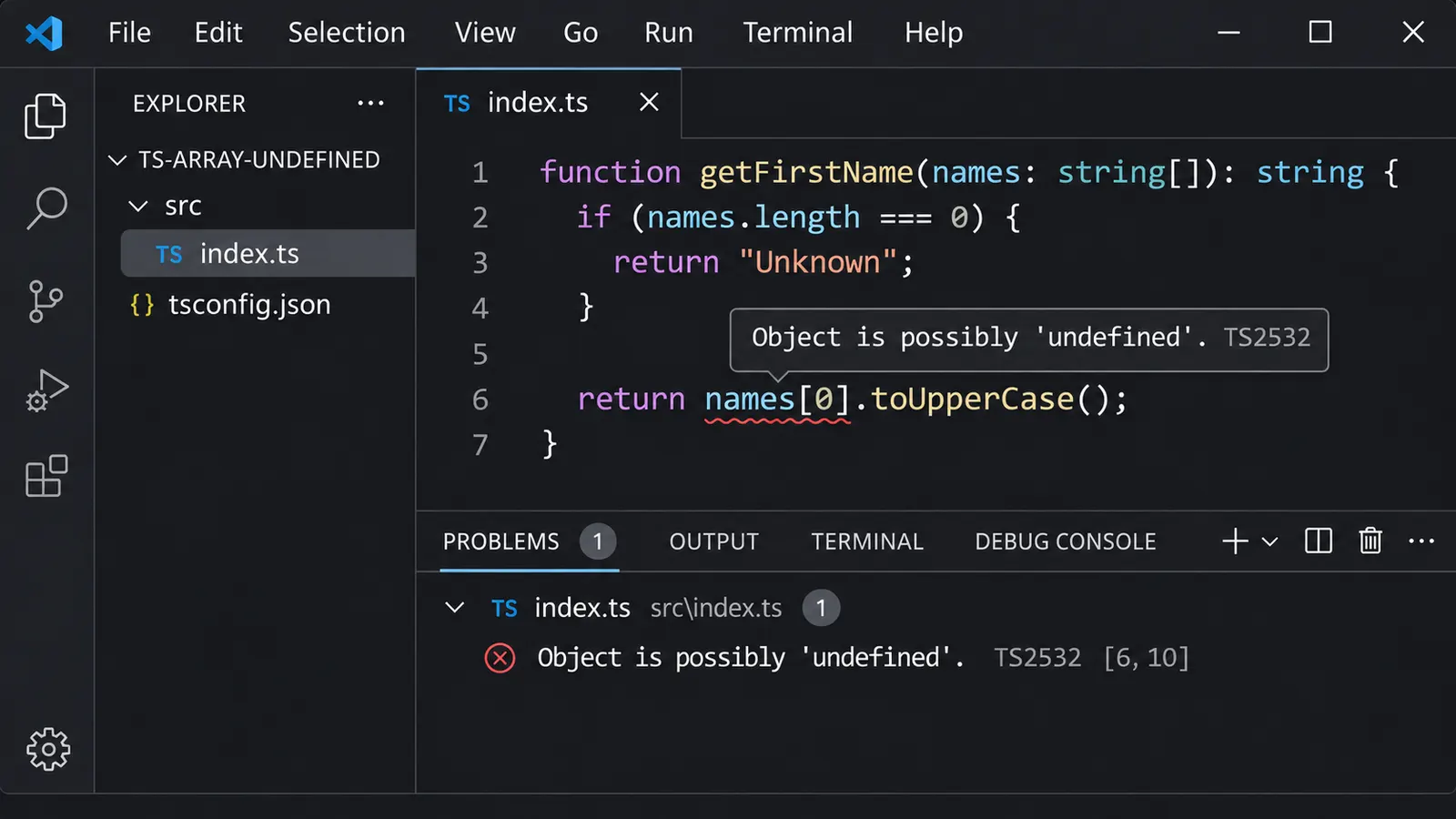
You have an array of strings. Before accessing its first element, you check whether the array is empty.
The condition passes, so the element should exist.
At least, that seems to be the obvious conclusion.
function getFirstName(names: string[]): string {
  if (names.length === 0) {
    return "Unknown";
  }

  return names[0].toUpperCase();
}
Yet TypeScript underlines names[0] and reports:
TS2532: Object is possibly 'undefined'.The error seems unreasonable. We already checked the length, and the function returns immediately when the array is empty.
What else does TypeScript expect us to verify?
Perhaps the compiler failed to understand the condition. Or maybe names.length is not being narrowed correctly.
But neither explanation quite describes what is happening.
The problem comes from an assumption that JavaScript developers make frequently: if an array has a positive length, an element must exist at a particular index.
That assumption is usually true for ordinary, densely populated arrays. However, JavaScript does not guarantee it in every situation.
And with noUncheckedIndexedAccess enabled, TypeScript deliberately refuses to treat an indexed array access as proof that a value exists.
The setting that changes how array indexing works
Consider an ordinary TypeScript project with this configuration:
{
  "compilerOptions": {
    "target": "ES2022",
    "strict": true,
    "noUncheckedIndexedAccess": true
  }
}
The relevant option is:
"noUncheckedIndexedAccess": trueTypeScript introduced this compiler option in version 4.1.
It changes how the compiler handles indexed access to arrays and objects with index signatures.
Normally, TypeScript may allow code like this:
const names: string[] = ["Alice", "Daniel"];

const first: string = names[0];
The variable first is treated as a string.
But what if we access an index that does not exist?
const name = names[100];

console.log(name);
At runtime, the result is:
undefinedWithout noUncheckedIndexedAccess, TypeScript may still infer the indexed value as string.
The declared array type tells the compiler what kind of values the array contains, but does not guarantee that every possible numeric index is populated.
With the option enabled, TypeScript changes the inferred type:
const names: string[] = ["Alice", "Daniel"];

const first = names[0];
// string | undefined

const missing = names[100];
// string | undefined
Both expressions receive the same broader type.
This may initially seem excessive. The first index is obviously valid in the example, while the second is clearly outside the array’s bounds.
However, the compiler is reasoning from the array’s declared type, string[], rather than treating its initial contents as a permanent guarantee.
An ordinary array can change after creation.
It may become empty, gain elements, lose elements, or contain missing positions.
The compiler therefore includes undefined as a possible result of indexed access.
One additional detail: noUncheckedIndexedAccess is not automatically enabled by "strict": true. It must be configured separately.
This explains why identical code can compile in one project and produce errors in another.
But shouldn’t checking length solve that?
Return to the original function:
function getFirstName(names: string[]): string {
  if (names.length === 0) {
    return "Unknown";
  }

  return names[0].toUpperCase();
}
We know that execution reaches the last line only when the array’s length is greater than zero.
So why does TypeScript still consider names[0] possibly undefined?
To understand that decision, consider an array whose length is not equal to the number of populated positions.
JavaScript supports sparse arrays.
For example:
const names = new Array<string>(3);

console.log(names.length);
// 3

console.log(names[0]);
// undefined
The array has a length of three.
Yet none of its positions contains an actual string.
This is not a TypeScript-specific behavior. It comes from JavaScript itself.
The Array constructor created an array with three empty slots.
Now examine the following condition:
if (names.length > 0) {
  console.log(names[0].toUpperCase());
}
The length check passes.
But names[0] evaluates to undefined, and calling toUpperCase() throws a runtime error.
The length check told us something about the array’s length.
It did not prove that the requested position contains a value.
Sparse arrays are not the only reason to distinguish these concepts. An array can also be modified between operations, and an externally supplied index may be negative, fractional, or otherwise invalid.
Of course, TypeScript is not performing a detailed analysis of all possible mutations every time an array element is accessed.
Its rule is more general: with noUncheckedIndexedAccess, indexed access to an ordinary array includes the possibility of undefined.
Even a familiar length check does not automatically turn that array into a type with a guaranteed first element.
That distinction is what produces the warning.
Check the value you actually retrieved
The most straightforward solution is to read the element and check it.
function getFirstName(names: string[]): string {
  const first = names[0];

  if (first === undefined) {
    return "Unknown";
  }

  return first.toUpperCase();
}
TypeScript accepts this.
The difference may appear small, but the two functions express different guarantees.
The original checked the array’s length.
The corrected version checks the value that will actually be used.
When execution reaches:
return first.toUpperCase();TypeScript knows that first cannot be undefined under the function’s declared types and the preceding condition.
The variable has been narrowed from:
string | undefinedto:
stringThis is an example of TypeScript’s control-flow narrowing.
The compiler uses conditions and the paths through which execution can reach a particular statement to refine its understanding of a value.
We can see the same behavior with an explicit exception:
function requireFirstName(names: string[]): string {
  const first = names[0];

  if (first === undefined) {
    throw new Error("Expected at least one name");
  }

  return first.toUpperCase();
}
The function does not need to return a fallback value.
It establishes that proceeding without a first element is invalid.
Once the exception branch is excluded, first has the type string.
There is a subtle advantage to storing the indexed value in a local constant.
The condition and the later operation refer to the same retrieved value.
Modern TypeScript can also narrow certain directly checked indexed expressions. For example, checking names[0] !== undefined before using names[0] can work. But retaining the value in a local constant makes the relationship explicit and avoids repeated lookup.
It also makes the code easier to modify without accidentally introducing another access that has not been checked.
Why checking an index is not always enough
Now consider a function that receives an index from its caller.
function getName(
  names: string[],
  index: number
): string {
  if (index < 0 || index >= names.length) {
    return "Unknown";
  }

  return names[index].toUpperCase();
}
The bounds check looks reasonable.
An index below zero is rejected, and an index greater than or equal to the array’s length is rejected.
Yet TypeScript still reports that names[index] may be undefined.
This is consistent with the behavior we saw earlier.
An index can fall within the array’s length without referring to a populated element.
There is another concern too: the declared type number includes values that are not valid ordinary array indices, such as fractional numbers and NaN.
The condition above does not reject all of them.
For example:
const index = 1.5;
const names = ["Alice", "Daniel"];

console.log(index < names.length);
// true

console.log(names[index]);
// undefined
An index of 1.5 is not an ordinary integer array position.
Yet it passes the earlier bounds check.
If the index comes from untrusted input, validating it as an integer is sensible.
function getName(
  names: string[],
  index: number
): string {
  if (
    !Number.isInteger(index) ||
    index < 0 ||
    index >= names.length
  ) {
    return "Unknown";
  }

  const name = names[index];

  if (name === undefined) {
    return "Unknown";
  }

  return name.toUpperCase();
}
The two checks now serve different purposes.
The first validates whether the requested index is a reasonable array position within the reported length.
The second verifies that reading that position actually produced a value.
For a dense array maintained entirely within the application, the second check may appear redundant from a runtime perspective.
But it gives TypeScript the guarantee it requires.
And if the array contains an empty slot, the code handles that case instead of throwing.
What if undefined is a valid array element?
So far, the examples have used string[].
That type tells TypeScript that the array’s elements are strings.
But some applications deliberately store missing values:
const names: Array<string | undefined> = [
  "Alice",
  undefined,
  "Daniel"
];
In this case, checking the value remains appropriate.
const name = names[1];

if (name === undefined) {
  console.log("No name available");
}
However, we have two possible reasons for receiving undefined.
The array position might be missing, or the position might explicitly contain the value undefined.
Ordinary indexed access does not distinguish them.
For example:
const names = ["Alice", undefined];

console.log(1 in names);
// true

console.log(2 in names);
// false
Both names[1] and names[2] evaluate to undefined, but only index one is actually present.
If the application needs to distinguish a missing position from an explicitly stored undefined, a property-existence check may be relevant.
For most application code, however, the difference is unnecessary.
If the goal is simply to avoid calling a string method on an unavailable value, checking the retrieved value is sufficient.
This also explains why using a truthiness check can produce unintended results.
Consider a numeric array:
const values = [0, 10, 20];

const first = values[0];

if (!first) {
  console.log("Missing value");
}
The condition runs even though the first element exists.
Why? Because 0 is falsy.
The same issue occurs with empty strings and false.
If the distinction matters, use:
if (first === undefined) {
  // Handle an unavailable value.
}
rather than treating every falsy value as missing.
Does destructuring avoid the error?
There is another way to obtain the first element:
const [first] = names;Perhaps destructuring will tell TypeScript that we expect an element to exist.
But when names has the type string[] and noUncheckedIndexedAccess is enabled, first can still be inferred as:
string | undefinedThis makes sense when we consider what destructuring does at runtime.
If the array is empty:
const names: string[] = [];

const [first] = names;

console.log(first);
// undefined
Destructuring does not require the array to contain enough elements for every variable.
Missing positions produce undefined.
The following therefore remains unsafe:
const [first] = names;

console.log(first.toUpperCase());
One solution is the same explicit check:
const [first] = names;

if (first === undefined) {
  return "Unknown";
}

return first.toUpperCase();
But destructuring also supports default values.
const [first = "Unknown"] = names;

console.log(first.toUpperCase());
Now the default is used when the destructured result is undefined.
TypeScript can treat first as a string.
This can be convenient when the application genuinely has a reasonable fallback.
For example:
function getDisplayName(names: string[]): string {
  const [first = "Guest"] = names;

  return first.toUpperCase();
}
The function works for both empty and populated arrays.
However, the default changes the function’s behavior.
It does not prove that a real first element existed. It supplies another value when one does not.
That is useful for display labels, optional configuration, and similar cases.
But if the absence of an element indicates corrupt or incomplete data, silently substituting "Guest" might conceal the problem.
The choice depends on what an unavailable value means in the application.
When we know the array must contain something
Suppose a function should never receive an empty array.
For example, we have a collection of available servers and need to select the first one.
function selectServer(servers: string[]): string {
  return servers[0];
}
With noUncheckedIndexedAccess, TypeScript complains.
We could check the first value inside the function, but perhaps the requirement belongs to the function’s contract.
The function is not supposed to accept an arbitrary array.
It requires a non-empty one.
TypeScript can express that using a tuple.
type NonEmptyArray<T> = [T, ...T[]];The first element is required.
The remaining elements are optional, represented by the rest element.
Now define:
function selectServer(
  servers: NonEmptyArray<string>
): string {
  return servers[0];
}
TypeScript knows that the first position is part of the tuple’s structure.
It does not need to add undefined to that access merely because noUncheckedIndexedAccess is enabled.
The function can be called with:
selectServer(["server-a"]);Or:
selectServer([
  "server-a",
  "server-b",
  "server-c"
]);
But an empty array is rejected:
selectServer([]);The difference is in the declared type.
string[] represents an array containing zero or more strings.
[string, ...string[]] represents an array containing at least one string.
That information was absent from the original type.
What about an array received from an API?
Now suppose the array comes from somewhere else:
const servers: string[] = await loadServers();Even if the server normally returns at least one entry, TypeScript sees an ordinary array.
We cannot pass it directly to a function requiring a non-empty tuple without establishing the stronger guarantee.
One approach is a type guard:
type NonEmptyArray<T> = readonly [T, ...T[]];

function isNonEmpty<T>(
  items: readonly T[]
): items is NonEmptyArray<T> {
  return items.length > 0;
}
Then:
const servers: string[] = await loadServers();

if (!isNonEmpty(servers)) {
  throw new Error("No servers available");
}

const selected = servers[0];
Inside the successful branch, TypeScript treats the array as non-empty.
The guard makes an explicit assertion about what a positive length means for this collection.
There is an assumption behind it: the array should be a properly populated array of its declared element type.
As we saw earlier, JavaScript can contain sparse arrays.
A positive length alone does not guarantee that the first position is populated in a malformed or sparse collection.
For data from an untrusted source, validating the actual element may be more appropriate.
For application-controlled dense arrays, the non-empty tuple pattern can provide a useful API contract.
There is also a reason to prefer a readonly tuple when mutation is unnecessary:
type NonEmptyArray<T> = readonly [T, ...T[]];It prevents callers from directly modifying the collection through that readonly reference.
It does not make JavaScript data permanently immutable or validate the array at runtime, but it expresses how the function intends to use it.
Why a for loop can have the same problem
The first element is not the only place where this warning appears.
Consider:
function printNames(names: string[]): void {
  for (let i = 0; i < names.length; i++) {
    console.log(names[i].toUpperCase());
  }
}
The loop begins at zero and stops before i reaches the array’s length.
That looks like a correct bounds check.
Yet with noUncheckedIndexedAccess, TypeScript can still report:
Object is possibly 'undefined'.The reason follows the same rule as before.
The loop condition constrains the numeric index, but it does not establish that every position contains a string.
This is documented behavior of the compiler option.
We could retrieve the value and check it:
function printNames(names: string[]): void {
  for (let i = 0; i < names.length; i++) {
    const name = names[i];

    if (name === undefined) {
      continue;
    }

    console.log(name.toUpperCase());
  }
}
This is appropriate when the index is needed, particularly if the application must report which entry is invalid.
But what if we do not need the index at all?
Then direct iteration may be clearer.
function printNames(names: string[]): void {
  for (const name of names) {
    console.log(name.toUpperCase());
  }
}
For an array typed as string[], TypeScript treats each iterated element as a string.
The code no longer performs an explicit indexed access, so the additional indexed-access warning does not arise.
This is one reason the TypeScript documentation recommends iteration methods such as for...of when an explicit numeric index is unnecessary.
However, there is a technical qualification.
A for...of loop does not magically repair a sparse JavaScript array. An empty slot can still yield undefined during iteration.
The type system assumes the array’s declared element type accurately describes the values being iterated.
So direct iteration is a practical solution for ordinary, correctly formed arrays, but it is not a substitute for validating untrusted or potentially sparse data.
The distinction matters whenever an example is presented as universally safe.
Why Array.at() does not solve the problem
JavaScript provides another way to access array elements:
const first = names.at(0);This method is particularly useful for negative indices:
const last = names.at(-1);It might seem like an alternative to bracket indexing that avoids the TypeScript warning.
But Array.at() can return undefined when the requested position does not exist.
Its type reflects that possibility.
const first = names.at(0);
// string | undefined

const last = names.at(-1);
// string | undefined
Unlike ordinary array indexing, this possibility is represented by the method’s return type even without enabling noUncheckedIndexedAccess.
So replacing:
names[0]with:
names.at(0)does not remove the need to handle an unavailable value.
The same applies to other array methods whose results are not guaranteed to exist.
For example:
const found = names.find(
  (name) => name.startsWith("A")
);
The return type is:
string | undefinedbecause no matching element may exist.
This is independent of whether an array contains elements at all.
An array might have a thousand strings and still contain none beginning with "A".
The correct handling is again based on the actual result:
if (found !== undefined) {
  console.log(found.toUpperCase());
}
The common principle is that a method or access operation that may fail to produce a value must have that possibility represented somewhere.
Why adding ! seems to fix everything
There is a very short way to silence the original error.
return names[0]!.toUpperCase();The exclamation mark is TypeScript’s non-null assertion operator.
It tells the compiler to exclude null and undefined from the expression’s type.
With it, the error disappears.
But what has changed in the running program?
Nothing.
The assertion is removed during compilation.
The generated JavaScript still behaves like:
return names[0].toUpperCase();If names[0] is undefined, the runtime error remains.
The exclamation mark does not verify the array’s contents.
It tells TypeScript that the developer is taking responsibility for a guarantee the compiler cannot establish.
There are situations where that is reasonable.
Perhaps an earlier validation step has already established that the array is populated, but the information was not represented in the type.
Or perhaps an external library has a documented invariant that cannot easily be expressed through the current API.
Even then, an assertion should be used deliberately.
Repeatedly adding ! to every indexed access can hide genuine problems, particularly when data comes from APIs, user input, or mutable collections.
If a missing element is a possibility the application should handle, use an actual check.
If an element must exist by design, consider expressing that guarantee through a suitable type.
The difference is between establishing a guarantee and merely telling the compiler to trust one.
Why the warning may suddenly appear across the project
Sometimes the original code has worked for months.
Then, after updating a project configuration, TypeScript begins reporting errors in array access throughout the codebase.
The cause may be a newly enabled compiler option.
Check the effective TypeScript configuration:
npx tsc --showConfig -p tsconfig.jsonLook for:
"noUncheckedIndexedAccess": trueThe option may be declared directly or inherited from another configuration through extends.
Also check whether strict null checking is enabled.
The distinction between string and string | undefined relies on TypeScript treating undefined as a meaningful part of the type system, which is the behavior enabled by strictNullChecks.
A project using:
"strict": truenormally has strict null checking enabled.
But noUncheckedIndexedAccess remains a separate option.
This explains why two projects can both use strict TypeScript settings while treating array indexing differently.
Other compiler options sometimes appear in the same configuration:
{
  "compilerOptions": {
    "strict": true,
    "noUncheckedIndexedAccess": true,
    "exactOptionalPropertyTypes": true,
    "verbatimModuleSyntax": true,
    "moduleResolution": "Bundler"
  }
}
These settings are not interchangeable.
exactOptionalPropertyTypes concerns the meaning of optional object properties.
verbatimModuleSyntax controls how type-only and runtime imports and exports are handled.
moduleResolution determines how TypeScript resolves modules.
They do not directly explain why an indexed array element has the type T | undefined.
For that particular behavior, noUncheckedIndexedAccess and strict null checking are the relevant settings.
Changing unrelated module options will not resolve the underlying array-access warning.
A more realistic example: selecting an API result
Consider an application that requests product recommendations.
The API returns an array:
interface Product {
  id: number;
  name: string;
  score: number;
}

async function loadProducts(): Promise<Product[]> {
  const response = await fetch("/api/products");

  if (!response.ok) {
    throw new Error("Failed to load products");
  }

  return response.json();
}
The function signature promises an array of products, but it does not promise that the array contains at least one product.
It also does not perform runtime validation of the JSON response. The annotation describes what the program expects; it is not proof that the server returned valid data.
Now suppose we sort the products and select the first result:
async function getBestProduct(): Promise<Product> {
  const products = await loadProducts();

  products.sort((a, b) => b.score - a.score);

  return products[0];
}
With noUncheckedIndexedAccess enabled, TypeScript reports that Product | undefined cannot be returned as Product.
This is a useful warning.
What if the API returns an empty array?
There is no best product.
The sorting operation does not change that.
Even if the array is non-empty, the declared return type does not explain what should happen when the requested data is unavailable or malformed.
One solution is to make the absence explicit:
async function getBestProduct(): Promise<Product | null> {
  const products = await loadProducts();

  products.sort((a, b) => b.score - a.score);

  const best = products[0];

  return best ?? null;
}
Now callers know that there may be no result.
const product = await getBestProduct();

if (product === null) {
  console.log("No products available");
} else {
  console.log(product.name);
}
Another application might consider an empty response an error.
In that case, a different contract is appropriate:
async function getBestProduct(): Promise<Product> {
  const products = await loadProducts();

  products.sort((a, b) => b.score - a.score);

  const best = products[0];

  if (best === undefined) {
    throw new Error("No products available");
  }

  return best;
}
Neither approach is universally better.
It depends on whether an empty result is an expected outcome or a failure.
But both describe what the application should do when an element is missing.
Adding ! after products[0] would make the error disappear without answering that question.
And that is precisely why TypeScript’s warning can be useful.
It forces a decision that the original return type had left undefined.
What the compiler actually knows
The original function seemed perfectly logical:
function getFirstName(names: string[]): string {
  if (names.length === 0) {
    return "Unknown";
  }

  return names[0].toUpperCase();
}
The array is not empty, so the first element should exist.
That reasoning is correct for a dense, properly populated array that does not change between the check and the access.
But string[] does not express every part of that assumption.
It does not guarantee a minimum length.
It does not distinguish a dense array from a sparse one.
And it does not establish that any particular index is populated.
With noUncheckedIndexedAccess, TypeScript makes this uncertainty visible by including undefined in the result of indexed access.
A length check narrows what we know about the array’s length. Checking the retrieved element narrows what we know about the value itself.
A non-empty tuple can express the stronger requirement when it is genuinely part of the function’s contract.
Destructuring can supply a fallback when one is appropriate.
And direct iteration can remove unnecessary numeric indexing when the application simply needs to process every element.
These approaches solve different problems.
Sometimes we need to verify that a particular value exists. Sometimes we need a default. Sometimes an empty collection should be rejected before it reaches a function.
The compiler cannot choose that behavior for us.
It can only report that the declared array type does not guarantee the element we are trying to use.
Once that distinction is understood, the warning is no longer particularly surprising.
The array’s length may be greater than zero.
But the operation we are performing is not reading its length.
It is reading an element, and that element is what needs to be accounted for.