Programming
Why TypeScript Requires .js Extensions When You're Importing .ts Files
TypeScript finds utils.ts, yet suggests importing ./utils.js. The explanation lies in how Node.js resolves the compiled JavaScript, not in a missing source file.
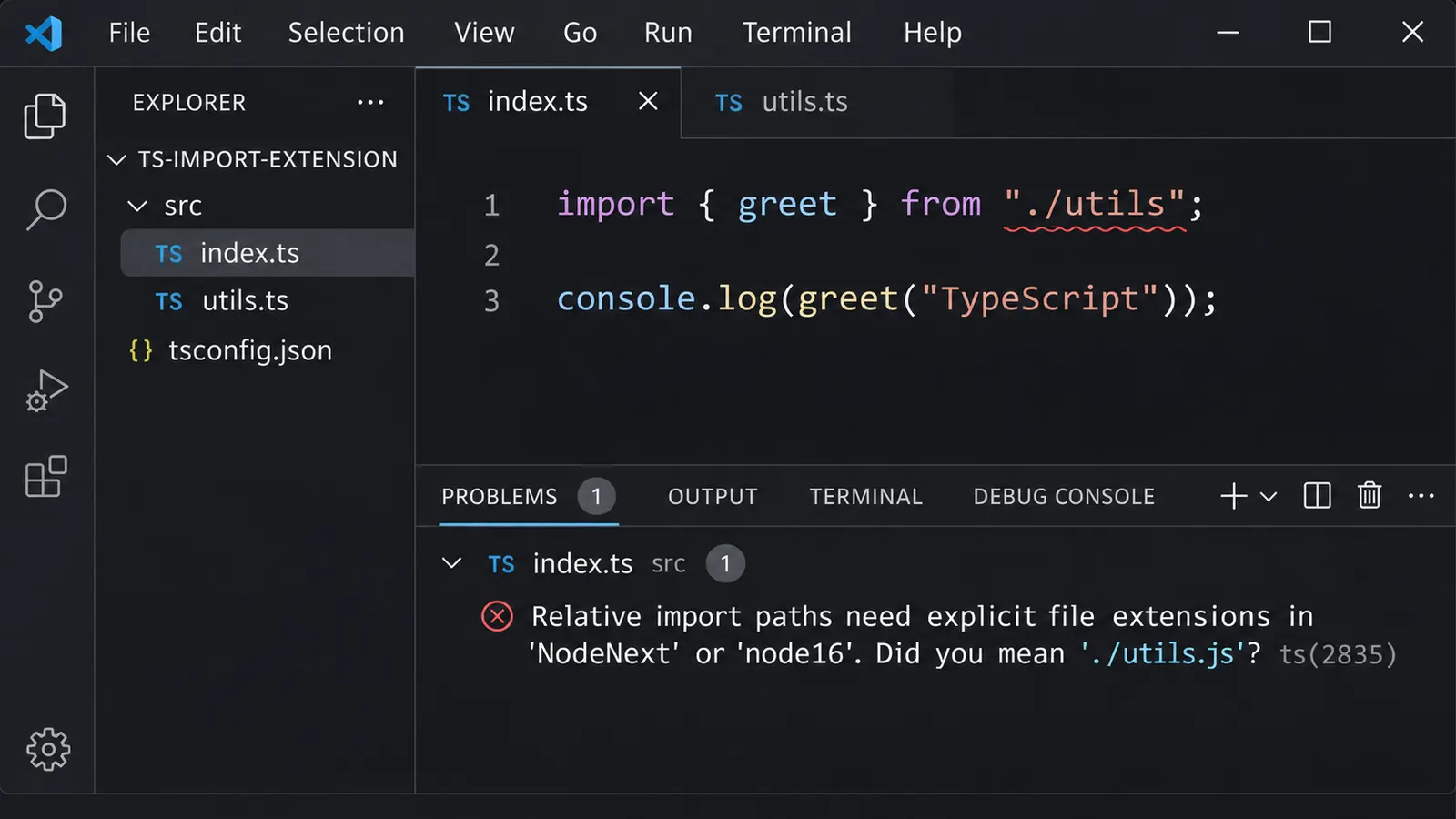
You have two TypeScript files in the same project. One exports a function, while the other imports it.
Nothing complicated.
// utils.ts
export function greet(name: string): string {
  return `Hello, ${name}`;
}
// index.ts
import { greet } from "./utils";
console.log(greet("Alice"));The import path is correct. utils.ts exists in the same directory, and your editor can find it without any difficulty.
Yet after configuring the project to use NodeNext, TypeScript reports an error:
TS2835: Relative import paths need explicit file
extensions in ECMAScript imports when '--moduleResolution'
is 'node16' or 'nodenext'.

Did you mean './utils.js'?
That suggestion seems rather strange.
Why .js?
There is no utils.js file in the source directory. The file is named utils.ts, and TypeScript knows that.
Perhaps the compiler is looking for an already compiled version? Or maybe the project was configured incorrectly?
The explanation is connected to what TypeScript expects the code to look like after compilation.
Although the source file is written in TypeScript, Node.js may eventually execute a JavaScript file generated from it. And when that happens, the import statement must refer to something Node.js can actually resolve.
That is where the missing extension becomes a problem.
The import that works in TypeScript but fails in JavaScript
Consider the structure of a small project:
project/
├── package.json
├── tsconfig.json
└── src/
    ├── index.ts
    └── utils.ts
Our index.ts contains:
import { greet } from "./utils";

console.log(greet("Alice"));
TypeScript has enough information to locate utils.ts.
It can examine the importing file’s directory, search for a matching module, and obtain the types exported by that module.
So why complain about the import?
Because finding a file during type checking is only one part of the compiler’s job.
Another part is making sure that the generated JavaScript will work in its intended execution environment.
Suppose TypeScript compiles the project into:
dist/
├── index.js
└── utils.js
The output files are JavaScript, but the import statement may remain unchanged.
Without special import-rewriting options, the resulting index.js can contain:
import { greet } from "./utils";

console.log(greet("Alice"));
The TypeScript types have disappeared. The source files have become JavaScript.
Yet the import still points to ./utils.
Now Node.js has to resolve that path.
If the output is running as an ECMAScript module, Node.js does not automatically add .js to a relative import.
It looks for the module specified by the path.
The actual file is named utils.js, while the import requests ./utils.
The result may be a runtime error resembling:
Error [ERR_MODULE_NOT_FOUND]:
Cannot find module '.../dist/utils'
imported from .../dist/index.js
This is the problem TypeScript was trying to prevent.
The source import can be understood by TypeScript, yet the corresponding JavaScript import may be invalid for Node.js.
The distinction becomes clearer when we examine Node’s module-resolution rules.
Why Node.js does not simply add the extension
JavaScript has more than one module system.
Node.js supports both CommonJS and ECMAScript modules, often abbreviated as ESM.
Their module-resolution behavior is not identical.
Consider a CommonJS import:
const { greet } = require("./utils");In the usual CommonJS resolution process, Node.js can search for matching filenames and supported extensions.
For example, it may find utils.js even though the statement only specifies ./utils.
This behavior is familiar to developers who worked with Node.js before ESM became common.
Now consider an ECMAScript import:
import { greet } from "./utils";For a relative ESM import, Node.js expects a fully specified file path.
If the target file is utils.js, the import should say so:
import { greet } from "./utils.js";Why are the rules different?
ECMAScript modules use a more explicit resolution model. The import specifier identifies the module to load, and Node.js does not apply the same extension-searching behavior used by CommonJS require().
This distinction also affects directory imports.
In CommonJS, a path pointing to a directory may resolve to its index.js under the relevant rules.
In native Node.js ESM, this automatic directory resolution is not available in the same way.
An import such as:
import { greet } from "./utils";does not automatically resolve to:
./utils/index.jsmerely because that file exists.
For native ESM, the path should explicitly identify the intended file.
TypeScript’s NodeNext mode attempts to model these Node.js rules.
And because the emitted JavaScript may contain ESM imports, TypeScript checks their paths accordingly.
Why TypeScript accepts ./utils.js when the source is utils.ts
Now comes the part that initially seems contradictory.
Change the source import to:
// index.ts
import { greet } from "./utils.js";

console.log(greet("Alice"));
But do not rename utils.ts.
Leave the source directory exactly as it was:
src/
├── index.ts
└── utils.ts
TypeScript can still find the exported function.
How?
The compiler understands that a JavaScript import path may correspond to a TypeScript source file during development.
When resolving ./utils.js, TypeScript can perform what its documentation calls extension substitution.
It checks for an appropriate TypeScript source or declaration file corresponding to the requested JavaScript module.
In this example, the .js specifier can resolve to utils.ts.
The compiler uses that TypeScript file for type checking.
However, the emitted JavaScript keeps the import path as ./utils.js:
import { greet } from "./utils.js";

console.log(greet("Alice"));
Now the generated directory contains exactly what the import requests:
dist/
├── index.js
└── utils.js
Node.js can resolve the module without guessing an extension.
So the .js extension in the TypeScript source is not telling the compiler to ignore utils.ts.
It describes the file that will be imported when the compiled application runs.
That is the reason the suggestion makes sense.
TypeScript resolves the source file for type checking while preserving the runtime-compatible path for JavaScript.
The source filename and the import specifier do not need to have identical extensions in this compilation model.
A small NodeNext project
We can make this behavior easier to examine with a minimal configuration.
Create a project containing:
example/
├── package.json
├── tsconfig.json
└── src/
    ├── index.ts
    └── utils.ts
In package.json:
{
  "name": "typescript-esm-example",
  "private": true,
  "type": "module",
  "scripts": {
    "build": "tsc",
    "start": "node dist/index.js"
  },
  "devDependencies": {
    "typescript": "^5.9.3"
  }
}
The relevant part is:
"type": "module"It tells Node.js to interpret ordinary .js files in this package as ECMAScript modules.
TypeScript’s Node-aware module modes also use this information when determining how .ts files should be interpreted.
Now configure tsconfig.json:
{
  "compilerOptions": {
    "target": "ES2022",
    "module": "NodeNext",
    "moduleResolution": "NodeNext",
    "rootDir": "./src",
    "outDir": "./dist",
    "strict": true
  },
  "include": ["src/**/*.ts"]
}
In src/utils.ts:
export function greet(name: string): string {
  return `Hello, ${name}`;
}
And in src/index.ts:
import { greet } from "./utils.js";

console.log(greet("Alice"));
After installing the declared dependencies, build the project:
npm run buildThen run:
npm startThe expected output is:
Hello, AliceInspect the generated dist/index.js.
Its import should still point to:
import { greet } from "./utils.js";This is intentional.
The source import was written to remain valid after TypeScript produced JavaScript files.
Nothing needs to rename the import during compilation.
There is no missing source file either. TypeScript already resolved ./utils.js to src/utils.ts while checking the program.
Why the error appears only after enabling NodeNext
Suppose the same project previously used:
{
  "compilerOptions": {
    "module": "ESNext",
    "moduleResolution": "Bundler"
  }
}
An import without an extension may have worked:
import { greet } from "./utils";Then the configuration changes to:
{
  "compilerOptions": {
    "module": "NodeNext",
    "moduleResolution": "NodeNext"
  }
}
And suddenly the compiler reports TS2835.
It may look as though TypeScript has become unnecessarily strict.
But the compiler is modeling a different module-resolution environment.
The Bundler setting assumes the code will be processed by tooling that supports its own resolution behavior.
Many bundlers can resolve an extensionless relative import by looking for suitable files, including .ts and .tsx sources.
Node.js native ESM does not use that same resolution strategy.
By changing to NodeNext, the project asks TypeScript to check imports according to Node.js module rules.
The import was not necessarily broken in the previous environment.
It becomes inappropriate when the target environment changes.
This is why the correct solution depends on how the application is built and executed, not simply on the fact that it uses TypeScript.
Bundler mode is not a less strict version of NodeNext
It is tempting to think of moduleResolution: "bundler" as a way to disable inconvenient errors.
For example:
{
  "compilerOptions": {
    "module": "ESNext",
    "moduleResolution": "Bundler"
  }
}
Under this configuration, TypeScript generally allows extensionless relative imports.
import { greet } from "./utils";For an application built with Vite or another bundler that understands this path, that can be entirely appropriate.
The bundler sees the source files, resolves their dependencies, and produces its own output.
It might combine several modules into a bundle, rewrite imports, or emit separate chunks with generated filenames.
The runtime does not necessarily receive the original ./utils import at all.
Now consider a different application.
It uses TypeScript’s own compiler to emit JavaScript files, then executes those files directly with Node.js.
If we use Bundler resolution merely to suppress TS2835, TypeScript may accept:
import { greet } from "./utils";But the resulting JavaScript can preserve the same extensionless path.
Node.js then fails to resolve the module.
So the compiler reports no error, yet the application breaks at runtime.
Nothing contradictory has happened.
TypeScript checked the import under rules intended for a bundler. The generated code was then executed by a different resolver.
The configuration did not match the environment.
A practical distinction is:
- Code processed by a bundler:
moduleResolution: "bundler"is often suitable. - Emitted JavaScript executed directly by Node.js: a Node-aware mode such as
NodeNextis generally more appropriate.
This is not an absolute rule for every toolchain. Custom loaders and build systems can change how modules are resolved.
But the configuration should represent the tool that will actually load the imports.
Selecting Bundler only because its error messages are less demanding can hide problems that appear later.
Why .ts is not always the correct replacement
After seeing TS2835, another possible solution comes to mind.
If the source file is named utils.ts, why not write:
import { greet } from "./utils.ts";That certainly looks more natural.
And in some environments, it is correct.
However, TypeScript has historically restricted importing .ts extensions in projects that emit JavaScript without rewriting those import paths.
Without the necessary compiler options, an import ending in .ts can produce TS5097:
An import path can only end with a '.ts' extension
when 'allowImportingTsExtensions' is enabled.
The reasoning follows the same pattern we have already examined.
If the emitted index.js retained this statement:
import { greet } from "./utils.ts";but the build produced only utils.js, the path would no longer point to the compiled file.
The .ts source file might not even be included in the deployed application.
TypeScript therefore needs to know how such imports will be handled.
There are now several supported approaches, and they should not be confused.
When TypeScript only checks the code
Suppose a bundler or TypeScript-aware runtime handles the actual execution.
TypeScript is used only for type checking.
A configuration might include:
{
  "compilerOptions": {
    "module": "ESNext",
    "moduleResolution": "Bundler",
    "noEmit": true,
    "allowImportingTsExtensions": true,
    "strict": true
  }
}
The import can then refer directly to the TypeScript file:
import { greet } from "./utils.ts";Because TypeScript is not emitting ordinary JavaScript files, it is not leaving behind an unsafe .ts import in its own output.
But the application still needs a runtime or bundler that understands the import.
allowImportingTsExtensions does not teach ordinary Node.js to resolve an arbitrary file or make every build tool support TypeScript imports.
It changes what TypeScript permits during checking.
The responsibility for actually loading the module remains with the environment executing the code.
TypeScript 5.7 introduced another option
There is a newer possibility that changes the situation.
Starting with TypeScript 5.7, the compiler supports:
"rewriteRelativeImportExtensions": trueThis option allows TypeScript to rewrite relative import paths ending in TypeScript-specific extensions when producing JavaScript.
For example, the source can contain:
// index.ts
import { greet } from "./utils.ts";

console.log(greet("Alice"));
With the appropriate configuration, TypeScript changes the import in the emitted JavaScript to:
import { greet } from "./utils.js";

console.log(greet("Alice"));
The source refers to the TypeScript file.
The output refers to the JavaScript file.
This is different from the earlier approach, where we wrote .js directly in the TypeScript source.
Both can lead to runtime-compatible JavaScript, but they take different paths to get there.
A suitable configuration for this approach is:
{
  "compilerOptions": {
    "target": "ES2022",
    "module": "NodeNext",
    "moduleResolution": "NodeNext",
    "rootDir": "./src",
    "outDir": "./dist",
    "strict": true,
    "rewriteRelativeImportExtensions": true
  },
  "include": ["src/**/*.ts"]
}
With this option enabled, modern TypeScript also permits the corresponding .ts import paths needed for rewriting.
This can be useful for projects that execute TypeScript directly during development but compile it into JavaScript for distribution.
However, the rewriting has boundaries.
The compiler does not resolve and rewrite every possible module specifier.
According to the TypeScript documentation, the option applies to relative paths beginning with ./ or ../ and ending in supported TypeScript extensions.
For example:
import { greet } from "./utils.ts";can be rewritten.
But a package specifier such as:
import { greet } from "some-package/utils.ts";is not rewritten in the same way.
Neither is an arbitrary alias:
import { greet } from "@/utils.ts";The compiler does not simply assume where every alias will point at runtime.
There are also complications with dynamic imports whose paths are calculated at runtime.
Consider:
const moduleName = "./utils.ts";

const module = await import(moduleName);
A compiler cannot generally infer and safely rewrite every runtime-computed path.
This is why rewriteRelativeImportExtensions is useful without being a universal solution to module resolution.
The build still needs to be examined if the application relies on aliases, dynamically constructed imports, or custom runtime behavior.
Directly running TypeScript in Node.js changes the answer
So far, we have assumed that TypeScript produces JavaScript files before Node.js executes the application.
But modern Node.js versions also support running certain TypeScript files directly by stripping erasable type syntax.
This introduces a different situation.
Suppose we have:
src/
├── index.ts
└── utils.ts
And we intend to run index.ts directly in a supported Node.js version without first producing index.js and utils.js.
Now consider:
import { greet } from "./utils.js";There is a problem.
The runtime is loading the original TypeScript files. It is not using the compiled dist directory.
If utils.js does not exist alongside index.ts, Node.js cannot resolve that file merely because utils.ts exists.
In this environment, the import should instead identify the actual TypeScript file:
import { greet } from "./utils.ts";This is the opposite of the recommendation for the earlier compilation workflow.
And yet both recommendations are correct for their respective environments.
The difference lies in what Node.js is executing.
When running emitted JavaScript, the import needs to resolve the generated .js file.
When running TypeScript directly, the import needs to resolve the existing .ts file.
Node.js does not consult TypeScript’s tsconfig.json to automatically convert one filename into another when using its built-in type-stripping support.
It also does not perform TypeScript’s full compilation process.
For example, features requiring JavaScript generation beyond simple type removal may not be supported without another transformation step.
This is why directly executing TypeScript should be treated as its own runtime strategy rather than as an interchangeable replacement for compilation.
The choice of extension follows that strategy.
The role of package.json
There is another condition behind the original error.
Why does TypeScript sometimes demand explicit extensions with NodeNext, but not in every file?
Because NodeNext models both ESM and CommonJS.
And a .ts file is not automatically an ECMAScript module merely because it contains TypeScript syntax.
For ordinary .ts files, TypeScript considers the nearest relevant package.json when determining the Node.js module format.
For example:
{
  "type": "module"
}
indicates ESM behavior for the corresponding .js output.
That is the situation where relative ESM import paths need explicit file extensions.
But if the package is configured as CommonJS, the output and resolution rules may differ.
In that case, extensionless paths can be valid because the emitted code may use CommonJS require().
The rule is therefore more precise than saying:
NodeNext always requires .js extensions.
What matters is whether the import will be treated as a native ECMAScript import in the output.
TypeScript attempts to determine that from the module configuration, file extension, and package metadata.
There are also file extensions that make the module format explicit.
TypeScript supports .mts for ESM-oriented source files and .cts for CommonJS-oriented source files.
Their emitted JavaScript extensions are:
source.mts → source.mjs
source.cts → source.cjs
Consequently, an .mts file targeting another .mts file would ordinarily use an .mjs import specifier when following the compiled-output approach.
For example:
import { greet } from "./utils.mjs";TypeScript can resolve that specifier to utils.mts during type checking.
This follows the same principle as utils.ts and utils.js.
The import path describes the runtime artifact, while the compiler finds the corresponding source.
Why changing tsconfig.json can make the error appear everywhere
Imagine a project that has been developed for several months.
Most files contain imports such as:
import { getUser } from "./services/user";
import { formatDate } from "./utils/date";
import { settings } from "./config";
The application works normally.
Then someone changes the compiler configuration to NodeNext.
Suddenly, dozens of files report errors.
It is easy to assume that the configuration broke the project.
But the new errors may be revealing imports that were only valid under the project’s previous resolution strategy.
Before changing every import, examine the build process.
Does Vite compile and bundle the application?
Does tsc emit JavaScript that runs directly under Node.js?
Does a development runner such as tsx handle TypeScript files without using the same resolution rules as native Node ESM?
Are separate TypeScript configurations used for the frontend and backend?
These questions matter because a monorepo can contain several execution environments.
For example:
apps/
├── web/
│   └── tsconfig.json
├── admin/
│   └── tsconfig.json
└── api/
    └── tsconfig.json
A frontend application bundled by Vite may reasonably use Bundler resolution.
An API compiled to ESM JavaScript for Node.js may use NodeNext.
There is no requirement for all packages in the repository to use identical module settings.
In fact, forcing one resolution strategy onto every package can produce unnecessary errors or hide runtime incompatibilities.
The configuration should reflect how each package is executed.
Find the configuration that TypeScript is actually using
Sometimes the apparent configuration differs from the effective one.
A TypeScript project may extend another configuration file, or its build script may select a different tsconfig.
To inspect the resolved settings, run:
npx tsc --showConfig -p tsconfig.jsonThis displays the effective configuration for the specified project.
Look for:
"module": "nodenext",
"moduleResolution": "nodenext"
Also examine whether the project enables:
"noEmit": trueor:
"rewriteRelativeImportExtensions": trueThese options affect which import conventions are appropriate.
The filename alone does not explain the error. Neither does moduleResolution in isolation.
The relevant question is which compiler configuration is applied and what the resulting runtime expects.
Why changing the path to .js is usually the simplest fix
For a conventional Node.js application that compiles TypeScript to JavaScript, the simplest correction is often:
import { greet } from "./utils.js";There is no need to rename utils.ts.
No need to create an empty utils.js file beside it.
And no need to disable NodeNext just to silence the error.
TypeScript resolves the .js specifier against the TypeScript source during checking, then preserves the path for the JavaScript runtime.
This approach also works naturally with other ESM importers that can consume the generated JavaScript.
But it is not a universal instruction for every TypeScript project.
If TypeScript is being executed directly, .ts may be the appropriate extension.
If the code is being bundled, extensionless imports may be supported.
If rewriteRelativeImportExtensions is configured, TypeScript can convert suitable .ts specifiers while emitting JavaScript.
The correct choice depends on which component of the toolchain resolves the import at runtime.
Changing a compiler option to avoid a particular diagnostic is rarely as informative as examining the output files themselves.
A useful way to check the final result
Suppose the project uses NodeNext and emits JavaScript.
After making a change, build it.
Then inspect the generated files.
For example:
dist/
├── index.js
└── utils.js
Open dist/index.js.
If it contains:
import { greet } from "./utils.js";the relative specifier is consistent with the generated file.
If it instead contains:
import { greet } from "./utils";and the output is meant to run under native Node.js ESM, there is still a resolution problem.
If it contains:
import { greet } from "./utils.ts";but the build distributes only .js files, the import is also inconsistent with the deployment output.
There may be environments where loaders or bundlers handle these paths differently.
But for direct Node.js ESM execution, the generated import needs to identify an actual module that Node.js can load.
This simple inspection often explains more than changing moduleResolution repeatedly and hoping the error disappears.
It shows what the runtime will actually receive.
The extension belongs to the runtime, not necessarily the source
Return to the original project.
There is a utils.ts file, and TypeScript suggests importing ./utils.js.
Initially, that seems like an error in the compiler’s reasoning. Why request a file that does not exist?
But TypeScript is considering a file that will exist after compilation.
The source code is only one stage of the process.
The compiler resolves TypeScript declarations, emits JavaScript, and attempts to ensure that the module paths remain meaningful for the intended runtime.
Under native Node.js ESM, extensionless relative imports do not receive the automatic resolution behavior that developers may remember from CommonJS.
So TypeScript asks for an explicit path.
In a typical compile-to-JavaScript workflow, that path ends in .js, because the runtime will load JavaScript files.
In a direct-TypeScript workflow, .ts can be correct because the runtime is loading the source files themselves.
And with a bundler, the original import may disappear or be transformed before the application ever runs.
The source filenames can remain identical across all three projects. Their correct import conventions can still differ.
That is why the compiler’s suggestion should be understood in the context of the build process.
Once the target runtime and emitted files are clear, the extension stops looking arbitrary.
It identifies the module that is supposed to exist when the code actually executes.
External Sources used for this article
- TypeScript 4.7 — ECMAScript Module Support in Node.js
- TypeScript — Modules: Theory
- TypeScript — Modules: Choosing Compiler Options
- TypeScript — moduleResolution
- TypeScript 5.7 — rewriteRelativeImportExtensions
- TypeScript — allowImportingTsExtensions
- Node.js — Modules: TypeScript
- Node.js — ECMAScript Modules