Programming
TS1484: Why TypeScript Requires import type
An import that worked yesterday suddenly fails with TS1484, even though the exported interface exists. The problem lies in what TypeScript is expected to preserve when it generates JavaScript.
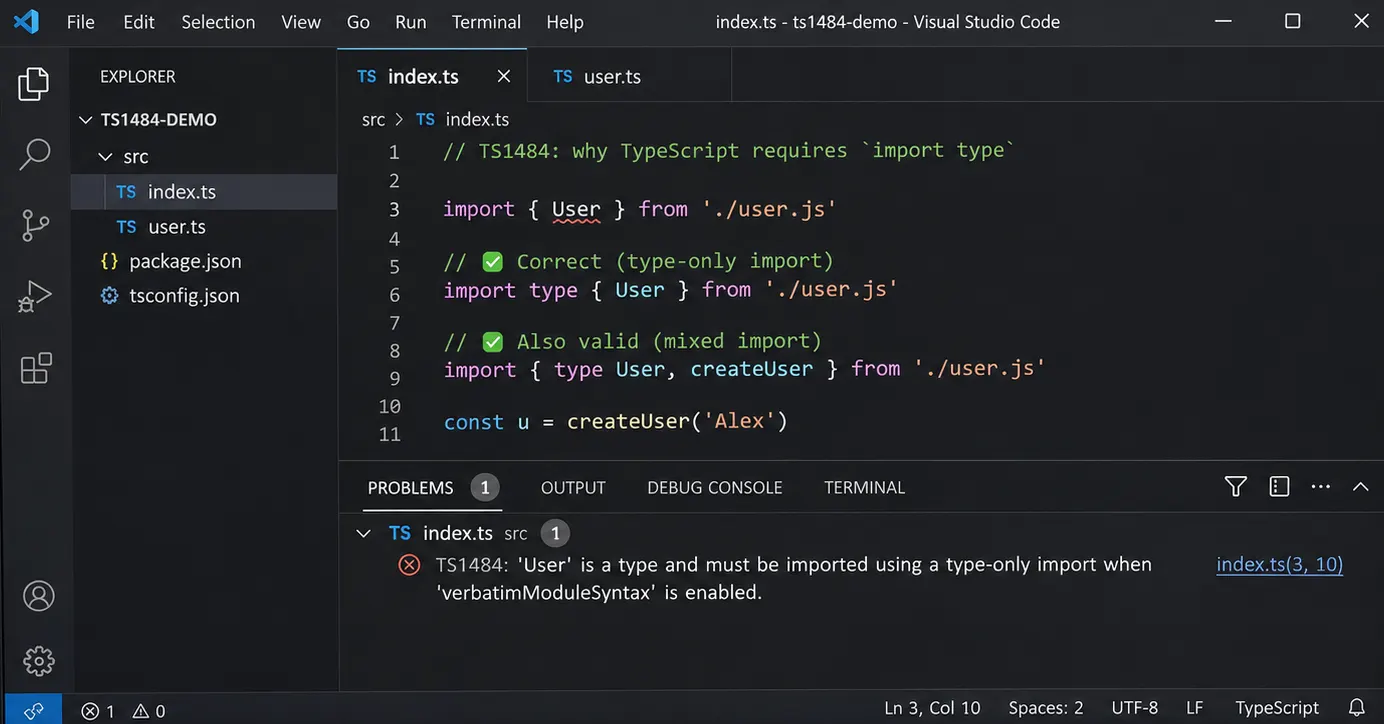
You open a TypeScript project, run the build, and encounter an error in an import statement that appears perfectly ordinary.
error TS1484: 'User' is a type and must be imported
using a type-only import when 'verbatimModuleSyntax' is enabled.
The confusing part is that User exists. The import path is correct, the interface is exported, and the same syntax may have worked in another project.
Perhaps the dependency was updated? Or maybe TypeScript changed how it handles interfaces?
Neither explanation necessarily identifies the actual problem.
Consider the following code:
// user.ts
export interface User {
  id: number;
  name: string;
}
And another file importing it:
// app.ts
import { User } from "./user.js";

const user: User = {
  id: 1,
  name: "Alice",
};
Nothing appears wrong with the type itself. We have exported User, imported it, and used it to describe an object.
Yet TypeScript may reject the import.
The reason is not that the interface is unavailable. It is that the compiler needs to know whether the imported name should exist in the JavaScript produced from this file.
And an interface, unlike a function or class, will not exist there.
What happens to an interface after compilation?
TypeScript adds a type system to JavaScript, allowing developers to describe the structure of objects and check how values are used.
But JavaScript does not have TypeScript interfaces.
When the compiler processes this declaration:
interface User {
  id: number;
  name: string;
}
The interface is removed from the JavaScript output.
Likewise, consider:
const user: User = {
  id: 1,
  name: "Alice",
};
The resulting JavaScript resembles:
const user = {
  id: 1,
  name: "Alice",
};
The object remains because it is a real value used by the program.
The User annotation disappears because it only provides information during type checking.
This distinction is simple enough when dealing with variables. However, imports introduce another question.
If a type disappears during compilation, what should happen to the statement that imported it?
For a long time, TypeScript often handled that decision automatically.
An import used only as a type could be removed from the generated JavaScript, even if the developer had written it using the ordinary import syntax.
That behavior is known as import elision.
It can be convenient, particularly in projects where types and runtime values are imported together.
But it also means that the compiler is making decisions about imports that are not explicitly visible in the source code.
Why the same import used to work
Imagine two files:
// models.ts
export interface Product {
  id: number;
  price: number;
}
// index.ts
import { Product } from "./models.js";
const product: Product = {
id: 10,
price: 49,
};
console.log(product);With older import-elision behavior, TypeScript could determine that Product was used only as a type and remove its import from the generated JavaScript.
The output would resemble:
const product = {
  id: 10,
  price: 49,
};

console.log(product);
That is a reasonable result. JavaScript does not need an interface to create the object or print it.
But notice what the compiler had to determine.
It needed to understand that the imported Product was a type rather than a runtime value.
In this example, the distinction is obvious because the declaration is available in a local file.
Now imagine a larger application with imported declarations, re-exports, dependencies, and several tools involved in compiling the project.
Not every transpiler performs the same kind of cross-file type analysis.
A tool that processes each file independently may see this:
import { Product } from "./models.js";But it may not have enough information to determine whether Product refers to something that exists in JavaScript.
Should the import remain? Should it disappear?
If different tools make different decisions, the resulting behavior can become difficult to predict.
This is part of the problem TypeScript’s explicit type-import syntax was designed to address.
What verbatimModuleSyntax changes
TypeScript introduced the verbatimModuleSyntax compiler option in version 5.0.
Its purpose is to make the relationship between TypeScript import statements and their JavaScript output more explicit.
For example, a tsconfig.json might contain:
{
  "compilerOptions": {
    "target": "ES2022",
    "module": "ESNext",
    "moduleResolution": "Bundler",
    "strict": true,
    "verbatimModuleSyntax": true
  }
}
The important setting is:
"verbatimModuleSyntax": trueUnder this configuration, TypeScript generally preserves ECMAScript imports and exports that are not marked with type.
Imports and exports explicitly marked as type-only are removed from the JavaScript output.
So consider our earlier statement:
import { User } from "./user.js";There is no type modifier.
Under verbatimModuleSyntax, TypeScript is expected to preserve this as a runtime import.
But the imported User is an interface, and the interface will disappear after compilation.
That creates a contradiction.
The source code asks for a runtime import, while the imported declaration does not provide a runtime value.
TypeScript reports TS1484 rather than silently changing the meaning of the import.
The correction is:
import type { User } from "./user.js";Now the intention is explicit.
The compiler knows that User is needed for type checking and that this import should not appear in the generated JavaScript.
Nothing needs to be loaded at runtime merely to make the interface available.
And that resolves the error.
Two ways to import a type
There are actually two valid forms of type-only imports.
The first marks the entire import declaration:
import type { User } from "./user.js";The second marks an individual imported name:
import { type User } from "./user.js";Both allow User to be used as a type.
However, under verbatimModuleSyntax, they do not always generate identical JavaScript.
Consider:
import type { User } from "./user.js";This entire declaration is removed.
But the following:
import { type User } from "./user.js";Can produce:
import {} from "./user.js";Why keep an import with empty braces?
Because the declaration itself was a normal ECMAScript import, while only the named binding was marked as type-only.
Removing the binding leaves an empty import declaration. That declaration can still cause the module to be loaded and evaluated.
This is a small difference, but it matters when imported modules contain initialization code or other side effects.
If you intend to import only a type and do not want the module evaluated for that reason, import type is the clearer choice.
The inline form becomes especially convenient when types and runtime values come from the same module.
When a module exports both types and functions
Suppose a file exports a type and a function:
// products.ts
export interface Product {
  id: number;
  price: number;
}

export function calculateTotal(
  products: Product[]
): number {
  return products.reduce(
    (total, product) => total + product.price,
    0
  );
}
Another file needs both declarations:
import {
  Product,
  calculateTotal
} from "./products.js";
Under verbatimModuleSyntax, TypeScript reports TS1484 for Product.
However, calculateTotal is a real function and should remain available at runtime.
Changing the entire statement to import type would therefore be incorrect.
Instead, mark only Product:
import {
  type Product,
  calculateTotal
} from "./products.js";
The generated JavaScript retains the function import:
import {
  calculateTotal
} from "./products.js";
The type-only binding disappears.
There is also another valid approach:
import type { Product } from "./products.js";
import { calculateTotal } from "./products.js";
Both forms are supported.
The decision is largely about code organization and whether you prefer keeping type imports separate.
For a file that imports many types and several runtime functions, either style can remain readable.
The important part is preserving the distinction between names that exist during execution and names that exist only for type checking.
Why blindly changing every import is dangerous
After encountering TS1484 several times, it may be tempting to add type to every import in the project.
That would solve some compiler errors, but it could also introduce new ones.
Consider a class:
// session.ts
export class Session {
  constructor(public id: string) {}
}
Unlike an interface, a class exists in JavaScript.
It can be instantiated:
import { Session } from "./session.js";

const session = new Session("abc123");
If we replace the import with:
import type { Session } from "./session.js";The constructor will no longer be available as a runtime import.
TypeScript will complain when we attempt to use it with new.
The same consideration applies to functions and ordinary values.
A type-only import cannot provide something that the running application needs to execute.
But classes introduce an interesting detail.
A class can be used both as a type and as a value.
For example:
import type { Session } from "./session.js";

function printSession(session: Session) {
  console.log(session.id);
}
This is valid.
The function only needs Session to describe the parameter’s type.
At runtime, it receives an object and accesses its id property. It does not need the Session constructor.
However, if the function needs to check the object’s class:
import type { Session } from "./session.js";

function isSession(value: unknown) {
  return value instanceof Session;
}
The import is no longer sufficient.
instanceof requires a constructor value at runtime.
So an imported class is not automatically a runtime import in every situation. Its usage determines what the program needs.
That is why the correct fix depends on the declaration and how it is being used, rather than on its name or file extension.
An error that appears after changing tsconfig.json
Now return to the original situation.
The imports worked previously, and suddenly the project reports dozens of TS1484 errors.
If the source files have not changed, the compiler configuration deserves attention.
Search the project’s TypeScript configuration for:
"verbatimModuleSyntax": trueIt might appear directly in tsconfig.json, but it can also come from another configuration file.
For example:
project/
├── tsconfig.json
├── tsconfig.app.json
├── tsconfig.node.json
└── src/
    └── main.ts
A project might use one configuration for application code and another for Node.js tooling.
Both can have different compiler options.
Configuration inheritance can make the situation more confusing. A file may extend another configuration rather than repeating every option.
To inspect the effective compiler configuration, use:
npx tsc --showConfig -p tsconfig.app.jsonReplace tsconfig.app.json with the configuration used by the failing build.
This prints the resolved configuration, including options inherited from other files.
If verbatimModuleSyntax is enabled there, we have an explanation for why TypeScript requires explicit type imports.
It does not necessarily mean the option was recently introduced to the project. The build might have switched to a different configuration or begun checking files that were not previously included.
The useful question is which compiler settings are actually being applied to the failing file.
Check whether the problem comes from TypeScript or ESLint
There is another distinction.
Sometimes an editor underlines a normal import and suggests using import type, even though the compiler does not report TS1484.
That warning may come from ESLint rather than TypeScript itself.
The @typescript-eslint/consistent-type-imports rule can enforce a preferred style for importing types.
It can also offer automatic fixes.
This is related to verbatimModuleSyntax, but it is not the same mechanism.
TypeScript’s compiler option affects how imports are interpreted and emitted. The ESLint rule enforces a coding convention.
To check whether the compiler itself reports an error, run the project’s type-checking command.
For example:
npx tsc --noEmit -p tsconfig.app.jsonIf TypeScript produces TS1484, the compiler configuration requires attention.
If the diagnostic appears only in ESLint, inspect the linting rules.
Do not assume that changing an ESLint setting will resolve a compiler error, or that disabling a compiler option is necessary merely to satisfy a linting preference.
The problem with re-exporting interfaces
Imports are only one part of the issue.
The same distinction applies when a module re-exports declarations from another file.
Consider a project with a central entry point:
src/
├── models/
│   └── user.ts
├── services/
│   └── user-service.ts
└── index.ts
The model contains an interface:
// models/user.ts
export interface User {
  id: number;
  name: string;
}
The service exports a function:
// services/user-service.ts
export function getUserCount(): number {
  return 10;
}
A central index.ts might re-export both:
export { User } from "./models/user.js";
export { getUserCount } from "./services/user-service.js";
With verbatimModuleSyntax enabled, the type-only re-export also needs to be identified explicitly.
The corrected version is:
export type { User } from "./models/user.js";
export { getUserCount } from "./services/user-service.js";
Now the generated JavaScript exposes the function, while the interface is available only to TypeScript consumers.
This matters for libraries and projects that use barrel files extensively.
A barrel file can make the public API convenient, but it does not turn an interface into a runtime export.
If the original declaration exists only during type checking, re-exporting it from another file cannot make it exist in JavaScript.
There is another supported syntax:
export {
  type User
} from "./models/user.js";
But, as with imports, the exact emitted module statement may differ from a completely type-only export declaration under verbatimModuleSyntax.
If a barrel file contains only types, export type usually communicates its purpose more directly.
What happens if the incorrect import reaches JavaScript?
A compiler error can seem unnecessary when the project appears to run successfully in development.
Perhaps the bundler handles the import automatically. Or perhaps the application never reaches the code that uses it.
But it is worth considering what an incorrect runtime import would mean.
Suppose our module contains only an interface:
// user.ts
export interface User {
  id: number;
}
After TypeScript removes the interface, the JavaScript module does not export a runtime value named User.
Now imagine another module trying to import it as a value:
import { User } from "./user.js";In an ECMAScript module environment, this can fail during module loading because the requested named export does not exist.
The runtime cannot use TypeScript’s type information to resolve the import. That information has already been removed.
By requiring import type, the compiler prevents this mismatch before the application reaches that stage.
There is an important qualification: not every build tool produces the same JavaScript output from TypeScript source.
A bundler may eliminate an import based on its own processing rules. Other tools may preserve it.
That difference is part of the reason explicit type imports are valuable. They make the programmer’s intention visible without depending entirely on the transpiler’s ability to infer it.
Why disabling verbatimModuleSyntax is tempting
If enabling one compiler option causes dozens of errors, turning it off may appear to be the simplest solution.
For example:
{
  "compilerOptions": {
    "verbatimModuleSyntax": false
  }
}
This can restore older import-elision behavior in configurations where TypeScript would otherwise accept the imports.
However, the change affects how the compiler handles module syntax throughout the project.
It should not be treated as equivalent to fixing a few import statements.
Suppose a module contains initialization code:
// registration.ts
console.log("Registration module loaded");

export interface RegistrationOptions {
  enabled: boolean;
}
Another file imports only its interface:
import type {
  RegistrationOptions
} from "./registration.js";
The import disappears from the JavaScript output.
The module is not loaded merely because its type was referenced, so that console.log does not run for this reason.
If the application actually depends on the initialization, it should import the module explicitly:
import "./registration.js";

import type {
  RegistrationOptions
} from "./registration.js";
Now the intention is clear.
One import loads the module for its side effects. The other supplies a type for checking the source code.
Changing compiler settings merely to avoid writing import type can obscure this distinction.
There may be legitimate reasons to retain an older module configuration, particularly when migrating an existing codebase. But it is worth understanding what the setting controls before disabling it.
For an application already using a modern ESM-oriented build pipeline, correcting the type imports is often a more targeted change.
TS1484 is not the same as an ESM/CommonJS error
While investigating verbatimModuleSyntax, you may encounter another error concerning ECMAScript imports in a CommonJS module.
It can appear after changing TypeScript’s module settings or the project’s package.json.
This is related to the same compiler option, but it is a different problem.
TypeScript can target several module systems.
Under Node.js-aware modes such as NodeNext, the module format may depend on the file extension and the nearest package.json.
For example:
{
  "type": "module"
}
Indicates that ordinary .js files in the package should be treated as ECMAScript modules under Node.js’s rules.
Without the appropriate module configuration, a TypeScript file may instead be interpreted as belonging to a CommonJS module.
With verbatimModuleSyntax enabled, TypeScript does not silently rewrite ordinary ESM imports and exports into CommonJS require calls.
It reports a separate error when the written syntax conflicts with the selected module format.
Adding import type to every statement will not fix that issue.
A runtime import remains necessary for real values, and the project’s module configuration still needs to match its intended execution environment.
If the error specifically names TS1484, investigate the imported declaration.
If it complains about ESM syntax in a CommonJS module, investigate module, file extensions, and package.json.
The two problems can appear during the same migration, but they require different corrections.
Why this matters when using Vite or other transpilers
A React project created with Vite may use TypeScript primarily for type checking while another tool handles JavaScript transformation and bundling.
This arrangement is common.
It also means that several tools may encounter the same source files, not necessarily with identical information available to them.
TypeScript can analyze the declarations and report type errors.
A transpiler may process a file without performing the same semantic type checking.
A bundler then resolves the resulting module imports.
If the source code explicitly distinguishes type-only imports from runtime imports, fewer decisions need to be inferred from context.
For example:
import type { MouseEvent } from "react";
import { useState } from "react";
The first import is used for type checking.
The second is needed by the application at runtime.
A developer reading the file can understand the difference immediately.
A tool processing the file can also remove the first declaration without needing to discover whether MouseEvent exists as a JavaScript export.
This does not mean verbatimModuleSyntax is mandatory for every Vite or React application.
It simply makes import behavior more explicit in projects that enable it.
A practical example with React and TypeScript
Suppose a component imports both a React hook and a type:
import {
  useState,
  ChangeEvent
} from "react";

export function SearchInput() {
  const [query, setQuery] = useState("");

  function handleChange(
    event: ChangeEvent<HTMLInputElement>
  ) {
    setQuery(event.target.value);
  }

  return (
    <input
      value={query}
      onChange={handleChange}
    />
  );
}
With verbatimModuleSyntax enabled, TypeScript reports TS1484 for ChangeEvent.
The hook useState is a runtime value.
ChangeEvent, meanwhile, is used only to describe the event parameter’s type.
We can correct the import without changing the component’s behavior:
import {
  useState,
  type ChangeEvent
} from "react";

export function SearchInput() {
  const [query, setQuery] = useState("");

  function handleChange(
    event: ChangeEvent<HTMLInputElement>
  ) {
    setQuery(event.target.value);
  }

  return (
    <input
      value={query}
      onChange={handleChange}
    />
  );
}
Or use separate imports:
import { useState } from "react";
import type { ChangeEvent } from "react";
Both are valid.
There is no need to modify handleChange, change the state structure, or alter the JSX.
The runtime behavior has not changed because the event type was never required during execution.
This is what makes TS1484 slightly deceptive.
The error appears in a statement that previously worked, while the code using the type may be completely correct.
The compiler is asking us to clarify how the import should be represented in JavaScript, not to redesign the component.
Checking the output rather than guessing
If the distinction still feels abstract, inspect what TypeScript generates.
Create two files:
// models.ts
export interface User {
  id: number;
}

export function createUser(id: number) {
  return { id };
}
// app.ts
import type { User } from "./models.js";
import { createUser } from "./models.js";
const user: User = createUser(1);
console.log(user);Use a TypeScript configuration that emits ESM and enables verbatimModuleSyntax.
For example:
{
  "compilerOptions": {
    "target": "ES2022",
    "module": "ESNext",
    "moduleResolution": "Bundler",
    "verbatimModuleSyntax": true,
    "strict": true,
    "outDir": "dist"
  },
  "include": ["*.ts"]
}
Then compile:
npx tsc -p tsconfig.jsonThe generated app.js should resemble:
import { createUser } from "./models.js";

const user = createUser(1);

console.log(user);
User is absent.
The function import remains.
That is the distinction the compiler wanted the source code to express.
If you change the source to:
import {
  type User,
  createUser
} from "./models.js";
The resulting runtime import will likewise retain createUser without importing User as a value.
This small example is often enough to explain the error more clearly than repeatedly changing compiler options.
The emitted JavaScript shows which declarations actually participate in execution.
What to check when TS1484 appears again
The next time TypeScript reports TS1484, begin with the declaration named in the error.
If it is an interface or type alias, it does not provide a runtime value. A type-only import is appropriate:
import type { User } from "./user.js";If it is imported alongside real functions or values, use an inline type modifier:
import {
  type User,
  createUser
} from "./user.js";
If it is a class, inspect how the class is being used. A type annotation can use import type, but constructing an instance or using instanceof requires a runtime import.
If the problem appears in a barrel file, check whether the declaration needs export type.
And if dozens of unrelated imports suddenly fail, inspect the effective tsconfig.json rather than assuming every source file was recently broken.
TS1484 can look like a complaint about syntax, but the underlying question concerns the boundary between TypeScript’s type system and the JavaScript that actually runs.
An interface may be available to the compiler without being available to the runtime.
A class may exist in both contexts.
A function exists at runtime, even when its parameters and return types disappear during compilation.
Once that distinction is clear, the type modifier stops looking like an arbitrary requirement.
It tells TypeScript which parts of an import belong to the type system and which parts must remain in the generated program.
And for an error that can initially make a perfectly valid import look broken, that is usually all the clarification the compiler needs.